Hi all, have added a H2C to my collection and have a H2S.
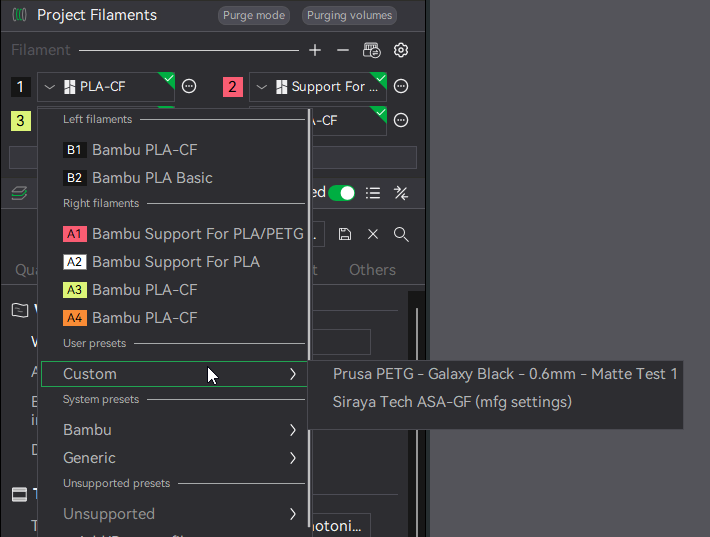
Question 1 - Now i’ve added the H2C all my filaments that I have calibrated previously are now “Unsupported”. Is this a glitch? Am I seriously unable to select these for this printer now?
Question 2 - How do I get my custom filament profiles from the H2S to the H2C? I spent a while perfecting the interface support settings, TPU settings, tree support settings so have loads of profiles for these.
Without having to manually copy and paste the info into new profiles, is there a way to simply copy them over? Nothing is obvious and glaring out at me on how to do that.
I am working now on this since two hours with KI help. There is no way to use my predefined materials for the H2C. It is annoying. @Kevin5 : There is no longer any filemanet settings concerning printers or nozzles.
I am on Bambu Studio v 2.5.0.66.
The only filaments I can use with the H2C are the Bambu filaments or the GENERIC profiles.
Why can’t I change settings from an older SUNLU PLA+ to use it for the H2C?
When I open my json files they have “inherits: …entries that point to SUNLU PLA+ @BBL X1C or SUNLU PLA+ @BBL A1.
Those files are not there. (anymore?) So using those profiles means just using generic profiles with standard values?
The H2C is my most expensive 3D printer ever, but this experience is a nightmare!
I do not want to spend hours on making my own profiles files manually.
Did you figure this out yet for the H2C? Must say that I completly agree with you that it is pretty pathetic for such an expensive printer. not sure why I could not import the settings from my P2S for my Esun filament into the H2C (At least for the left nozzle)?? Let me know if you made any headway with this.
Same thing here. I just figured it was a bug in the early version of the software/firmware but nearly 4 months in I still can’t create custom filaments.
To be clear, I know how to do this and it still works just fine on my P1S. But once I switch to H2C everything but Bambu and Generic go away.
I have the same issue. I submitted a ticket and the response was basically, ‘it does not affect the operation of the printer and you can just create a new custom profile’.
The whole filament thing imo is not very nice to use.
I hate it when I don’t fully understand something, but to me the whole process is a bit wishy washy. In the end I THINK I got it to work by going into the add remove filament part and added the h2c to the user preset for that material.
But does the k factor carry over? Do I have to calibrate the material again for that printer?
Only got mine yesterday so following on . It doesn’t seem to let you create anything and if you do it changes them all is save on generic Sunlu everything becomes Sunlu or the one you want is dimmed out so can’t be used
I had the same issue after accidentally installing the Beta version of Bambu Studio. My custom filaments showed up as “Unsupported” and couldn’t be selected anymore.
Installing the normal/stable version fixed the problem for me.
Have wondered this since I got my H2C. My X1C has like 10+ brands with all sorts of profiles to choose from in the slicer or on the machine itself and I tried a whole host of things with the H2C to get that but it will only ever let you choose Bambu or Generic lol.
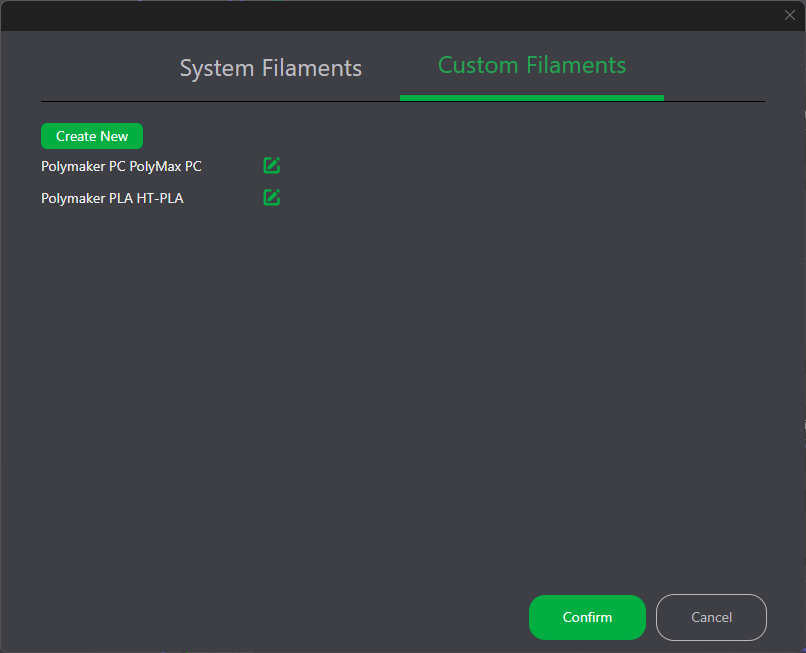
You’re able to manually enter Custom Filaments from different Brands if you click the cog wheel on the right side of your filaments aka ‘Project Filaments’ then there are tabs at the very top that say ‘System Filaments’ & ‘Custom Filaments’ and I’ve made a few that actually pop up under ‘Custom’ but I can never import any one brands config’s and choose from their filaments.
I hit the same thing moving from a P1S to an H2S – all my calibrated presets ended up under “Unsupported presets”.
What’s going on (user_1329389890 was on the right track): a user preset only stores your changes and inherits the rest from a system preset tied to one printer family – e.g. “SUNLU PLA+ @BBL X1C”. Bambu didn’t ship SUNLU / eSUN PLA+ / PolyLite / Overture system presets for the H2C, P2S or X2D at all, so that parent doesn’t exist there and Studio hides your preset. Newer printers also keep one value per nozzle type (Standard / High Flow / E3D High Flow), so the arrays have to match.
Manual fix: open the preset .json (%APPDATA%\BambuStudio\user\filament), change inherits to a preset that exists for your printer (e.g. “Generic PLA @BBL H2C 0.4 nozzle”), re-import via File > Import > Import Configs. Your own overrides (flow ratio, temps) stay.
I had ~40 of these, so I made a small free tool that does it in the browser – nothing is uploaded. New account here so I can’t post links; it’s at 3d.omrielcharizi.com/porter (source: github.com/OMRITGM/preset-porter).
Drop all your .json files, pick the new printer, hit “Download all” – you get one .zip and Import Configs takes it directly, so the whole library is a single import.
Tested on my H2S: presets from P1S/X1C/A1 moved from Unsupported to Custom with the calibrated flow ratio intact. I don’t own an H2C – its output is generated from the same Studio profile data but I couldn’t import-test it, so if one of you tries it, tell me what happens. One limitation: when the brand preset doesn’t exist on the target printer it falls back to Generic, so re-check speeds/cooling.
Fair question. The porter doesn’t copy the P1S profile wholesale. A Bambu user preset only stores the values you changed; everything else comes from the system preset it inherits from. The porter re-points inherits to the matching system preset for the new printer (e.g. “Bambu PLA Basic @BBL H2S”), so all the H2S-specific defaults (cooling, chamber, speeds, volumetric limits) come from Bambu’s own H2S profile.
What does carry over is only what you tuned yourself: say a nozzle temp or flow ratio. If one of those overrides was a P1S-specific workaround (like extra fan because the P1S ran hot), it will carry over too, so it’s worth a glance. The porter lists every change it made, and warns when it had to fall back to a different parent.
Exception: flattened exports with no parent keep all their values as-is. The porter flags those.
So yes, a head start, not a guarantee. You still run a quick test print on the new machine.
I understand how the different profile json files add up to a complete profile.
A heated chamber was not present in the P1S so those settings will not be overridden in the H2S profile.
But for instance part cooling for ABS on the P1S required possibly minimal values to prevent the reasonable cool air in the chamber not to cool the part extremely.
So if you played slightly with part cooling in the P1S, those low settings transfer to the P2S. As the P2S has a heated chamber, the part cooling requires to be stronger. But your adjusted settings just killed those.
Therefore, it might be better to start from scratch and decide for each modification you made, if that is still applicable for the new printer.