Hi is it possible to add my machine to this update? I can’t send you a message…
I resolved this problem by dedicating my H2D to engineering prints and my H2C for fun prints.
I too am posting so that @SupportAssistant can add me to the beta firmware for my H2c
For the stans: I am one of the people who purchased the track switch for my H2C not knowing that it would not be available for immediate use. Remember what can be attributed to malice can easily attributed to ignorance. Not everyone is deep into the release schedules, betas and such. Some people just have the money and see something is available on the site and expect it to just work; you know, kinda like the unofficial slogan for this brand.
Yeah I would agree it’s a fkup of them to mark it as supported for now.
I heard that in China you can contact the support to add you into beta queue once you bought the switch. Don’t know if it’s the same outside of China.
The Part of that beta to use the Birdseye cam for the cutting tool without the laser is so great. Waiting for month to get this ready 
I was told they could no longer hand input users and that the pool size needed to be increased. Disappointing as I only got the H2C the day the Beta dropped and couldn’t get in.
Honestly….not what I expected from BambuLab. If a new accessory is launched that’s the moment the firmware has to be available too! And I mean not a beta but the finished product.
So this is somehow failed communication within Bambulab or a veeeery bad decision made by the sales/marketing/development department.
I’d love to know the details but I’m sure unfortunately we will never know
The moment they answered my inquiry here that it was in fact directly compatible with the H2C, I purchased it. I knew then that it would take some time for the Firmware to release. So this delay was expected. I wasn’t aware that they eventually lit up the H2C purchase light on the page. I’ve been following the threads here and hadn’t seen that the Firmware was released yet. I figure it’ll happen within the next little bit. It did strike me as a bit odd that the H2C was lit on the page. No idea why they would do that, but it’s not really a big deal to wait a week or three for the Firmware. If it bothers a user to the degree that they are emotionally bent, not sure what to think about that. Not much chance of that behavior happening to the individuals in my circles so it is honestly odd to read. But this Forum has revealed to me that people are very different across the globe. And that’s ok. To each his own I reckon. I wish ‘em all the best and genuinely hope that the issues get solved soon enough for ‘em. And that’s where I see it.
I also am unable to PM @SupportAssistant and I have both the birdseye camera and the filament track switch, so I’m super eager to test this Beta.
I created a ticket, gave them my username and they added me just now. I went to my printing room and bam the screen said update available. Almost instantly
Usually in most companies that make products, the marketing department is way ahead of the engineering department.
They added a description that the official firmware will be available early June 2026 in the shop if you choose the FTS for H2C.
It’s possible they will still add you (you should PM them) but people are reporting different and varied outcomes. There honesty is no rush - it’s pretty buggy and depending on your workflow, may actually mean you’re worse off with it installed!
Yeah, I can’t PM them for some reason, I guess I’ll have to wait!
People if you can’t PM because your forum account is new and needs couple of posts and engagement to level up.
New users don’t even need to post. They simply need to read. To advance to the trust level that enables PM’s one needs to:
Hey everyone,
I wanted to share a small thing I’ve been working on because this H2C beta opened up a really interesting possibility for me.
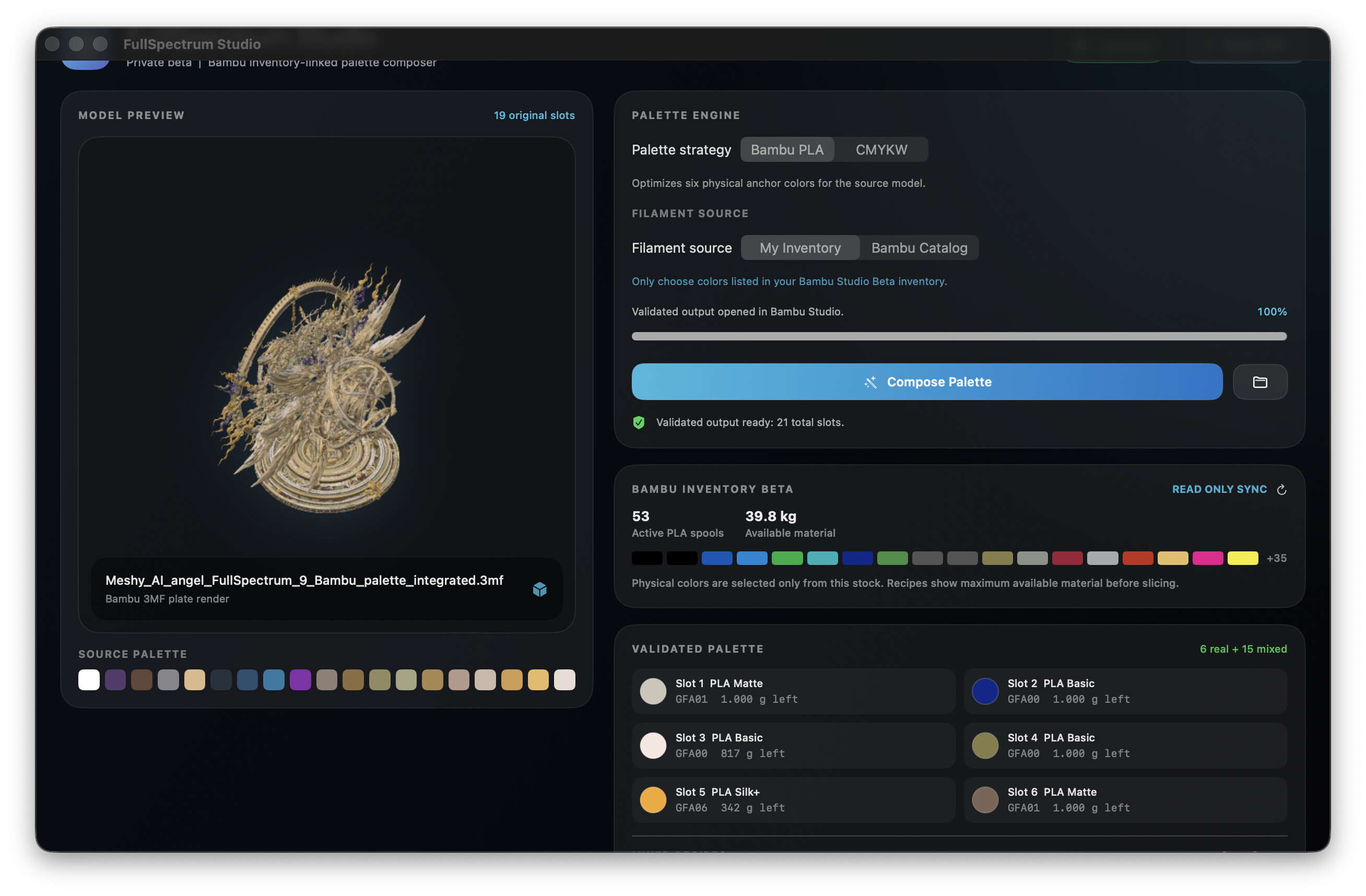
I’m not a developer, but I had an idea and, with a lot of AI help, I managed to make a little macOS app called FullSpectrum Studio. It is basically a colour compressor for painted/multicolor 3MF files: I give it a model with many colours, and it prepares a project for the H2C using 6 real filament slots plus mixed colour recipes.
What feels really cool is that it can read my Bambu Studio Beta filament inventory (read only) and choose from the filaments I actually have at home. I also added another choice to try the full Bambu PLA colour catalog if I want to plan a palette beyond my own stock.
At the moment, the inventory part only works with this Beta/Bambu Studio version, because it uses the new local filament inventory data created by it.
This angel example originally had 19 painted colours. The app converted it to 6 real filaments + 15 mixed slots from my own inventory, validated the generated 3MF, and then opened it directly in Bambu Studio.
I am still checking real print results and purge behaviour, so I am not pretending it is finished. But I thought it was too cool not to share here, and if it becomes reliable I would really like to give it back to the community for other H2C users to try.
Not affiliated with Bambu Lab, just a user experimenting with this new workflow and honestly having a lot of fun with it.
I too am posting so that @SupportAssistant can add me to the beta firmware for my H2C
You won’t get a response on a post, you need to send a PM or best open a ticket stating you purchased the filament track switch and can’t use it without the beta firmware