You can glean a lot of information from watching the layer lines going down. Information about the filament and nozzle. I recently had noticed defects in one of my prints. Turns out there was something on the back of the nozzle (carbonized plastic) that was causing the filament to extrude at an off angle/uneven. Something I didn’t even notice until the print was done. I would have seen this on a close up.
I still highly doubt if they have the bandwidth to stream the video. But even intermittent images would be helpful as well. I’m just super not impressed by the speed of the bird’s-eye view camera, it takes forever to take a picture and transfer to the computer,hinting a bottle neck somewhere
Actually, the available bandwidth is already terrible — the camera video only runs smoothly at certain moments… would it really have been too expensive to add an Ethernet port?
@SupportAssistant any news on cutting tool not requiring a laser on h2d machines? What about the early description stating the birds eye camera being required here
It’s not about the network, it’s about the internal bandwidth.
Bambu has a weird structure of Machine Controller → APplication board ← Tool head board.
The AP board also connects to all sorts of cameras. The connection is I assume USB 2.0 based…not sure.
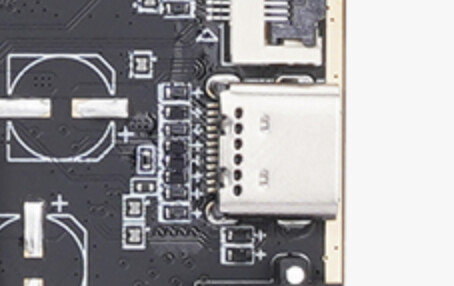
Actually, it might be USB3.0, ok that’s better than I thought? Not sure if it’s really USB 3.0 though. On the X1C it was USB 2.0 though.
The AP board is using an arm cpu which is from… uh, many many years ago.
Anyway what I’m trying to say is that it’s just a very weak SOC from many years ago, and it’s already having a high load of memory pressure currently, Im assuming that they don’t really have enough cpu power or hardware accelerators to process more video streams than the chamber camera.
I’m using the cutting module on my non-laser H2D. You don’t need the Birdseye camera to cut, but it could help in some situations (print then cut, or using scraps). The missing bit is allowing the birds eye camera to be fitted with no laser module.
If its only bugfixes why is this on beta i have to wait 2-3 weeks more for only that?
When I purchased they clearly announced a future firmware update would be needed to use the required camera. This was labelled red and later removed. But at the time of purchase it was required. Therefore I bring it up. However, thanks for sharing. Much appreciated.
No birds eye camera support for the cutting module without laser module? 
cmon guys this isn’t a full update, If I know anything about updates its this:
The first two digits are for complete revamps (On release its always a 1 due to it passing beta/alpha prereleases)
The second two digits are for significant updates, like adding the ability to access the cameras or when a new accessory needs to be backed up by the printer’s firmware. These add new things to the printer.
The third two digits are for minor updates, like fixing a bug or adding an ease of life to the UI. Usually just adding things onto the firmware that’s already in place, but just tweaking them to perfect optimization.
The last digits are for miniscule updates, only adding one or two bugfixes. These updates are almost always extremely hard to tell what they added if you’re just printing casually or if you don’t check the news!
New firmware can’t keep the bed stable anymore
This is mid print and it lost 8°C which let the print lose its grip.
This is what happens when developers keep listen to all those who yells “printer is using to much power” “we need lower power consumption” now I can’t print anymore without raising the temperature even more.
Why should I need to run it at 120°C just to have it stable at 110°C?
Reverting to previous…
Bed is stable again, beta it can’t keep set temperature anymore. This is now confirmed BETA issue.
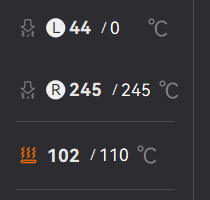
At this point I can’t print POM anymore. The bed temperature drops from 120 °C to 100 °C even with all fans off. I can’t find any mention of this in the firmware release notes. If the PID control was adjusted to behave this way, that’s a significant change because it forces me to raise setpoints by 10–15 °C where possible. For POM I can’t go higher, so on the current beta firmware I’m effectively unable to print POM.
I would also strongly prefer fast, responsive heating over a sluggish control loop that fails to hold the setpoint. If this change was made to address complaints about power consumption, it should be a user-selectable option or profile. As it stands, the new behavior makes the machine unusable in the other direction—especially for materials like POM.
Gcode fix helps a LOT… I’ll bet it’s there
ok So question.
When we were asking you to fix the hair on purge tower, you gave us couple instructions and a new gcode.
This step solved the issue.
Now comes a new update for bambu studio, with no mention of said gcode/fix
AND a bugfix update FOR the machine, which states that fixes this exact issue? I mean we were told its because of studio no?
I do, been in the tech/software industry for decades, but that doesn’t mean I can’t hope the next released version would have included birds eye for cutting module.
As someone out of the loop, what is the gcode fix? Also what bug does this fix? The oozing on the tower?
Is it normal though after this amount of time since last firmware update that it only brings bug fixes and no improvements?
No, no it is not. But we must also regard how busy Bambu has been developing the H2S, P2S, and soon, the H2C. Again, like I always say, Bambu’s firmware team is not on the same crack the hardware team is on. (/j, but I do always say that)
not normal. It’s like they assigned one dev 2-3 hours to fix 3 bugs in the last 2 months.
Yea, i think the same they are doing bad the part of a customer spending 3.5k euros in a laser combo and forgeting about fixing and polishing the firmware to the top because they are fighting with snapmaker with the U1 its like a speedrun and they forget about their new products ._.
I mean i like the vortek system and i want it but bro dont forget the h2d/h2s