It insists I type extra things in here.
Have you tried the preferences and there to increase the counter for the historic projects ?
If it is anything like the X series you can store more prints if you move them outside of the Cached folder.
I got 13 on the internal memory and 14 on my USB on the H2D. =]
Setting does not appear to exist.
I see thank you. It looks it is a flexible limit based on available storage. First thank you, and second I am an idiot for not realizing this.
EDIT Wait I meant the printer’s touch screen, not the cloud or the slicer. The touchscreen seems fixed at 8.
Don’t be so hard on yourself, we don’t know what we don’t know.
I have a large 256GB USB drive and its still 8 total, its always fixed at 8. They need to let us choose how many we want to store, I posted about it before to @SupportAssistant but never got a reply.
I have mine set to copy print jobs to the USB stick and I have tons more than 8 on there. Everything I’ve printed since I got the printer.
Internal storage on the printer only has a few.
@MikeDVB
Same, internal only shows my last print, but usb shows all files since my last reset
@Eponymous
For the slicer itself, you also have this choice. Or sending from history in handy which holds a ton. Maybe all ever sent through bambus cloud. Mine just keeps scrolling forever lol
Thats very strange. You access them on the printer touchscreen and you have more than 8 on the USB? They all have the little clock to show they are cached and not files you put manually on the USB? I just want to make sure we are talking about the same thing. How big is the drive you have plugged in? Do you have video recording turned on?
It only caches the last print job to the internal 8GB eMMC, the other files are the ones that come with the printer.
The printer touchscreen shows the projects?
Nope, those are only visible from the handy app. I still think we have some kind of miscommunication and misunderstanding as the printer from the touchscreen only holds 8. If someone can see more then 8 cached on the printers touchscreen please let us know so we can figure it out.
I started a feature request for this, please like the post if you want the feature to be implemented.
Im 90% certain I had 10 visible through the lcd screen, when I looked earlier. From the USB. I recently reset everything so im not positive what the actual max is. I have prints going now, so cant check for 2.5 hours on one and 5 hours on the other.
I have video recording turned off with a 512mb samsung usb storage. Maybe video recording has a big allocation? and limits you? Ill check back later and let you know if im wrong
You can check while its printing just hit the “files” button, beside the icon of what printing now. Should be 8 two rows of 4, not more.
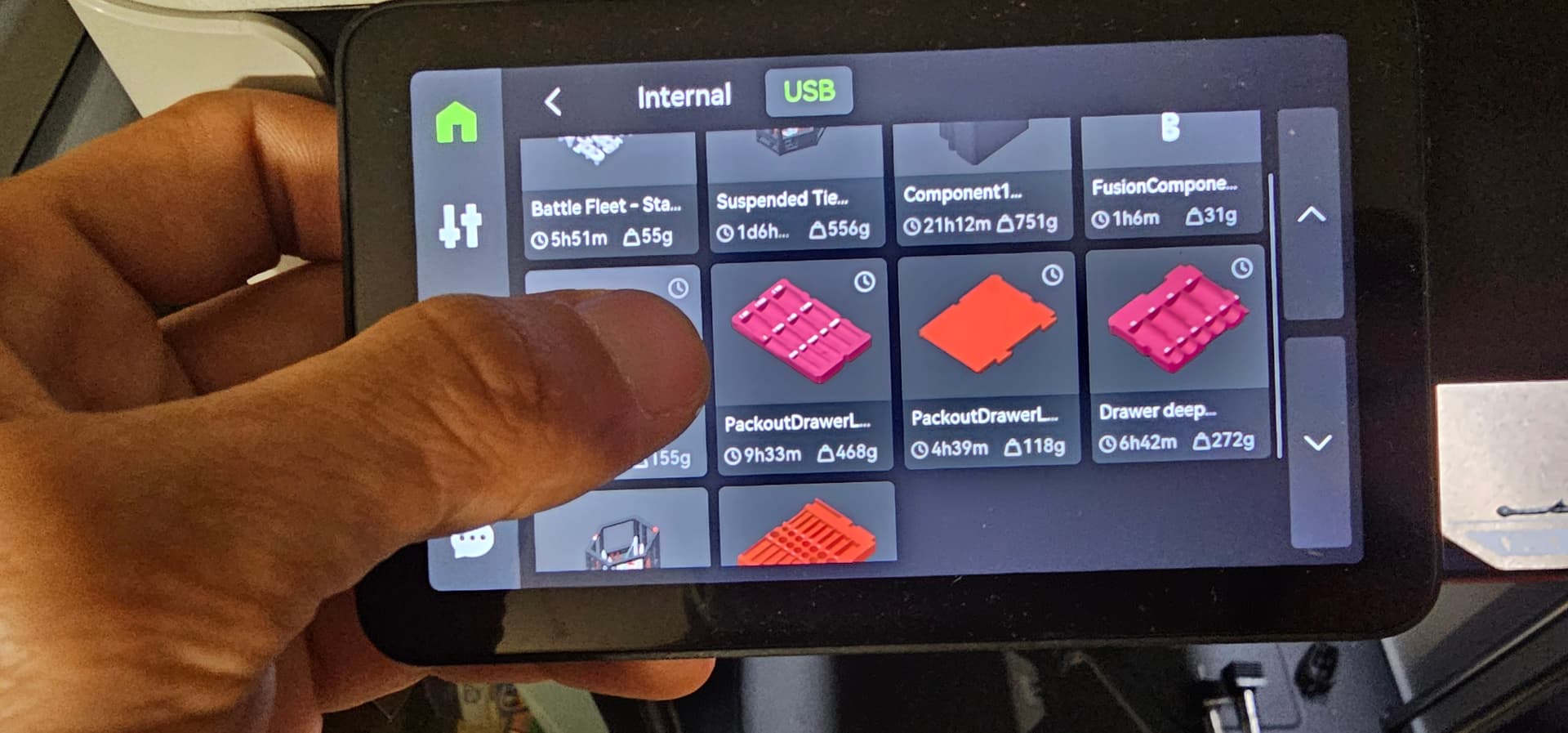
The bottom two are not cached, see how they dont have the clocks on top right corners? Those files were put manually on the flash drive.
Like I said its a hard limit of 8 cached. Please like my post in the feature request to get this implemented.
Good eye. I didnt even notice. So it is 8 through the lcd.
Does this hurt the guys on Lan only mode?
I liked your request post, btw.
Like I said earlier I suspect we were talking about different things, I doubt Mike can see more then 8 either. He was probably looking at handy app which is totally different cached files.
I think the LAN guys will have zero as it caches the files sent through the cloud, but I might be wrong. We need to have someone on LAN only mode chime in.
They can however put as many manually on the USB as it will fit, just a pain in the rear to do that. It should let us pick how many we want cached, especially those of us with large flash drives.