Hi,
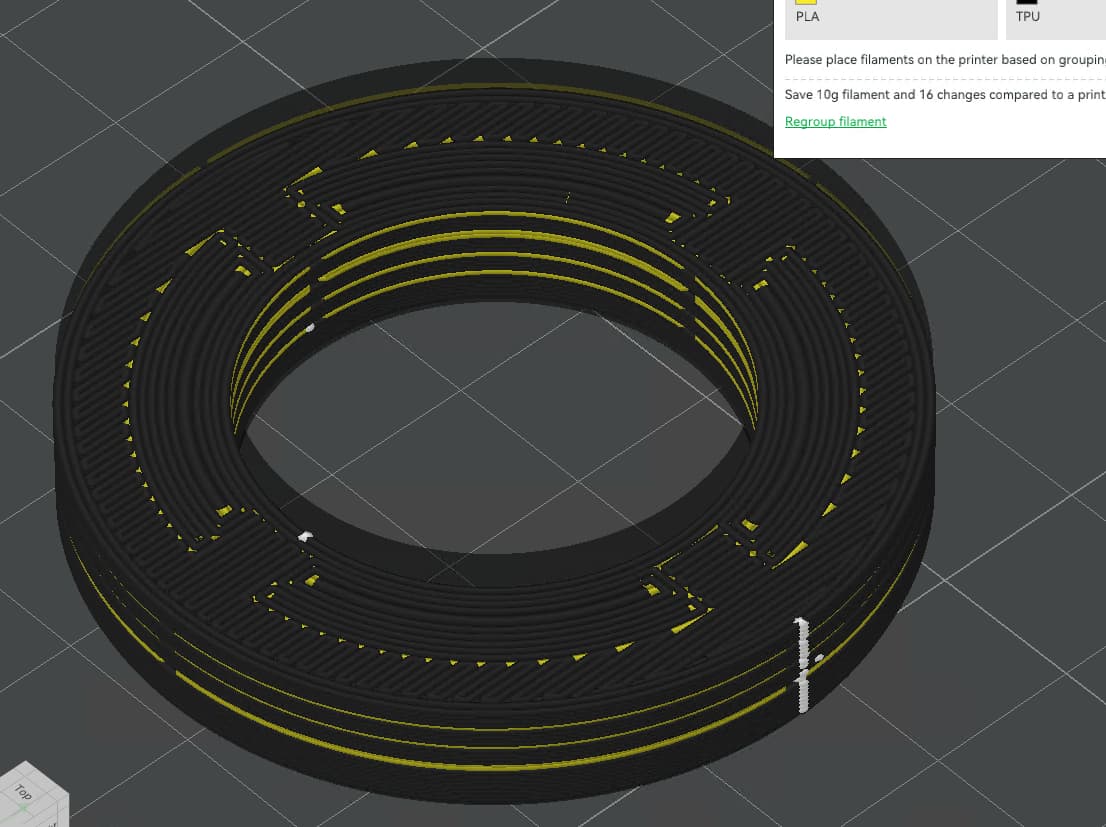
I’m currently working on a project that involves printing TPU with PLA as support material. I created the supports in CAD, and they are set up as separate objects within Bambu Studio. However, Bambu Studio is treating them as a single part, which results in it ignoring the individual objects and not creating shell layers between them, despite having different filaments selected and assigned.
Is there a way to get Bambu Studio to recognize these as distinct objects? Even when I create a small gap, the software overlooks it and fails to generate shells between the parts. If I increase the gap sufficiently for the program to create shells, the print ultimately fails due to the size of the gap.
Here’s a screenshot, the yellow parts are assigned to PLA and are their own objects inside Bambu Studio.
That’s how the part looks, the yellow parts are the support and individual objects inside Bambu Studio.
If I don’t utilize the supports generated in CAD and instead rely on the support feature in Studio, the resulting supports appear in a way that makes them difficult, if not impossible, to remove.
Thanks!
Hi,
To force a separation between objects in contact with one another they need to be significantly different enough, like having different wall counts or infill settings (see Reinforcing parts by designing modifiers in Fusion ). But I don’t think that’s what you want here (though it may work since PLA shouldn’t stick to TPU).
To create a proper gap, you’ll need to carefully design the model & supports so there is at least a one print-layer-thick gap between the objects. Eg. if you’re slicing using 0.2mm layer height, make sure your gap is at least that large. This is a similar concept to designing print-in-place parts like joints or self-supporting parts… there needs to be a physical gap which the slicer won’t ignore, but not too much so the upper layers deform.
To further refine the gap you could use variable layer heights in the slicer, either via height modifiers (r-click object to add some) or the layer height “painting” tool in Studio (top toolbar), both in Prepare mode. You could fine-tune the layer heights around the support/model transition points. Only possible negative here is that it will also affect the actual model at those heights as well.
Having said all that, the built-in support generator is pretty flexible and you may be able to get a better result by fine-tuning those settings and checking the result layer by layer. The big advantages here are that the height between support and model can be finely tuned (much easier than what I describe above), plus different patterns can be employed as interface layers. Among other options. What it generates by default is usually junk(y) except in the simplest situations… I always have to fine-tune it to my picky satisfaction.
HTH,
-Max
Thank you for your response!
I attempted using a gap, but unfortunately, it caused the print to fail, so that approach isn’t viable.
Do you have any tips for preventing supports from flowing over the sides of the part? While setting the normal support expansion to a negative value improves the situation, it also removes some necessary internal supports. In this case, the part lacks support on the edges.
Also concentric leaves some parts unsupported
I managed to make it work by giving the support objects a very high wall count and creating the entire part as solid with no infill, relying solely on the walls. However, this approach only works for that specific model since a completely solid structure isn’t an issue in that case. For other parts, it would be preferable to print them as independent objects, even if they are touching each other.
Didn’t this functionality work in past versions of Bambu Studio? I recall using CAD-generated supports that sliced correctly as individual objects, even with a 0 mm gap. However, my memory may not be entirely accurate.
Not sure  but can’t you select a layer hight modifier ? only on the PLA object
Thank you for the tip! I was able to make a modifier by copying the support structure object and then changing its type manually to a modifier via right-clicking on the object.
However, I’m having difficulty altering the pattern on the surfaces that come into contact with the support. I believe this pattern is a result of the small gap (approximately 0.5mm from the walls and between the support objects) I created between the TPU and PLA to make separation easier later on. It seems that Bambu Studio is interpreting this gap as a bridge. Is there an option to “ignore” bridges below a certain length and just print as there would be no bridge?
The object support is 4 parts to be able to remove it later, studio is treating the gaps as a bridge: