1000 * $40 would be $40,000, not $4,000
yes… i read 100 vouchers… upsi 
 yes, did you read any of the other threads (or even this one?)
Either air assist or sensing probe to measure distance to the material to be cut/engraved.
15:00 CET is Central European time, not US Central. It is 10am ET.
Yes I understand this. 25char
Maybe the front cover slides off (better than the magnets on the P1S) and the laser/cutter can slide on in place of it?
2 Likes
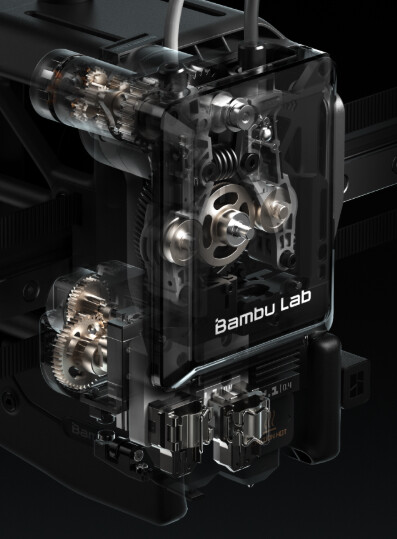
I’m guessing based on the rendering, that front faceplate slides off, and you snap on the tool.
1 Like
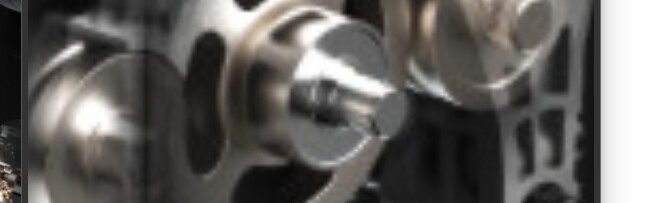
I added a enlarged image that looks like its extruding
I think they are good at keeping secrets, everything we’ve seen was leaked on purpose to build hype, it happens every time there is a big product release these days
The only difference is how well the company deliberately “leaking” the info makes it look like an accident
I’d imagine, just like the recent elegoo printer, Bambu have been dropping these $3-4k price hints through this forum and other social media so when they say $2499 and $2999 everyone says oh wow so cheap!
Marketing 101 these days
1 Like
Here’s a superimposed picture of the laser sitting on top of the regular print head. They line up with the print nozzle that’s shown in the picture.

5 Likes
It looks fancy, I liked it 
2 Likes
Unless its a dookie laser, the 40w laser alone will prob command like $800. Theres A LOT of variation in the a quality of diode lasers (regardless of the wattage) I’ve noticed. One $250 40w laser prob isnt going to compete with a $800 one so I’d def need to see some reviews of the actual laser performance to even consider it, though if I want one tomorrow, I guess wont have a choice but to get it with laser. Then again I also imagine it’ll ship with only the 10w as to keep cost lower for initial release.
well 2999 is 3k  but yeah if it would be 2.5k that would be nice, let’s see, it makes sense for the non-laser version
Source: Blue Laser vs Red Laser: Which One Is Best for You.

Blue Laser vs Red Laser: Understanding the Differences
Laser wavelength is the main factor influencing the efficiency of different applications. There is a difference between working with blue laser vs red laser in the laser engraving process regarding accuracy, material compatibility, and efficiency.
There are laser wavelength differences between the two. This means that blue laser, which has a shorter wavelength, will therefore suit applications demanding extremely high accuracies and a very high requirement for precision of measurement. On the other hand, red laser, which has a comparatively long wavelength, is suitable for dynamic applications and very high-speed measurements—for instance, measuring moving items on conveyor belts.
What Determines Laser Color and Performance?
Laser color and performance are defined by the wavelength of light they emit. Blue lasers have shorter wavelengths than red lasers, leading to distinct laser wavelength differences in functionality.
The Science Behind Laser Wavelengths
- Blue Lasers: Operate at wavelengths around 440–450 nm, which are in the visible light spectrum. Their shorter wavelength allows for higher precision and better absorption by various materials.
- Red Lasers: Function at wavelengths around 630–700 nm. These longer wavelengths are also visible but have less precision than blue lasers.
Why Choose a Blue Laser for Engraving and Cutting?
- Precision & Detail: Smaller wavelengths translate into sharply engraved blue lasers, tightly intended lines, and reduced diffusion on reflective surfaces.
- Material Compatibility: They perform exceptionally well on wood, metals, and shiny surfaces, as these materials absorb blue laser light more effectively.
- Energy Efficiency: Blue lasers offer higher energy levels and intensity, making them efficient for demanding tasks.
- Related Term: Blue laser engraving excels in delivering intricate and precise results.
When a Red Laser Might Be Your Best Bet
- Versatility & Cost-Effectiveness: Red laser diodes are widely available and are typically more affordable.
- Simplicity in Most Situations: Performs reliably on matte, non-reflective surfaces, making it suitable for general-purpose applications.
Application Scenarios: Blue vs Red
The choice between blue laser vs red laser depends on the materials, precision requirements, and budget considerations.
Engraving & Cutting
Blue lasers excel at intricate engraving on various materials, including tough or reflective ones. Red lasers handle basic cutting and engraving at a lower cost but with less refinement.
Measurement & Alignment
Red lasers are commonly used in sensors and industrial measurement tools due to their availability and speed. Blue lasers can offer higher accuracy in specialized scenarios but at a higher cost.
Handling Reflective, Organic, and High-Temperature Surfaces
Blue lasers maintain focus and precision on shiny surfaces, hot metals, and translucent materials. Red lasers struggle with these conditions due to deeper penetration and diffusion.
Cost and Efficiency Considerations
Red lasers are generally cheaper to produce. Blue lasers may cost more upfront, but they can offer long-term energy savings.
Operating Safely with Red and Blue Lasers
Both types of laser are visible, which enhances safe handling. Always follow these safety measures:
- Use proper protective eyewear.
- Follow manufacturer guidelines.
- Ensure adequate ventilation and workspace precautions.
Blue Laser Modules Recommendation
If you are looking for the best blue laser module, consider Snapmaker laser modules. The Snapmaker 10W High Power Laser Module features advanced laser beam splitters, doubling the power from 5W to 10W. It works at speeds up to 6000 mm/min and can cut through 8 mm basswood, making it eight times faster than the 1.6W module—perfect for efficiently tackling more materials and projects.
The Snapmaker 20W & 40W Laser Module with Air Assist offers powerful cutting capabilities, handling up to 20mm pinewood or 15mm basswood plywood in a single pass (40W) and 10mm basswood plywood (20W). Its smart Air Assist reduces charring, enhances quality, and keeps the laser lens clean and controllable via Luban for seamless operation. Enjoy 1000+ ready-to-use design templates in Luban for quick and creative projects.
Other Types of Laser: Infrared
So now we know that blue lasers are great for deeper engravings and cuts, and red lasers are perfect for matte, non-reflective surfaces. However, another type of laser is very popular: infrared lasers.
Infrared lasers emit invisible light at the typical wavelength of 1064 nm, so special safety measures are needed. Infrared lasers have a smaller laser spot, perfect for delicate engraving and detailed designs. Click here for detailed information about infrared lasers.
The Snapmaker 1064nm Infrared Laser Module engraves plastics and metals with precision, integrating seamlessly with Snapmaker 2.0, Artisan, and Ray series. Its built-in safety sensor halts operation if misaligned, while the AB position feature in Luban ensures flawless graphic placement for efficient engraving.

The Final Verdict: Blue Laser vs Red Laser
Blue and red lasers each have their strengths and limitations. Blue lasers are outstanding in energy efficiency: no other laser takes the performance efficiency match; it can be applied to a broader range of materials than red lasers can. Red lasers, however, win on price and speed for all-round applications. It’s essential to match your laser choice with project requirements. You should also consider material type, precision needs, and budget.
With a clear understanding of these differences, you can confidently select the laser that best suits your needs.
4 Likes
It looks like the base model will be laser free and judging by the photos it’ll be a straight upgrade path, so you might be able to just get the printer and wait for those reviews for the laser
Apart from the A1 the first release model for all of their printers has been pretty solid, even if you look at the iterations with the X1 > X1C… the X1 was still good, I’d be happy getting the base model for home, but I have no interest in the laser
Bambu studio ( seperate plates ? )
My question is is there anything preventing them from releasing a better laser module that uses a different wavelength down the line? I’ve seen comparison pictures of blue vs infrared lasers in marking 3D prints and the infrared laser performs much better. Seeing as the laser is a separate module, have we seen anything hardware wise that would prevent a better module from being installed? Are there other considerations that would need to be taken care of first?
1 Like
So would that be base model with the additions of what the laser model has or just without the laser? To my understanding there was air filtration kit that would be able to be added down the road, but I had figure their initial release would be that of the laser capable models (with it built in). I didnt think the non laser version was gonna be in this initial release