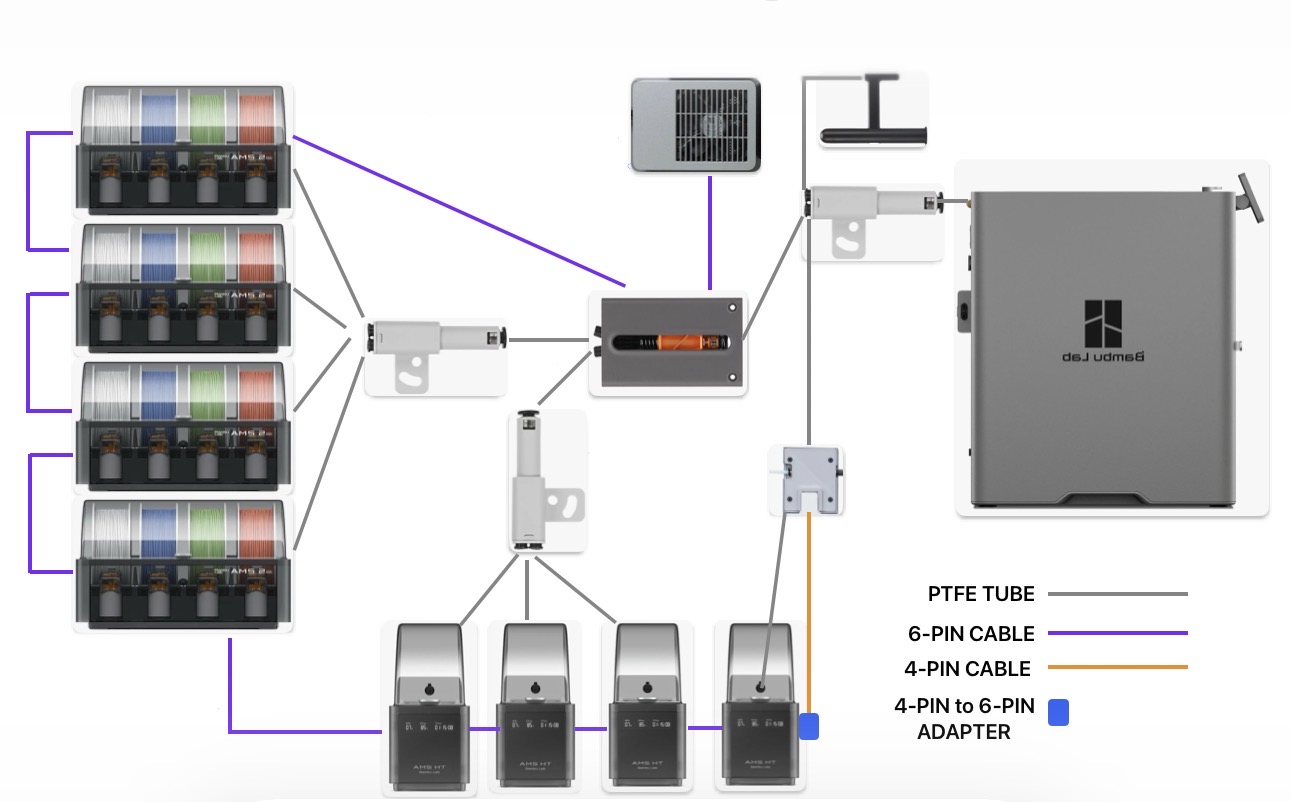
The simple answer is… you can have any combination of 4 AMS1/2Pro along with 4 AMS-HTs simultaneously connected to P2S creating a maximum of 20 AMS slots.
The 6 Pin cables for ANY AMS units are ALWAYS daisy chained from one unit to another in any order with only the 1st unit connected to the filament buffer.
PTFE tubes from AMS must be separated into groups of no more than 4 units through the inputs of a 4-in-1 PTFE adapter and then on to the filament buffer.
THE END.
If you still need or want additional clarification and caveats…
-
The diagrams in the Bambu connection guide are helpful and would generally be my suggestion for connections. However, your connections do NOT have to EXACTLY match the diagrams AS LONG AS you follow the underlying “rules” mentioned above. Based on the placement of your AMS units and printer, you may need or want to make variations to the diagrams.
-
The P2S filament buffer does NOT support 2 separate 6-Pin connections for use with AMS units. All AMS units must be connected to ONLY ONE of the two 6–pin ports on the filament buffer. It does NOT matter which one. The second port is reserved for other devices such as external fan, TPU extruder, etc.
-
It does not matter which order you daisy chain your AMS units.
-
You can have up to 4 AMS 1/2Pro units and up to 4 AMS-HT units but never more than 4 of each type. (For example, even though you can have 8 total units, 5 of one type and 3 of the other will NOT work.
-
The PTFE tubes from AMS units can be grouped into ANY combination of the two AMS types through a 4-in-1 PTFE adapter.
-
You can have either 1 or 2 POST 4-in-1 PTFE adapter feeds into the filament buffer.
-
You can use any number of 4-in-1 adapters to reduce PTFE tubes down to the 1 or 2 filament buffer inputs but as few as possible is highly suggested. The fewer 4-in-1 adapters, the fewer possibilities of filament snag points while the filament travels through the tube system.
-
ANY time an AMS unit is involved in auto feeding filament, that filament MUST pass through the filament buffer before continuing on to the printer.
-
If you want to retain the option to use an external spool either alone or in combination with AMS units, there are a few options: [1]- You can TECHNICALLY route the PTFE tube from an external spool through the filament buffer by connecting it directly to one of the two filament buffer inputs or through an empty 4-in-1 PTFE adapter port that eventually routes to the filament buffer. [2] - You can add a 4-in-1 PTFE adapter AFTER the filament buffer between the buffer output and the main printer PTFE tube input.
-
I highly suggest using option 2 to include an external spool feed AFTER the filament buffer rather than before the filament buffer.
-
When introducing the external spool feed before the filament buffer, you will STILL need to manually push the external spool filament to the tool head so the extruder can “grab it” and pull the filament itself while printing. The filament buffer will NOT assist in feeding external spool filament to the printer simply turning the buffer into just a 2 to 1 PTFE tube reducer but ultimately creating additional tension on the external spool feed and introducing additional points for failure.
There are of course many different variations, needs and preferences for routing filament to your printer. While abiding to the main 3 underlying points/“rules” mentioned at the beginning of this post and considering the additional details/suggestions, use your best judgment to accomplish your individual needs and preferences in delivering filament to your printer.
The only other common variation I can think of is using TPU. If you don’t intend on using any TPU, you can ignore the rest of this.
-
Traditionally, feeding TPU directly into the tool head extruder by removing the top glass was the best option.
-
My personal opinion is that TPU for AMS sacrifices too many aspects of TPU so I won’t consider it here.
-
You CAN use AMS-HT to dry and deliver TPU to your printer by routing it through the dedicated TPU port at the rear of AMS-HT and that seems to work just fine. The spool will just rotate around freely on the rollers from the “pull” of the tool head extruder while printing.
-
Using an AMS-HT for TPU does NOT change the way you connect the 6-pin cables in any way. AMS units will still be daisy chained with only one 6-pin cable connection to the filament buffer.
-
Do NOT route TPU through the filament buffer.
-
You can route TPU filament with or without an AMS-HT in 4 ways. [1] Directly down into tool head extruder through the top by removing top glass [2] Directly into the main printer PTFE tube input from external spool holder or AMS-HT TPU output port. [3] Through a 4-in-1 PTFE adapter placed before the main printer PTFE connection but only AFTER the filament buffer. This allows for simultaneous connection and use of TPU and AMS units together while not having to keep disconnecting and reconnecting PTFE tubes. [4] Using a TPU Feed Assist Motor with its own variations and requirements.
-
TPU Feed Assist Module output can be connected either directly to main printer PTFE connection or grouped into other PTFE connections through a 4-in-1 PTFE adapter placed before the main printer PTFE input and always AFTER the filament buffer.
-
TPU Feed Assist Module cable can be connected directly to port 2 on the filament buffer or at the end of daisy chained AMS units via the included 4-Pin to 6-Pin adapter.
-
Using a TPU Feed Assist Module does NOT create an additional “digital” external spool spot in Bambu Studio or Handy. It will use the 1 existing external spool spot. , You may still keep the actual external spool holder’s PTFE tube connected through a 4-in-1 PTFE adapter to avoid having to make switches of PTFE tubes but can not use the actual external spool along with TPU Assist Module in the same print.
-
You can also use an External Exhaust Fan along with a TPU assist module and up to 8 AMS units.
-
To use all 3 devices types (AMS units, Exhaust Fan and TPU Assist) simultaneously, you must connect the TPU Assist cable to the end of daisy changed AMS units.
All of these additional details, requirements and caveats are a lot to consider. But here’s how I’m setup: