I’m worried something more serious might be out of whack and curious if anyone has any suggestions. Today my nozzle blocker bent severely and messed up a print. I know this can happen, so was not overly concerned. I followed the steps to try and bend it back and print.
That worked for a while - then it bent again.
This time I replaced it. Had a few successful prints. Just now the new blocker bent.
At this point there has to be something wrong on the cleaning or something in that mechanism that is causing it to repeatedly to fail.
1 time normal
2nd time when I bent it back - ok maybe I did it wrong
3rd time brand new blocker?
This is a serious bug in the software and I have reported it to Bambu but they have not been able to resolve it yet. My problem is that when I finish the previous print with the left nozzle, the printer runs to the discharge chute and the flow blocker is blocking the right nozzle. I continue to print the next print with the right nozzle → the extruder runs to the right causing the flow blocker to bend because it collides with the nozzle cleaning part. On the other hand, when the extruder is at the discharge chute position and unloads the plastic, the left nozzle of the extruder also runs to the right and bends the flow blocker. I have reported the bug but it seems that Bambu is quite slow in solving this problem.
Just remove the blocker, remove any oozed filament from nozzle at the start of each print. I have been running like this for months, much better then the blocker catching on things.
when the tool head is in the discharge chute, check if the flow blocker is on the right side, if so, move it to the left. That’s the best way, also you should print mainly on the right nozzle, however no one buys a machine just to print mainly on 1 head, bambu said to wait for the next update, I’ll wait to see if it’s fixed. The funny thing is that the printer doesn’t seem to know where the tool head is so it always runs to the right in most cases and accidentally breaks the flow blocker if it’s locking the right nozzle
Be aware of the flow blocker if it is blocking the right print head and the tool head assembly is in the discharge chute position as there is a high chance of a line blocker failure, the machine has damaged 2 of mine.
i’m not sure how to check this every time, and doesn’t feel like something I should need to check that often. Good news is i’ve been printing from right side only today and no issues at all.
Sorry to jump in i should call myself new_to_h2c I assume the same bug is probably still in also for the h2c. Does it make sense to end the end of each print to make the right head active on the display or is that too simple thinking from my side until they solve this bug.
Not sure if this happens with H2C, but it has been and is happening with H2D. Which version are you using? I have reinstalled Version 01.02.00.00 and it seems the error has been somewhat fixed, though not 100% because the tool head assembly still moves to the right in some cases.
I am on 01.02.02.00. It does not happen every print. It happens way more than a piece of finely tuned hardware ever should, but it is not all the time. I’ve had mine since beginning of November and all this is recently.
I’ve used the left nozzle a lot - even moved my AMS over there for a short period before moving back to the right.
h2c is at 01.01.00.00 and probably its own number. We have no idea if it has the bug ill just put it on right at the end until we know for sure. If nobody has this issue ill stop doing it. Back to the h2d issue and sorry for me to jump in.
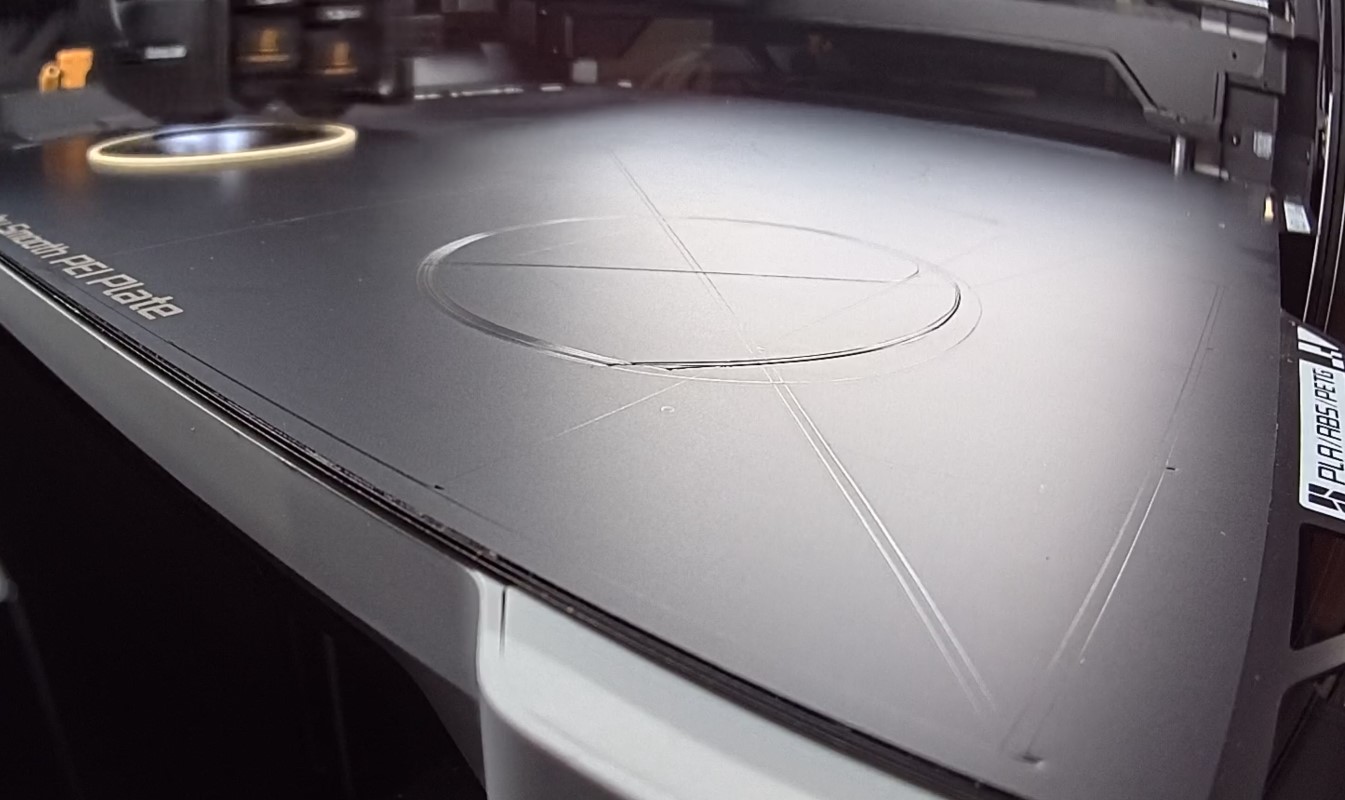
This crash happened to me last night, and it wrecked my smooth PEI build plate before I could intervene. Considering the minor inconvenience of not having a blocker at all, I’m considering deleting it so this doesn’t happen again. Bambu recommends restoring the blocker to its original shape… presumably, it will happen again since they haven’t made any firmware corrections or addressed this otherwise. H2D btw, firmware is 01.02.02.00 (20251105)
Quick snap from my live camera, this damage was caused to a perfectly intact smooth sheet after the nozzle blocker was folded back on itself resulting from automatic motions at the start of the print.
Prior to the crash, perfectly intact and aligned nozzle blocker, with no previous bumps or bends, good nozzles, normal Bambu material, nothing whack in the slicer settings (stock bambu preset). Most likely firmware to blame (or Bambu studio, either way, nothing the operator could anticipate as it happens very quickly even with personal check-ins for the first layer).
That entire quadrant is useless now, hopefully I can be expecting a replacement sheet soon
(update: Support has been really helpful and responsive on this issue, I provided as much detail as possible to them including logs, project file, code, photos, and stuck to their instructions. Glad to report timely responses and resolution.)
Q&A at Bambu lab musst be on vacation. I can’t imagine a scenario where such behavior is not caught during testing before releasing a firmware. They have to step up their game.
I agree I’d like a fix as was pointed out intermittent is the worst and causes people to lose trust. It should not be a matter of me hovering over every single print the whole time just praying it doesn’t happen. I’ve gone a couple of days without it happening.
Earlier the question of “do you bend it back” - I’ll say I put on a brand new fresh one the other day and first print it bent. I bent it back and it hasn’t happened again. So it’s very random and hard to know when.
I had to replace the part totally when it ripped the little silicon gasket off the blocker.
In general the idea of putting more “metal” between the hot end and the bed feels dangerous to begin with. Any little bit of off it will damage build plates or rip prints off.
I’d think with proper retraction and flushing on the unused nozzle this could be avoided.
Agreed, anything extending below the nozzles (tool tips) needs to be absolutely strictly controlled to prevent crashing into the bed/print. The blocker design isn’t ideal because it cannot get right out of the way, it just moves back and forth between tool tips, it’s always “in the way” by design, and I’m not really confident it’s been been executed perfectly. Especially from the programming side.
Deleted mine for the time being, Will treat the machine accordingly, as a typical machine which just happens to have a second nozzle I can switch to, operator present for any indexing between the two nozzles. The hardware is fine I think ultimately, this is something that can be addressed in firmware/software update from what I’m seeing.
I’m cutting all dual-material jobs and designs until it’s resolved, sticking to one material per print or letting the AMS do its thing within reason.
@SupportAssistant nothing? Some kind of info would be good. Who is affected of this issue, how to mitigate, if it’s being worked on and when it will be fixed?! I find it kind of strange when there is an issue that can damage the device and there is no Information from Bambu.
 I assume the same bug is probably still in also for the h2c. Does it make sense to end the end of each print to make the right head active on the display or is that too simple thinking from my side until they solve this bug.