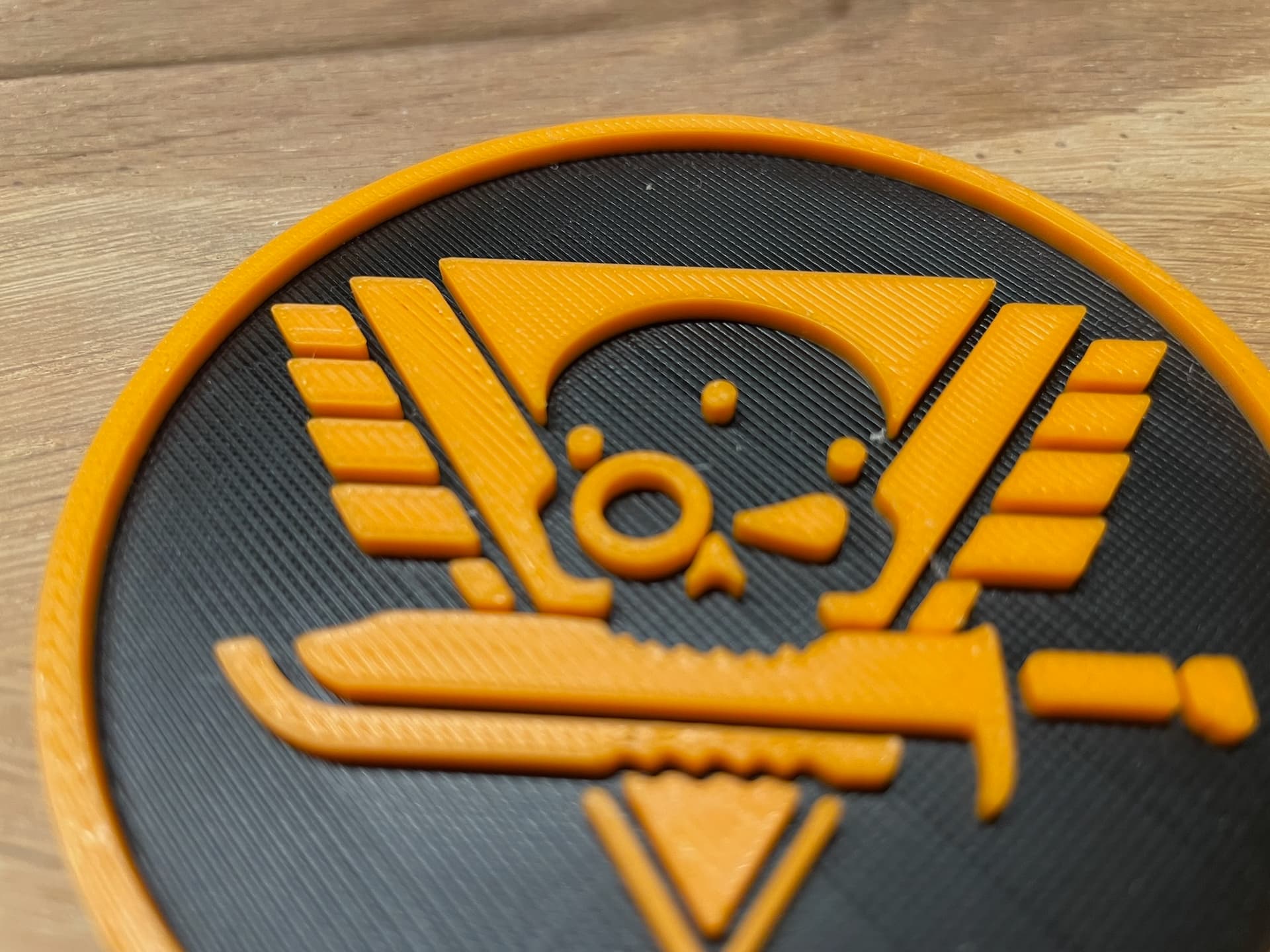
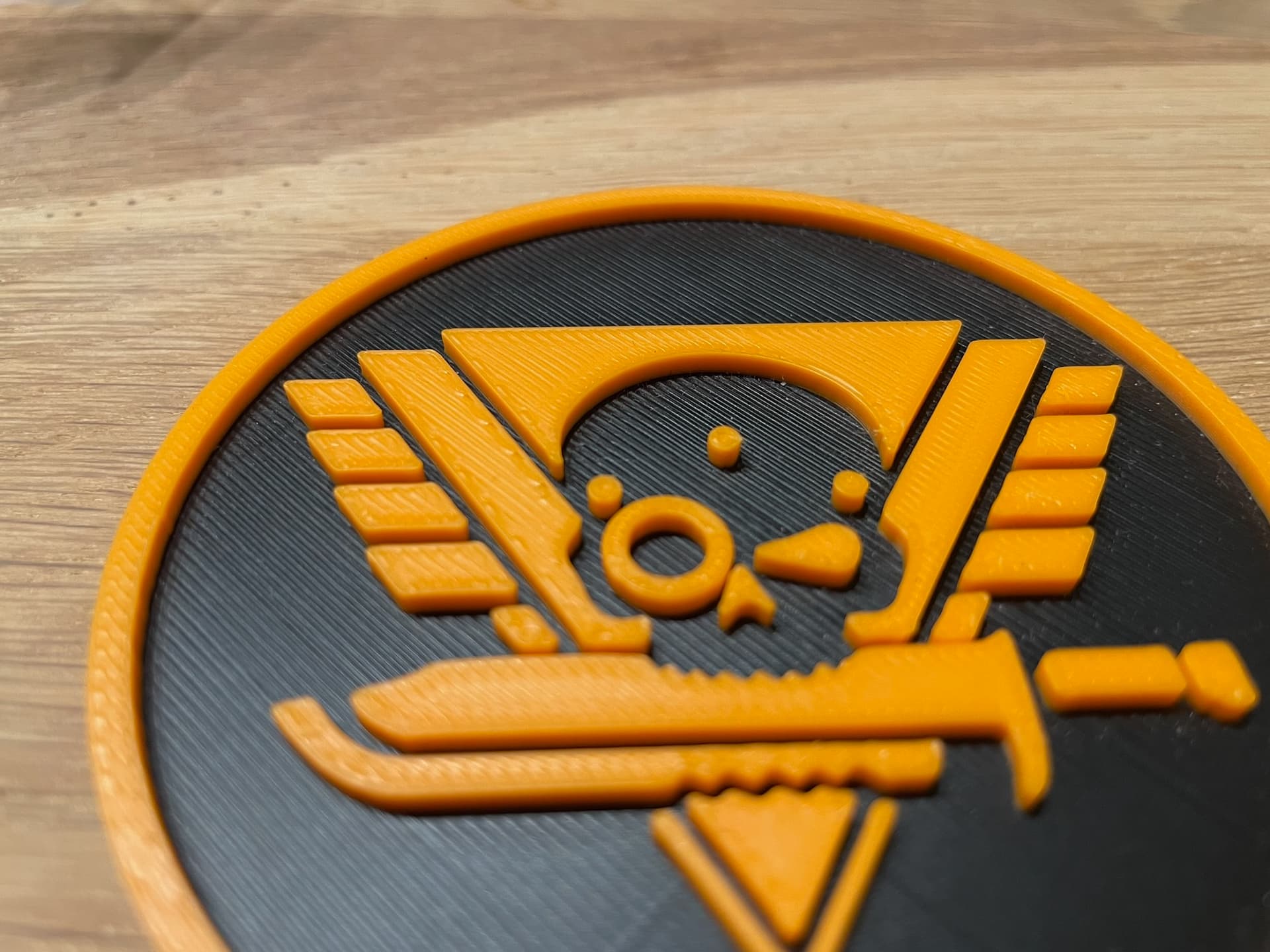
for a couple of weeks I’ve been noticing a degradation in top layer quality in prints with my P2S. It looks like under extrusion. I think it is happening across all colors of PLA Basic. Probably with other materials too, but I don’t have enough prints to make a comparison there. There are currently 840 operating hours on the machine, I have had the machine since it came out in October of last year.
I tried doing a flow rate calibration with Bambu Studio which gives me something about 1.02. But I have the strong impression that printing with a flow rate of 1.02 gives me over extrusion in other parts of prints.
The Bambu wiki says a flow rate of more than 1 hints toward a clogged extruder or nozzle.I’ve already taken the extruder apart, looked pretty clean to me. Also tried a new 0.4 nozzle which didn’t change anything.
I also noticed that the most problematic areas stay the same when printing the same object twice.
I did clean and lubricate the axes a couple of times.
Other things I’ve tried:
tightening the belts
firmware downgrade to 01.01.00.00
replacing the PTFE tubes in the printer, from the buffer to the printer and from the AMS to the buffer. Looked like it improved things on one small test print but I’m not 100% sure.
drying the filament
I’m running out of ideas - I’m thinking about replacing the PTFE tubes in the AMS and replacing the extruder gears. But feeding filament from a new AMS HT I’ve got since last week doesn’t change anything, so I doubt it’s the tubes.
Attached are two pictures, the bottom one is of a print I did when the printer was pretty new, the other one from today. I’m doing another print now with a flow rate of 1.02.
It seems to be a common problem, Im experiencing exactly the same thing. Ive tried different PLA brands, calibrated the flow, used auto calibration, increasing the flow ratio on top layer (which make it a bit better but does not fix the issue totally) and plenty other things but no luck.
So I printed the model shown on the pictures I posted again with a flow rate of 1.02, and the worst areas still show under extrusion, while areas where the problems are less prominent improved.
I don’t know if som settings changed in Bambu Studio or the configuration packages, but I can’t seem to get the initial quality back.
Might have to take some proper pictures tomorrow, the phone camera doesn’t quite cut it, but it’s pretty obvious with the naked eye.
I have the same problem and already started a thread about it. I’ve contacted Bambu, but unfortunately, I didn’t get any useful feedback. Surfaces with long lines just don’t look good. It’s as if the flow rate is too low. Bambu only tests with their cube, which has short lines. I’ve already tried everything: thinner lines, more overlap, higher flow rate. It all helps a little, but it’s not why I bought a Bambu printer. My gut feeling tells me it was better before firmware version 01.01.01.
I have done about 820 hours on my P2S, and i have the same problem. I have a message saying lubricate the gears in the AMS, I cant find any instruction show how to lubricate these gears? I dont know if these relate to the poor top layer quality?
I am now noticing this issue. Did anyone find a resolution? I thought it was my nozzle because I printed some TPU, but small cubes/test squares come out fine.
i have 100 hours of purely troubleshootin on my p2s, nothing but bad/failed prints and im down 3 kgs of filament of just trying to get an acceptable result
I have the exact same problem and no matter what settings I change it seems to be exactly the same. Mine will even have half of the top surface look alright and then the other half look super bad. It’s so inconsistent it’s impossible to diagnose it feels like.