It looks like the switch time for your Anker power station is <20ms. My D2M is <30ms. But the D3M/plus have <10ms switch time. We shall see how my D2M performs. If not, I may pick up the newer D3MPlus with <10ms + HID switch times.
That isn’t the complete picture though, is it? I notice multiple times you’ve simply said “they take the same time to print”… sure, ok, that might be the case. But is the startup routine the same on both? Break it down down properly into heating, priming, homing, bed-leveling, etc… is the actual bed heatup stage faster, but some other stage slower? Which can all somewhat be tuned by modifying the machine startup g-code. For example, on my A1 and P1S, I removed the fast XY vibration check, as I really don’t see the need for it to be done every single print and hear the machine vibrating through the whole house… I just run it manually every so often. I’m not saying they shouldn’t add a “reduced power usage startup” option (with accompanying “my lights are flickering” complaints that will result), just highlighting that there is more to the picture than that metric alone.
I agree with you. On my test I printed two items that took about 39 and 38.75 minutes to complete on both. If you create longer print jobs, the minor amount of difference become less and less. An hour or more and the time difference could get into the milliseconds. While I agree there is something different going on with the printers, there seems to be zero real world advantage to drawing 3x power and requiring costly electrical upgrades for some. Thats all I’m trying to say.
Same here. Running 220 volts, but power is not consistent here, so I decided to use a UPS, since UPS have AVR built in. The UPS cut off when I started the print job. Since I have solar, I don’t need the UPS for power backup, so I just bought a stand alone AVR instead. The AVR works great, doesn’t turn off when print jobs start, and keeps my voltage constant.
I bought a CyberPower CP1500PFCLCD when I got my first P2S in January and it works great, even plugged in the AMS 2 (also plugged into the UPS) to heat PETG while printing with no issues. I did test it early on a print and unplugged the UPS from the wall and the printer didn’t even flinch. I wanted to test and see how long it would go but 20 some minutes later it was still over 60% left on the battery so I plugged it back into the wall, again no issues.
Now I bought a 2nd P2S and the UPS kicks in for about 15 seconds when 1 printer is on and the 2nd starts up. Only last 2 to 3 seconds with the alarm and then the display is on the UPS for 10 to 15 more seconds and it goes out, all is fine. Both printers perform flawlessly. I have about 61 hours on the new printer now, so I would say 60 of those hours are with both being plugged into the same UPS. I have not had both plus the AMS on heat through.
Am I going to damage the printers? Or the UPS? Should I just get a 2nd UPS, they are $240 on Amazon right now?
If the ups alarm is going off, it’s overloaded and will eventually be damaged. You can also damage the printers is they are getting under voltage from the UPS. Your best bet is getting the correct UPS for the printers. You also have to be sure your electrical circuit can handle both printers starting at the same time.
I’ve said it a bunch of times in this thread - it’s unfortunate BL made the startup current so high with so little benefit. Hopefully they’ll come out with a firmware update one day.
By the way. You can still use your current UPS on the surge protector side. It won’t help if the power goes out, but it will protect the printer during a surge. Best of luck.
I submitted a support ticket about this high power draw, since it makes impossible for me to run the P2S on many of the outlets in my house or to use a UPS reliably. They said:
I understand your predicament, and it is reasonable, so I will forward your request to the development team for consideration. I can’t guarantee implementation, but it will be considered.
So hopefully if more people file tickets, we can get an option for a lower power draw option.
Not sure if it was mentioned, but filament drying will add to the load as well.
If it were me and I was setting up a shop of these I would run all 240V 30A circuits and load them for worst case constant load at 80%.
I have 1 circuit at 20A 120V with the correct sized wire dedicated to an H2D (up to 1800w), 4 AMS2s (96W each) and 4HTs (170W each). That wouldn’t even be enough if everything was at peak load. I wouldn’t dry using all 8, but I am aware it’s unwise to do that and print high temps and should expect a breaker trip or worse if I kept doing it.
It’s up to each person to determine the risk of constant loads and sizing appropriately and it can consume circuits quickly. If you don’t think it’s a big risk just search for all the car charger outlets melting and even fires burning houses down because people hired electricians or a Chuck in a truck that didnt size it with 80% max load. That might help you determine if its within your risk tolerance.
Owning commercial and residential rental property I have seen first hand and had to deal with what happens when people think a microwave, toaster, and coffee maker can all work on the same circuit.
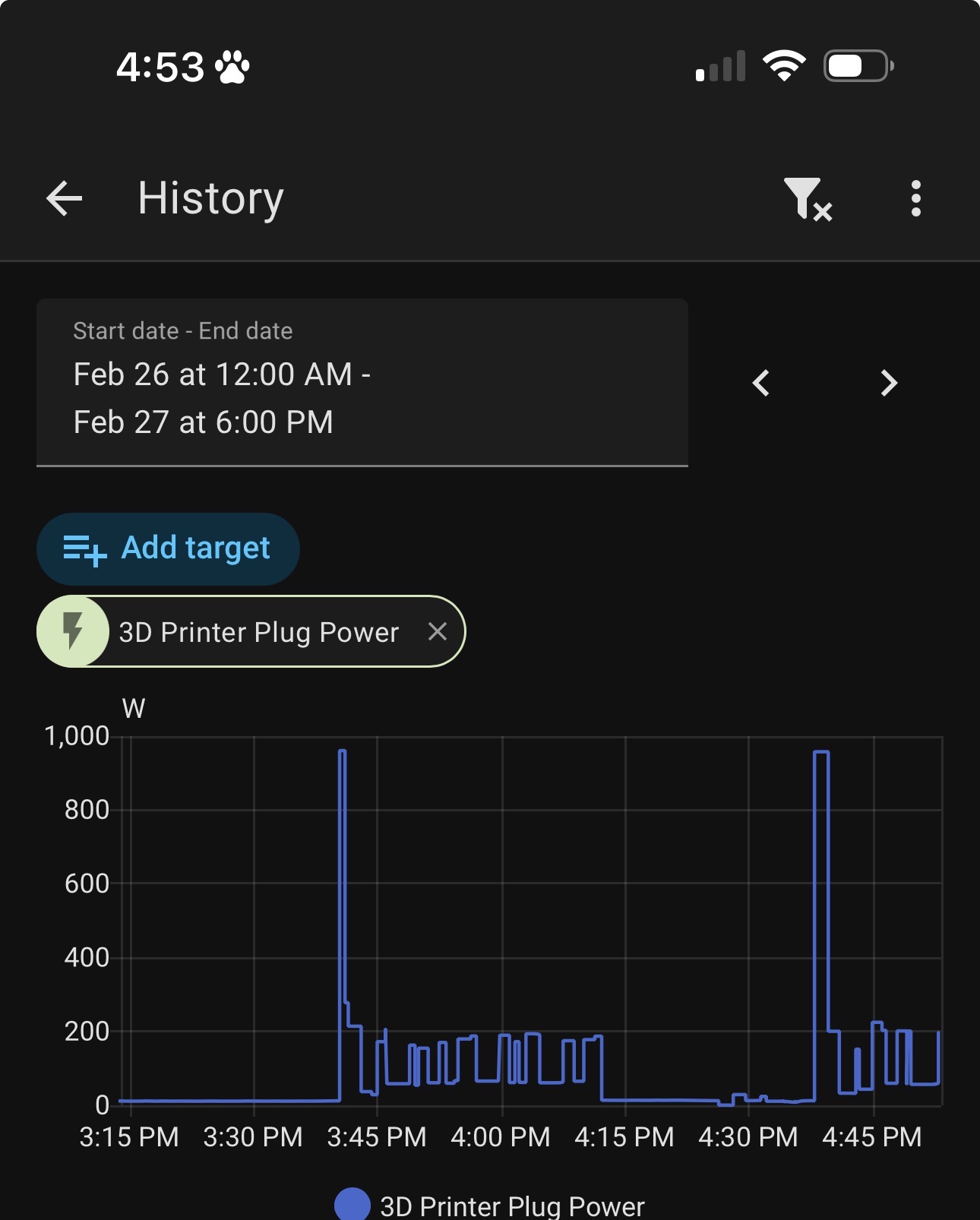
Unfortunately, in most homes you have what you have. I had 2 extra 20 amp circuits pulled into my shop when I built it, but my 3D printer is on the other side of the room and there is no way to switch things around. With the P1S this wasn’t an issue, but in case anyone is wondering, the most recent P2S firmware update didn’t change anything as the below image shows. The spikes you see are two back to back prints, before and after the firmware update.
I did finally bite the bullet and spent another 240.00 for a 1000W UPS and tested that today with no more screaming UPS errors when the printer initiates. That’s a good thing.
I still hope BL does something about that 8 second spike so I can get a second printer on that circuit. Bambu, are you listening?
They may not be able to do much, it’s a line level heater and even if it pulses on and off it’s a high resistive load. Staggering start times will help reduce constant load, but I personally would never trust that because workflows and automations can surprise you.
Not sure what the resolution is on your outlet in HA but it does aggregate data. Live monitoring in emporia vue 32 circuit monitor surprised me when I started some ASA prints on an H2D as it was showing the load higher longer than HA reported.
Excuse me - Late to this thread
I thought the reason behind the high initial power surge was because the machinetry to get everything to running temp quickly. That way you don’t have to wait too long for it to warm up, before you start printing. One of the reasons behind it is because that is what they believe most average customers want, switch on and start printing as quick as possible, which would also explain why the H-series has a low power option built in. Pro users are more bothered about power usage and have multi printer set-ups.
Interesting to hear someone say that the power drain from a plug outlet affects thier lighting, not sure that would happen in the UK due to the regulations here (might be wrong).
The print time is the same from P1S to P2S, so the high current draw at startup does not improve print speed. Other than causing a high current spike I can not determine any benefit at all.
Having the same issue with my PSU being overloaded. Also would like to add a second P2S to my room ASAP, but until Bambu adds a low power mode I’m holding off.