Very excited for this! Was about to buy the AMS 2 for my P1S right before this was announced, glad I waited
Maybe when the X2C releases, the X1C will be the same price as the P2S or possibly lower.
I’m placing my bets on the fact the X2C is compatible with the vortek hotend change system, meaning that its going to release after the H2C releases.
Also, crazy thing if this is true
P2S is a smaller H2S
X2C is a smaller H2C
Bambu is essentially creating budget-friendly versions of their flagship H2 series just by revamping their older models. This sounds like the most logical thing Bambu is doing at the moment with the 2nd generation printers.
Very good to know! I would have assumed a Hub was needed
I’ve gone through the numerous post on Buffers, Hubs etc but it is still not clear to me.
I have an P2S Combo (with 2-in-1 Buffer). In addition to the AMS 2 Pro I also want to buy (and hopefully connect) an AMS HT. And, I still want to be able to connect an external spool.
So,
- P2S Combo
- 2-in-1 Buffer
- AMS 2 Pro
plus
- 4-in-1 PFTE Adapter
want to buy and connect
- AMS HT
and retain at least one (1) external spool.
- What is the preferred way of connection this?
- What do I need to buy in addition to actual AMS HT?
Thank you for you help.
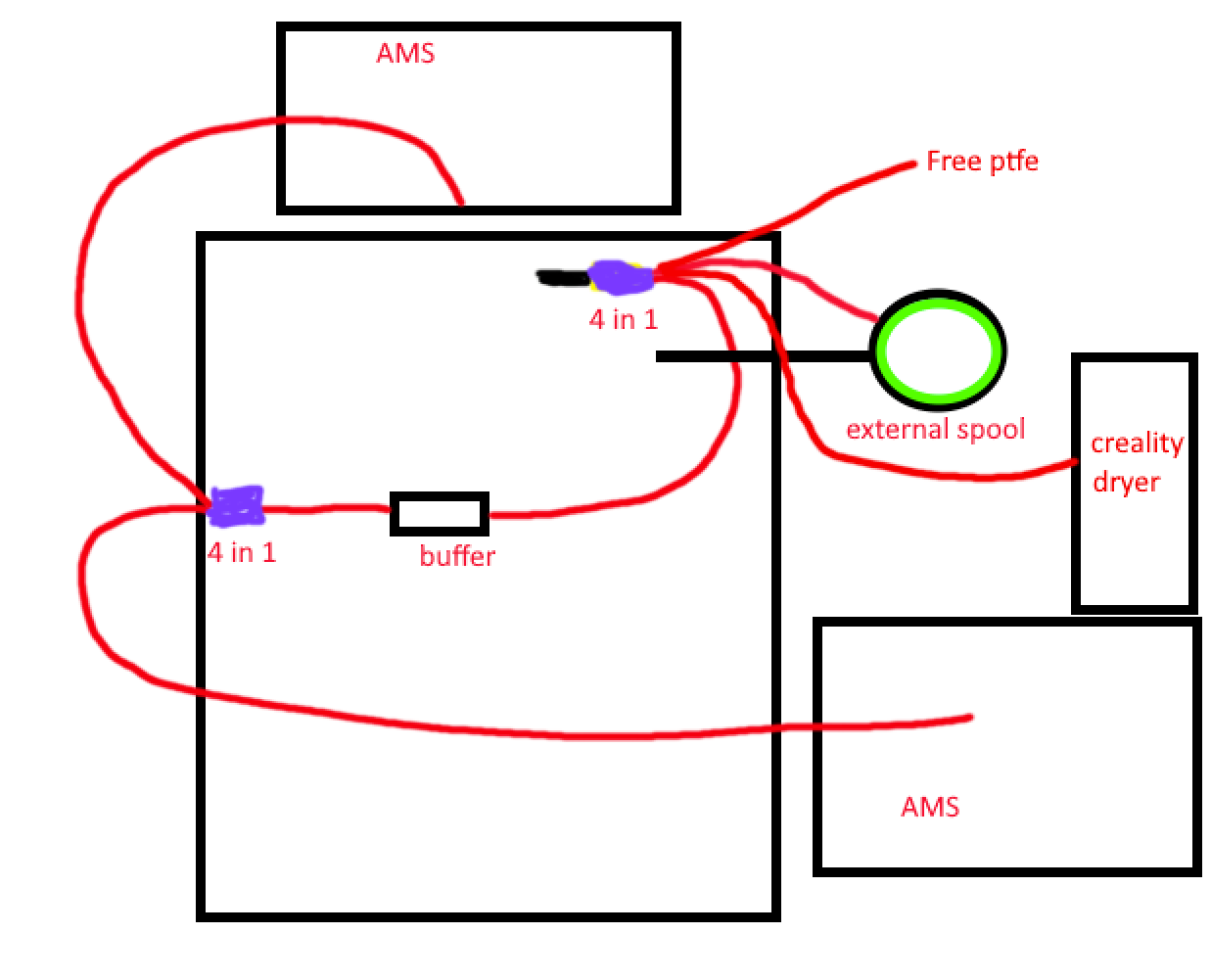
TLDR;
Thank you but I’m not sure that that is correct for the P2S. P1S and P2S seem to differ from what I’ve read this thread.
This is my idea of how I should connect everything.
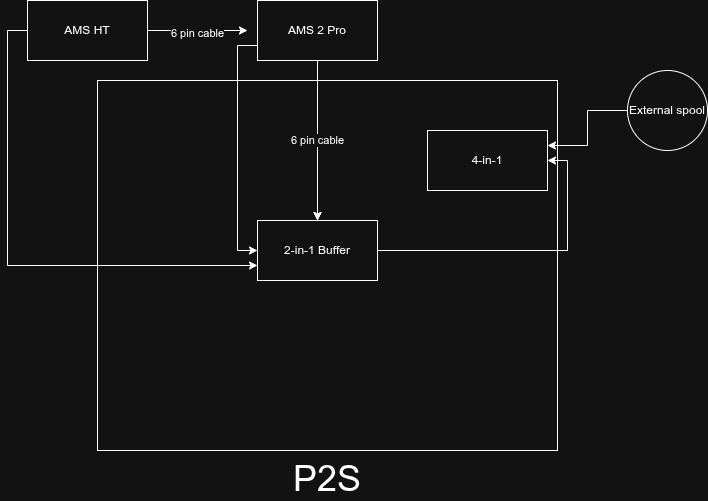
Which mean I could just buy the standard AMS HT.
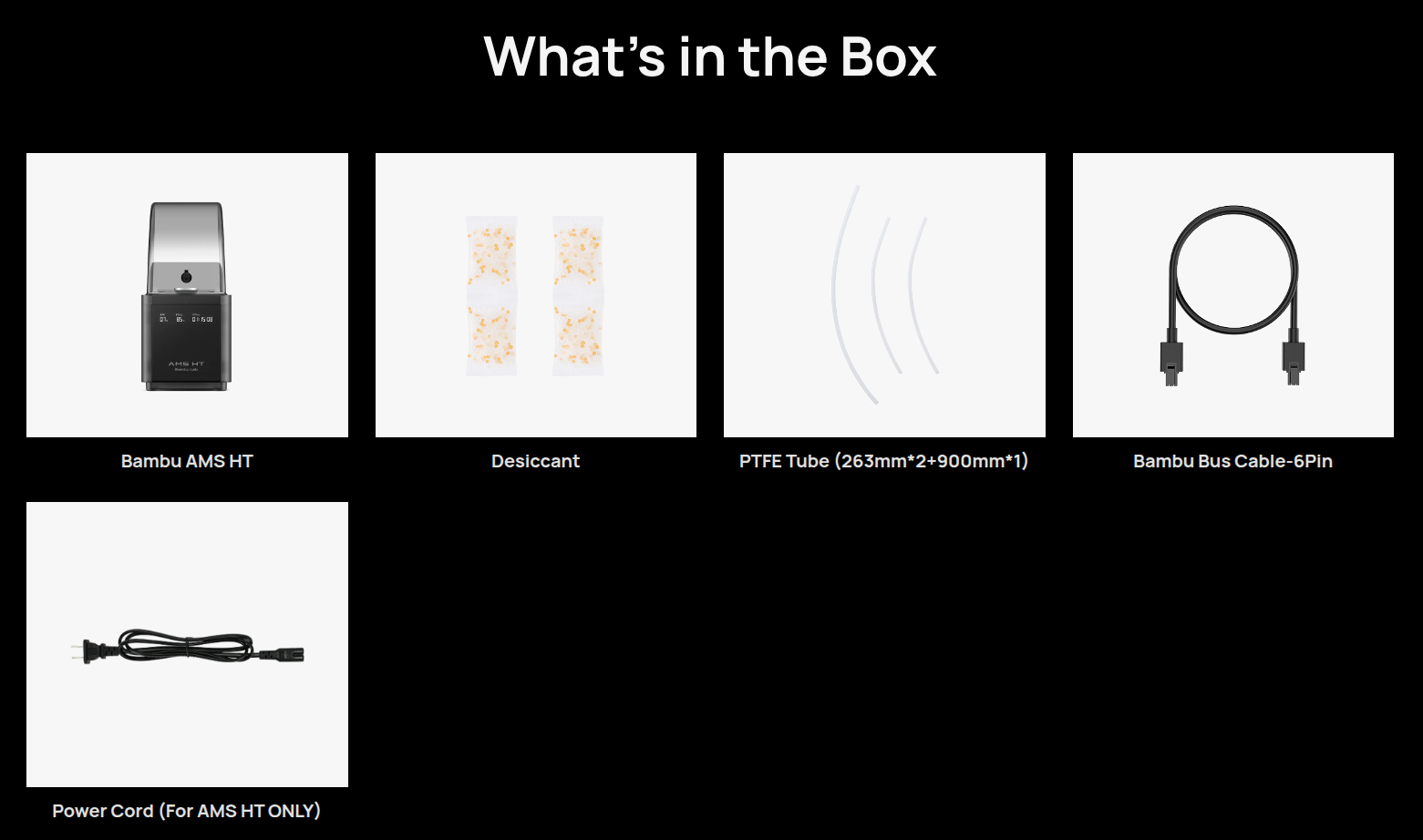
Long version:
I have a P2S Combo (AMS 2 Pro) with a 2-in-1 Buffer.
I’m reading the instructions for the AMS HT and P2S, but I can’t make sense of them. In addition, I want to connect a 4-in-1 PTFE Adapter for external filament.
“If only connecting one AMS HT to X1/P2/P1/A series printer, the PTFE tube coupler, 4-pin cable and Filament Buffer are required. If connecting multiple AMS HT units, we recommend that you purchase an AMS Hub.”
As far as I know, there’s supposed to be a 6-pin cable between AMS units.
Here’s what I was planning to connect — will this work?
Buffer:
- Input 1: AMS 2 Pro
- Input 2: AMS HT
4-in-1 PTFE Adapter:
- Input 1: Buffer
- Inputs 2–4: external
Will this work?
Reading the FAQ now:
“Q: Why does the buffer have two filament inlets, and what are their functions?
A: The buffer is equipped with two filament inlets, which offer the following advantages:
• Support for dual AMS connection: Two AMS units can be connected simultaneously.
• Flexible switching between AMS and external spool: When using an external spool for filament feeding, there is no need to remove the PTFE tube from the chamber inlet (as required for the X1/P1 series); quick switching can be achieved directly within the buffer.”
The buffer has two inputs, and you have one external input.
If you only need the following (from your original list), then you have all you need:
- AMS 2 Pro
- AMS HT
- External Access
Connect as follows:
- Buffer A: AMS 2 Pro
- Buffer B: AMS HT
- External: Whatever

If you wish to add more choices, you could add a 4-in-1 adapter to the Buffer (A or B, as it doesn’t matter) and another to the external connection.
- Buffer A: 4-in-1 adapter
- AMS 2 Pro
- Future choice
- Future choice
- Future choice
- Buffer B: AMS HT
- External: 4-in-1 adapter
- TPU 95A
- Exotic filament
- Future choice
- Future choice
Connecting the cables is easy. Connect the first one to the printer via either buffer socket (ONLY one, the second is for future features or time-lapse), then connect to the AMS, from the AMS to the next AMS until you have daisy-chained each AMS you have connected.
Example 1:
- P2S to AMS 2 Pro
- AMS 2 Pro to AMS HT
Example 2:
- P2S to AMS 2 Pro A
- AMS 2 Pro A to AMS 2 Pro B
- AMS 2 Pro B to AMS 2 Pro C
- AMS 2 Pro C to AMS HT
Still no price or release date… @BambuLab will it be before December?
(PT-BR)Prezados, como estão? Acompanho e estudo a P1S única e exclusivamente por hobby desde o início do ano e agora, quando estava prestes a comprá-la, lançaram a P2S. Estou muito ansioso para saber quando a P2S chega ao Brasil. Alguém tem ideia de data e preço?
(EN-US)Dear all, how are you? I’ve been following and studying the P1S purely as a hobby since the beginning of the year, and just when I was about to buy it, they released the P2S. Now I’m really excited and wondering when the P2S will arrive in Brazil. Does anyone have any idea about the release date and price?
@MalcTheOracle You sure?
How do you feed the filament from the buffer to the toolhead?
…and one output that goes (more or less) straight to the printer inlet (upper right corner on your picture)
Wouldn’t it rather be like this?
- AMS2 → Buffer A inlet
- AMS HT → Buffer B inlet
- Buffer Outlet → 4-in-1-Adapter inlet (1, 2, 3, 4)
- External Spool → 4-in-1-Adapter inlet (1, 2, 3, 4)
- 4-in-1-Adapter outlet → Printer inlet (not “External”)
Just the way @xsynatic has drawn it.
(Picture from the wiki)
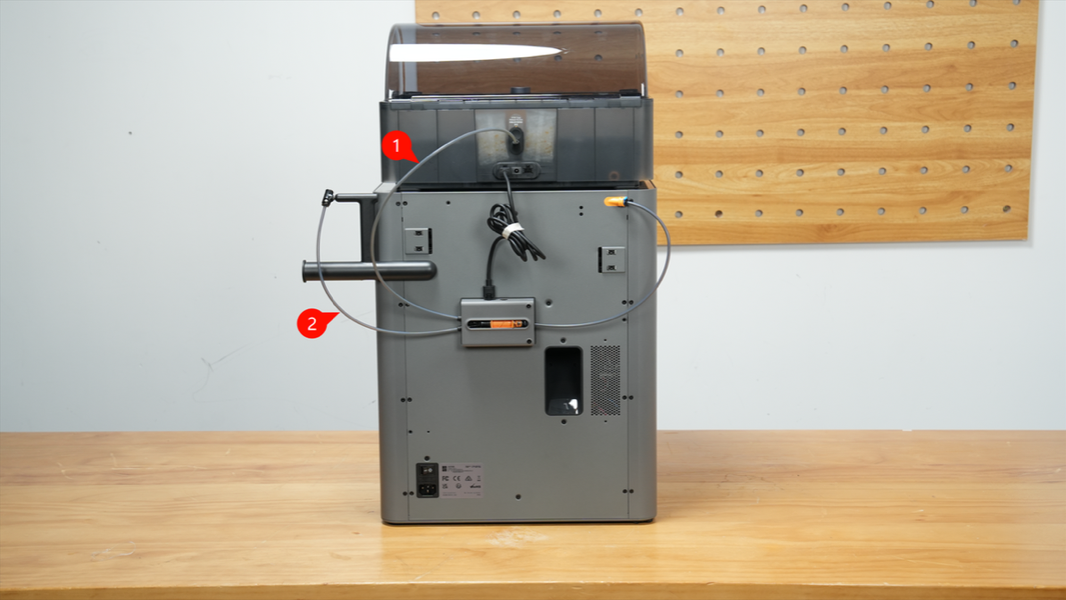
One can, of course, create a more sophisticated variant for future enhancements:
AMS2 (1), future AMS2 2…4 → 4-in-1-Adapter[A] inlet (1…4) → Adapter[A] outlet → Buffer A inlet
AMS HT (1), future AMS HT 2…4 → 4-in-1-Adapter[B] inlet (1…4) → Adapter[B] outlet → Buffer B inlet
Buffer outlet → 4-in-1-Adapter[C] inlet (1…4)
External spool → 4-in-1-Adapter[C] inlet (1…4)
sth. completely different → 4-in-1-Adapter[C] inlet (1…4)
sth. truly unexpected → 4-in-1-Adapter[C] inlet (1…4)
Adapter[C] outlet → Printer inlet
data wire wise a bit of a nightmare (at least when it comes to cable lengths), but it’s all in the wiki: (P2S FAQ | Bambu Lab Wiki)
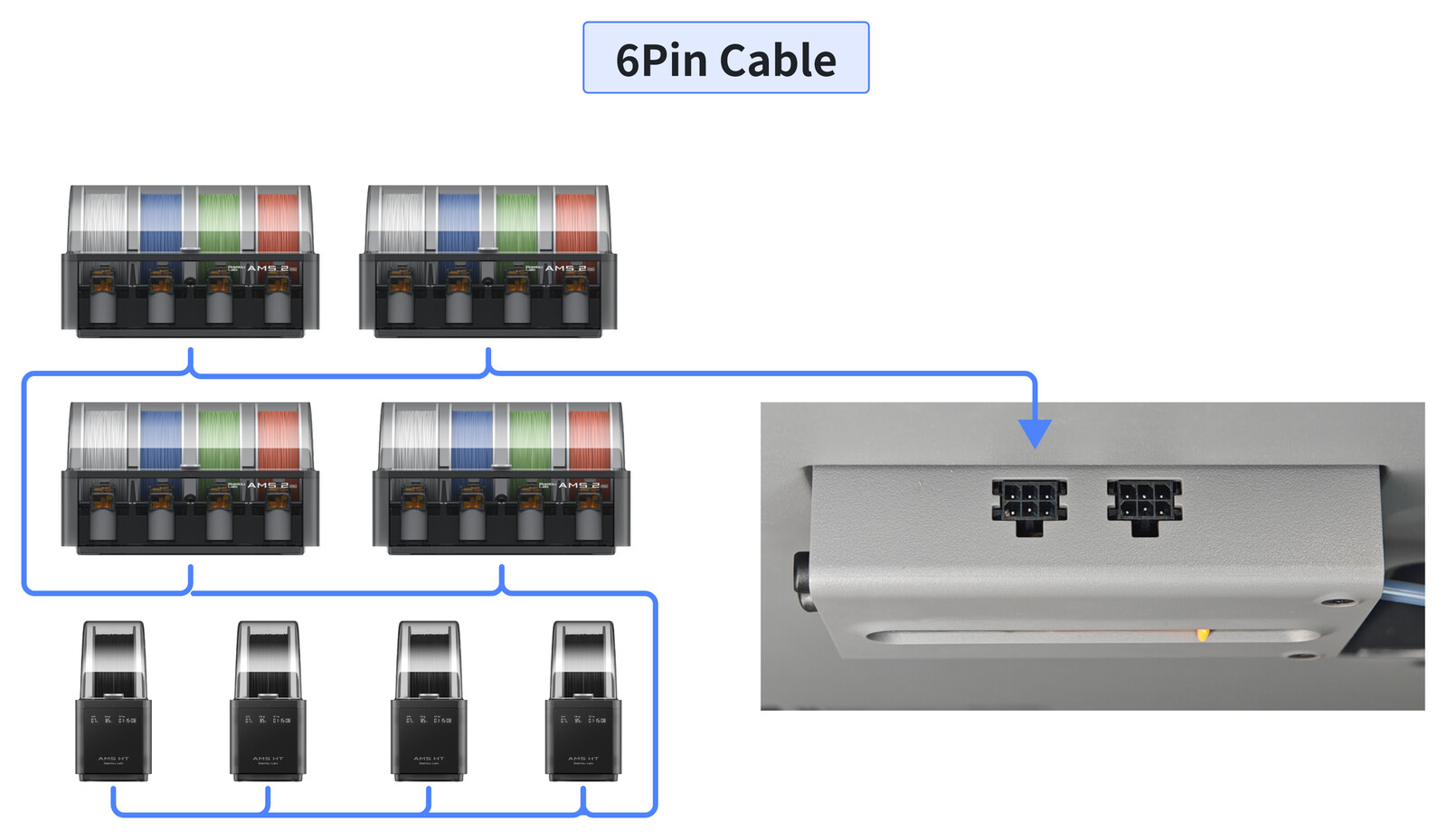

Nowhere it says “do refrain from connecting a third 4-in-1-Adapter between Buffer outlet and Printer inlet”…
Been there, done that
I printed with PLA+, but fitting the lid on the box was a nightmare. I think I should print with a more flexible material. Design is awesome, but the lid just broke while snapping in.
The hinge design he uses is very hard to get right. You need to reprint it in PETG. Layer adhesion is the deciding factor, although that design needs more layers for it to actually adhere. Its been optimized for speed too much.
Let me guess. It broke in a straight line parallel to the edge of the case on the back? It is a repeated area that really needed reinforcement.
Does anyone know of a company that sells refurbished P2S printers?
I do not, but you may help your quest if you state which country you are based as the forum has people from all countries, most of which may not be of help to you.
If you are in the US.
Microcenter occasionally has great deals on open box printers. Although they are almost never combos.
Great machine. I’ve had it for a week and have no complaints.
Same here! i’m in love with it