About 10 years ago I saw a semi automatic router that could trace a pattern by scanning easly printable dominos-like signes that you glue on material. Cant remember how it was called but maybe it is this method only improved?
This may be the base plate for when you are engraving. The markers will help establish the positioning of the material for the Live Spatial Alignment.
you were right! good thinking!
Reminds me of

Or

But with a pattern of bed plate markers. Maybe to show multiple capabilities in 1 ad
@jetpad has the right idea, i think
Yes, we all know…
H2D Features & Specifications
AI Powered Safe Start
Peace of mind, every time you print
H2D’s vision system initiates a comprehensive pre-flight checklist before each print cycle:
- Chamber Integrity Scan: Detects debris across the print surface.
- Hardware Configuration Audit: Instantly identifies nozzle dimensions and build plate properties.
- Digital-Physical Alignment: Verifies consistency between detected hardware specifications and active slicer parameters.
Comprehensive Filament Monitoring
State of the Art Filament Monitoring
Unlike legacy systems that rely on a single filament run-out detector, H2D features a complete material flow system with 15 strategically placed sensors. These sensors track five critical dimensions along the AMS-to-nozzle journey:
- Feeding velocity
- Tension fluctuations
- Filament tip localization
- Thermal environment in the extruder
- Dynamic extrusion pressure
This creates an intelligent monitoring web for precise filament control.
Multi-material Printing
Combine rigid and flexible materials
Create innovative designs by pairing high-performance materials with standard ones. This setup allows the creation of interlocking structures and reduces costs by using premium materials only where necessary.
Support Printing
Print with support has never been easier. With H2D’s dual-nozzle setup, one nozzle can be dedicated to support material, ensuring secured prints and a perfect support interface.
Enhanced Multi-color Printing
Efficient Multi-color Printing
Dual-nozzle printing reduces purge cycles in multi-color prints. H2D’s smart algorithms maximize filament use and minimize time and material waste.
Laser & Cutting Modules
-
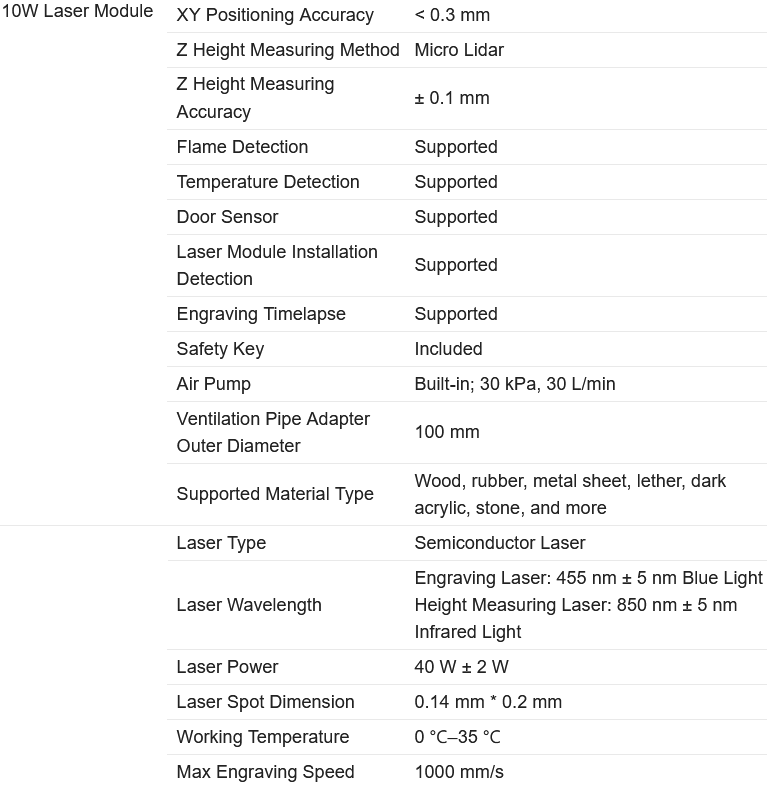
10W & 40W Laser Modules: Both modules support engraving and cutting with the following differences:
- Maximum Cutting Thickness:
- 10W: 5mm
- 40W: 15mm
- Maximum Engraving Speed:
- 10W: 400mm/s
- 40W: 1000mm/s
- Processable Area:
- 10W: X310mm * Y270mm, Max Height: 280mm
- 40W: X310mm * Y250mm, Max Height: 265mm
- Maximum Cutting Thickness:
-
Cutting and Foiling: Versatile blades for precise cutting and foiling tasks.
Laser Safety & Protection
- Laser modules come with protective windows and a safety system to prevent accidents during engraving or cutting.
Full Auto Calibration
One tap initiates laser focus verification and material recognition, eliminating manual adjustments and ensuring precise material thickness configuration and positioning.
Specifications & Compatibility
AMS System
- Maximum Supported AMS Units:
H2D supports up to 4 AMS 2 Pro and 8 AMS HT units (12 total units with 24 slots).
With dual-hotend configuration, this allows for up to 25 color prints in extreme cases.
Hotend Compatibility
- The H2D’s left and right hotends are identical, making them interchangeable for optimal flexibility.
- H2D hotends are optimized for H2D printers with better flow rates and clog prevention. Using A1 series hotends on H2D is not recommended for best print quality, although they can be used with the necessary silicone sock.
USB Storage & Usage
- The H2D does not come with a standard USB flash drive, but it does feature built-in storage to run print files.
- Without a USB, several functions are limited:
- Recording and time-lapse photography cannot be activated.
- Printing via LAN is disabled.
- Print files cannot be sent via studio to storage.
- Log files cannot be exported.
USB Requirements: USB2.0 or above (write speed > 10MB/s), supporting FAT32 and exFAT formats.
Upgrades & Expansion
Laser Upgrade Kit
- The H2D laser full combo comes pre-installed with an air pump and BirdsEye camera. The laser protection includes the front door, side windows, and top cover.
- Non-laser H2D versions can be upgraded to the laser edition in June, with a kit that includes:
- External air pump
- Laser module
- Cutting module
- Smoke exhaust pipe and adapter
- Emergency stop button
Answered Questions
-
Can the H2D be upgraded to the Laser Edition?
Yes, with a laser upgrade kit, which will be released in June. -
What is the maximum number of AMS units H2D supports?
The H2D can support up to 12 units (4 AMS 2 Pro, 8 AMS HT), allowing up to 25 colors. -
Is H2D compatible with first-generation AMS?
Yes, with full plug-and-play compatibility, though the AMS drying function is not supported. -
Why can’t I freely select hotends for built-in models?
The hotend is predetermined during slicing. You can choose the hotend when slicing files in Bambu Studio, allowing you to select either the left or right hotend for the print.
(take this with a grain of salt as it’s AI, but it’s basically all confirmed.)
where did you find this, through AI?
Human-cleaned and AI-summarized based on files shared by other people (my computer didn’t have the leak bc they removed it  )
)
Does anyone with laser cutter/engraver experience know - if you went with the lower power laser, could it cut thicker material than what is stated if you did it in multiple passes? If speed is not a top priority, could you do everything with the 10 watt laser that can be done with the 40 watt one?
No, there is a limit to how much a 10w laser can cut, even with a 20w. if you are cutting thicker material you have to have a more powerful laser
Also, if you keep on making passes, it just scorches the wood and sometimes starts it on fire
Makes sense because you wont be able to set material at x0, y0. Because the head would hit the aux fan. Youll have to set the material in the center of the bed. This thing will find its position and align the sliced project to it or whatever its called for laser etching. Something for the laser folks, it seems
.3mm is not accurate for an actual 3d scanner though
maybe you can put any model inside the build volume… and scan it with the laser… after that you can put it out and print the part… so it would be a scanner and printer in one!!
Like a “paper printer” which duplicates the page you lay on top of it
Maybe 2d designs at .3mm resolution. Not sure how it would scan the sides of a 3d object. It would need a turn table and a side mounted scanner on a vertical rail. Slowly raising and lowering as the part spins. Also a far superior sensor. This looks like lidar 2.0.
Because of the design if the printer, they would have to use something to “find” the material to be etched. Because you cant set it in the corner of the bed.
This was probably an expensive way of being able to use a laser in a 3d printer. compromise of $. They could have made the chamber wider which would have given you the whole 350mm x axis and x0y0 alignment stops. But this way they can advertise 350mm in a small package. Its like the smaller 256mm printers with exclusion zones. only 25mm of each side of the bed is an exclusion zone for the laser and when using both nozzles. Maybe slightly less for the laser, but then the laser probably loses some y axis near the back of the bed(it mounts to the front center of the toolhead)
You could make a combination of laser scan from the top, or one side, than with 2 cameras from different angles it should be possible for an AI to generate a 3D model.
The AI programm takes the messurements from a part of the laser plus the pictures from the cameras and generates an 3D model with that.
2 cameras plus a Laserscanner from one side and it would work. The programming and learning for the AI would take years so get at least some decent results.
But you could do the combination if you take an existing AI programm thats builds a 3D model from a picture.
Do i think Bambu labs does that with the laser?
No chance… absolut unlikely. No way. So much trouble just for a simple 3D file that is not accurate and mostly extrapolation.
Exactly. I have a 40W (Xtool S1) and it does fine for some stuff but it has it’s limits. I can get through 1/2" wood but I wouldn’t chance that at all inside of a 3D printer. Also, diode lasers have a lot of limits with acrylic too. Black acrylic is fine but other colors can be a challenge or impossible. I got a P2S for cutting (wood/acrylic/etc.) and some other tasks. The S1 is still great for engraving and using the rotary tool (which I don’t see how Bambu could incorporate here) which still make it useful but it’s has a lot more usable space.
Also, the fumes/residue that collect in a laser, even with good exhaust, is more than I’d want in my 3D printer.
On top of all of that, a diode laser really cannot engrave on printed stuff. It just melts.
True. The Snapmaker A350T is amazing from what I can see and honestly I don’t know why I didn’t get one yet. It has everything (okay, 3-in-1 anyway). At the time I started with 3d anything, I was using AnyCubic Vyper… which to me I felt was great. Auto leveling bed ftw…  Well, not so much anymore. Times have sure changed quickly.
The competition is fierce and I must say it is riveting. Hopefully the fine companies that build these machines stay true to the quality and not let greed take them in the wrong direction of less for more.
Looks like a big pixelated Bambu Lab logo to me, so the squares between the calibration markers are decorative
@PowerPrinter Did you ever unblur the pic for the 24th?
