Weird Filament Issue

Hello community! I just ran across an issue that has me stumped. I’m hoping someone has some insight to my issue.

I have a roll of matte green PLA from Sunlu that I have used many times. There is about half of a roll left. I decided that I wanted to print something today, using that roll of filament. Admittedly, all of my PLA has been sitting out, for up to two months, this roll included. I put this roll into my AMS, found the model that I wanted to print, and hit go. I changed no setting all at. I used the same exact settings that has given me perfect prints this entire time. My P2S went through its process, everything was good, printed the calibration line with no problem, moved to the print position, and everything went downhill from there. Very little filament extruded, and the filament that did extrude, either blobbed right away, or just drug itself around the print bed. NOTHING was sticking. I thought great, dirty bed. I cleaned the heck out of it, both sides, resliced the model, and same results, failed from the start. I did this 3 more times with the same results. The calibration line prints perfect every time. My settings were heat bed at 55c (I also tried bumping this up to 65c at a few points during my test), nozzle at 220c, again, these are the settings that I have been using for months, I have used no other settings for PLA.

I thought maybe this was a bad profile. I printed the benchy that was preloaded on my machine, and same issue, failed from the start. I have printed this same exact benchy file dozens of times, not problems, until now. Great, moist filament. I dried this roll, along with 3 others for about 4 hours (I know, not long enough) and decided to try again. The model again failed, along with the benchy. I was lost.

I decided to try to print that same benchy with a different color PLA, and it printed no problem at all! No bed adhesion issues whatsoever. I then attempted to print the original file with this new color, and again, no issue! I have narrowed it down to this specific roll of matte green PLA.

I left for a few hours, and kept that green roll in my AMS. I came home and gave it one more try. I loaded up the original file that failed me so many times, and it printed JUST FINE with that same roll of matte green PLA that has failed me over and over today. I have absolutely no idea what the issues is. I figured maybe it was moist filament, but it even failed AFTER drying. The only time it finally worked was AFTER I ran that other color through my machine when I was testing the print file and the benchy.

Could I have inadvertently fixed something by running a different filament through my machine between the green failures and the green success? I’m still lost as to why the green failed all day until now. HELP!

I guess I spoke to soon. I was able to successfully print the original part in the green filament, but then I went and tried to print the benchy that I have printed many times, and boom, it failed…again. It looks to have been about 25% completed and then spaghetti everywhere. The benchy was pulled from the bed and drug around the build plate.

I decided to attempt a totally different model, in a totally different color. Now this print failed on the first layer, as did the green color. Different colors, different print, same result. The filament extruded, but didnt stick to the plate.

is it at all possible that my build plate is bad? Ive thoroughly washed it several times with soap and water, never used IPA, im at a total loss, and about to pack this machine up and sell it. Is it possible that my p2s is reporting an incorrect bed temperature? Please help!

If at first you don’t succeed, Dry, Dry again! :wink:

6 Likes

I also thought drying was the issue, but like I mentioned, the green failed miserably yesterday, and then out of nowhere, it magically started to work. The failure and the successful print were both after drying.

Here’s another update. I tried to print the benchy again using the troublesome green filament, and it came out great. No failures, at all.

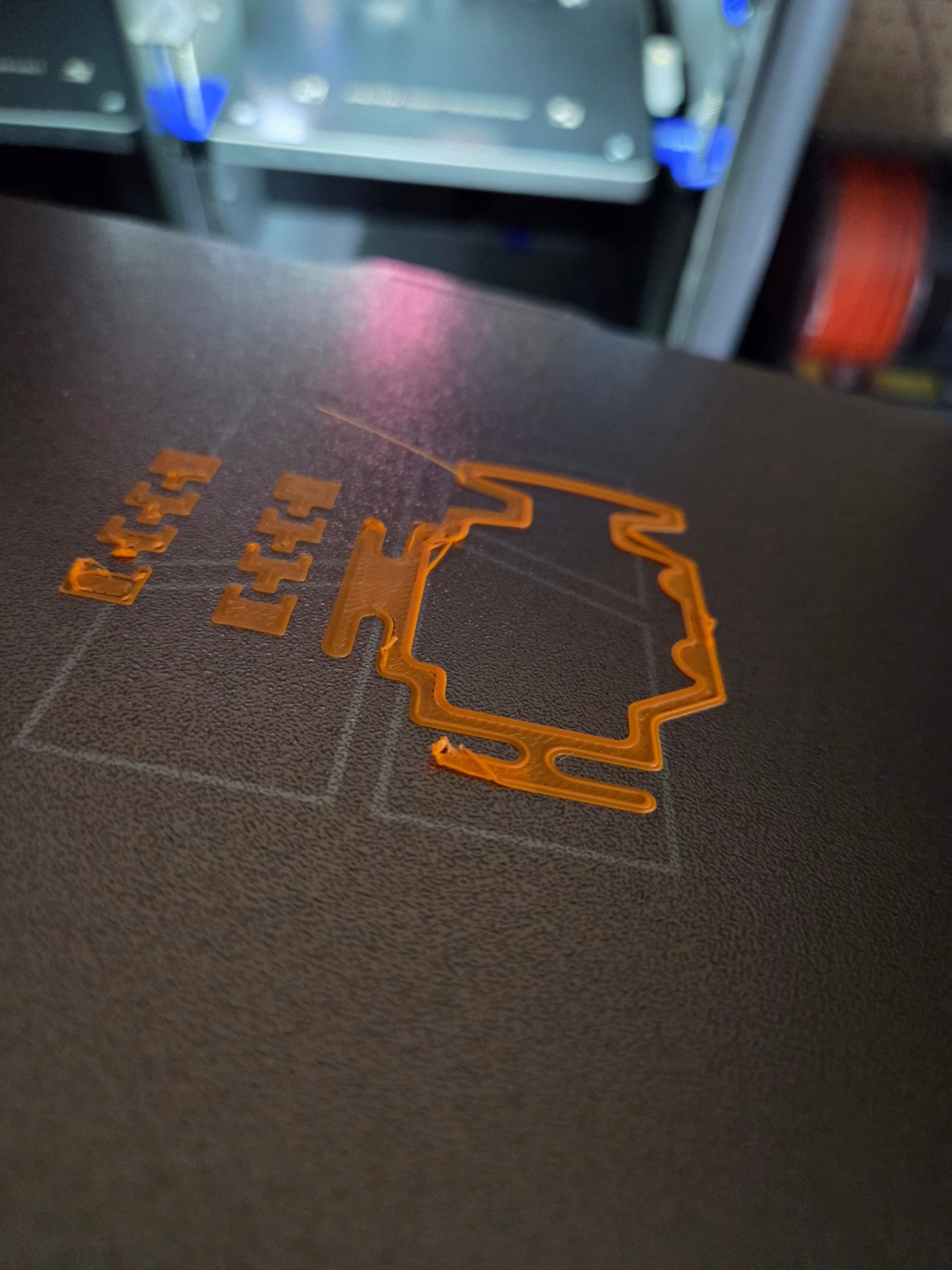
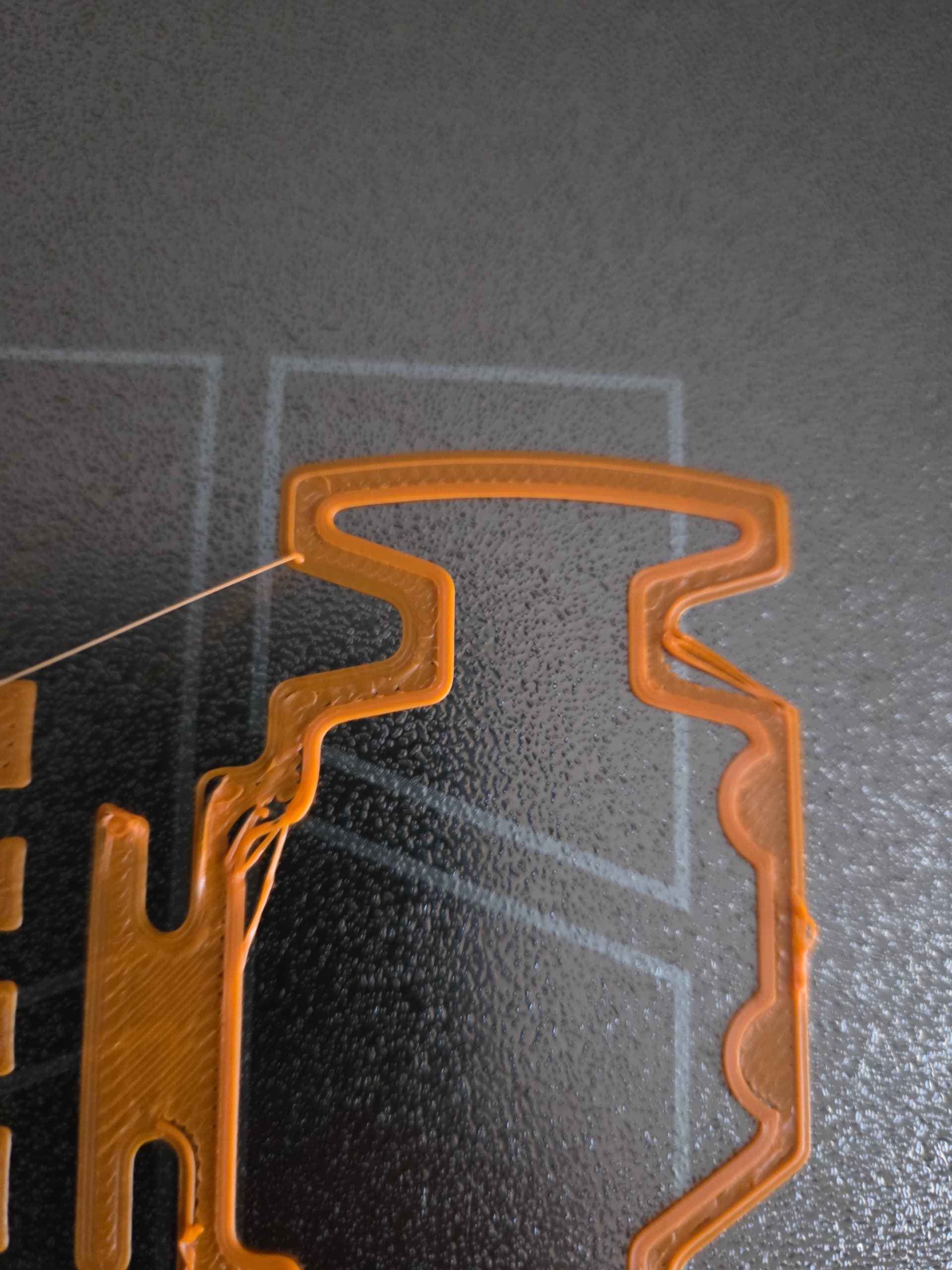
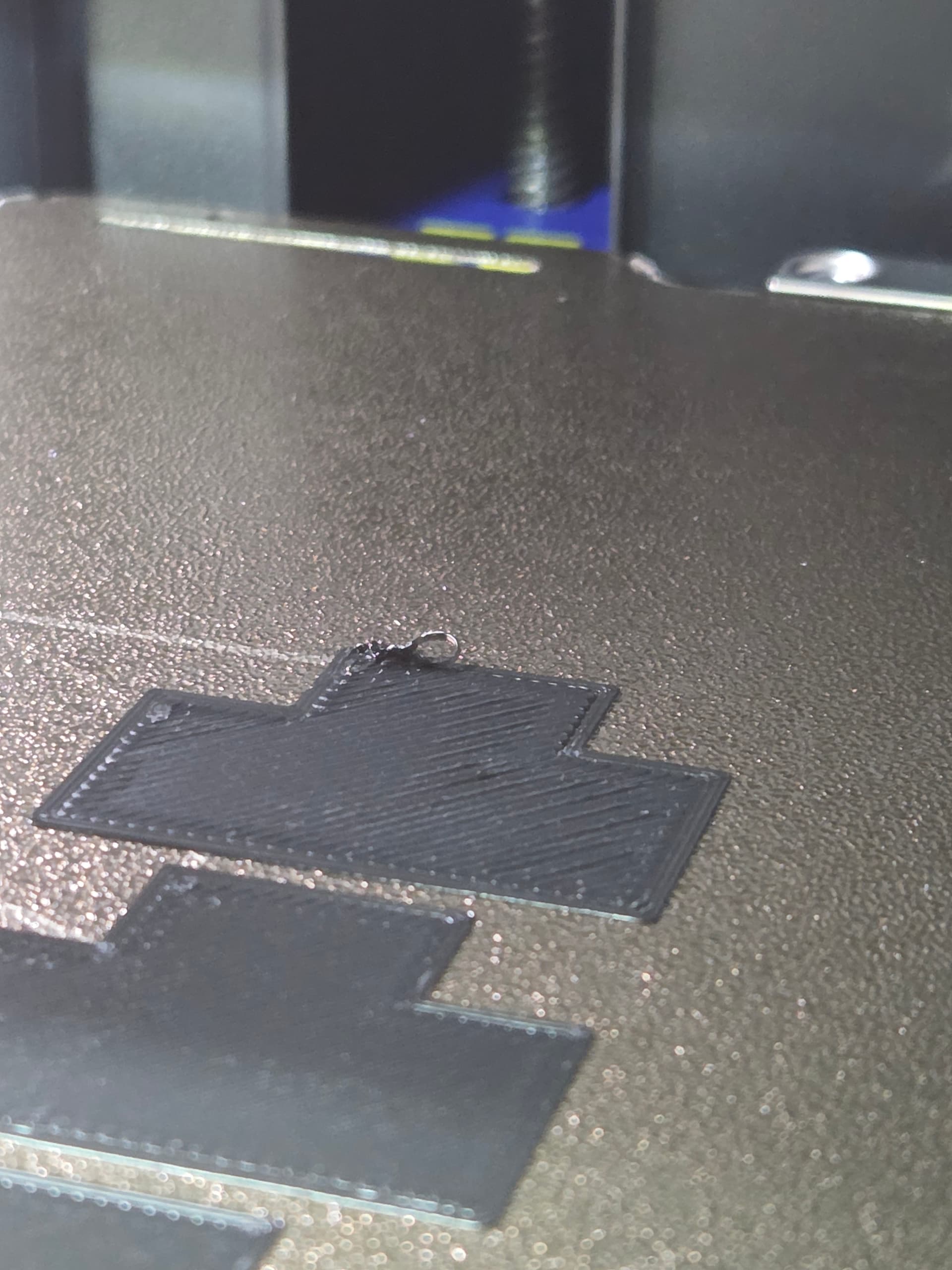
I then tried to print something else using a different filament, and had the same exact first layer failures that I had with the green filament. I grabbed a few pictures this time. Again, this is a clean plate, dried filament (PLA) and no settings have been changed since day 1. The calibration line always comes out perfectly. While watching in person, as soon as the filament leaves the nozzle, it is being drug around the build plate. It will adhere in some places, and not in others. Pleaseeeeee help!

Just wondering if you have a partial nozzle clog? I’ve had to sort my nozzle out a couple of time since I got the P2S in December last year, its only happened with PLA! I put it down to my PLA being a few years old, left over from my first foray into these fun and games…

I have actually performed 2 cold pulls and they both came out clean as a whistle. I was hoping it was as easy as a nozzle clog. I have also removed the heating element, checked the 3 screws on the front and the 4 behind those to verify that they were tight, and they were.

1 Like

How did you clean your build plate? Please be specific.

2 Likes

I remove the build plate from the P2S, take it to the sink, put dish soap on the plate, I use one of those double sided sponges, and with the rough side, I scrub both sides of the plate, pretty vigorously. I do not take it easy on the plate when cleaning it. I then use a microfiber rag, to dry the plate. I make sure my bare hands/fingers do not touch the plate at all during this time. I have also let the plate air dry before, but I still get the same print results.

2 Likes

Lol. Well done.

Only potential issue is if your rags go in the dryer - fabric softener sheets can and do contaminate rags, which transfers onto build plates. I use paper towel only to avoid this.

2 Likes

Already ahead of you on that one! I stopped using dryer sheets long ago, as they are not good for the sensors in these new high tech clothes dryers. Also, I have let my plates air dry to rule this out.

2 Likes

Alright, I’m stumped. Good job on having excellent plate cleaning technique though!

Another update. I tried a totally different print file, with a totally different filament that I have not used during this test.

I had to stop the print on layer 4 because I literally watched the print curl off of the build plate, and the nozzle grabbed it and drug the piece around. I removed the plate and snapped a couple more pictures of the pieces curling off of the plate. If I wouldn’t have stopped the print, they would have been grabbed by the nozzle also. Please see those pictures below.

Just before this, I had a successful print, using a filament that I have not previously tested. This is the same object that I tried to print using the orange filament in my previous post. This time, the print in this blue filament came out great. See below.

Both of these, the purple and bluish-grey filaments have been used in successful prints in the past.

Flip that purple fail-to-stick over and take a pic of its underside. Perhaps your machine isn’t leveling well repeatedly, and checking first layer squish can help see that.

Any modifications to your printer? Custom startup gcodes? Hard to tell from the progress, but that isn’t grid infill type, right? [grid will add to the problem of poor adhesion since it strikes itself]

Is your filament set to no fan for first 1 layer or first 3? if at 3, and on layer 4 you get peeling, maybe its too long without the fan

You mentioned your cleaning regimen and it seems ok to me but yet here we are with what really looks like… Perhaps somethings being overlooked. Try a dedicated Non-food scrubber? Follow up with a spritz of isopropyl + thorough wipe? Grasping at straws. Some people even sandpaper their surface if they suspect the plate is wearing out [i do not recommend, p2s couldnt have seen enough life]

@Bullocks Here is a picture of the underside of the failed purple print, and the underside of its prime tower.

I am using the “generic pla" print profile from Bambu Studio, which I have been using religiously since day 1, with dozens of successful prints. The cooling fan is set to 40% for the 1st layer by default. I do not have any modifications to the gcode or anything like that. Fully stock profiles. I have also tried a new, unused sponge to clean my print bed.

Hey everyone, I did some tinkering and actually got two items to print. See below.

These prints were prints that previously failed on the first layer, from sever warping, which is totally new to my machine. Reminder, I have about 500 hours on my machine, and this is the first time I have have these issues. I had to create a custom print profile to get these to print. The major modifications I had to make where:

0% part fan for first 4 layers

Max part fan speed 70%

Once I made those changes, the prints were successful. This totally goes against what PLA should do. The preset profile had 100% fan speed after the first layer. Once that fan kicked on during layer 2, I saw immediate warping on the edge of my prints, which caused the failures. PLA benefits from cooling, right? The way my custom profile is set up, the PLA is extremely warm for the first 4 layers. I thought all was well, and then I had this failure, that is pictured below. I took this picture moments before it was pulled from the bed by the nozzle. You can literally see the warping of the part. This part was printed with my custom profile, which has the cooling fan off for the first 4 layers.

The only thing that has changed is the physical location of my printer. How can my printers physical location make my printer totally unreliable? I have ran calibrations numerous times since being placed in the new location. I have read that since the temperature seems to be the issue here, that I may need to look at nozzle cooling or some sensor that is related to the temperature of the nozzle.

I am at a total loss again, as this temperature issue seems to go against how PLA should be printed. I also don’t understand how after 2 successful prints with my custom profile, I get a failed print again, with the same symptoms as before. Please remember that in the first 500 hours, my P2S was a workhorse and performed absolutely flawlessly. It was literally overnight and bam, nothing is working with this thing. Please help!

I also tried to do the flow rate calibration with my custom profile. It failed. See pictures below.

The picture below shows what happens when I run the flow rate calibration with the generic pla profile that I have used for the past almost 500 hours. Failure again!

I cant even run basic calibrations anymore!

1 Like

I guess no one else has advice or input?

A few things. Moisture in filament can be tricky if you are near a threshold. One guy here discovered a day in an AMS was enough to remove just enough moisture to print properly. Normally a desiccant-style AMS doesn’t remove much water and is a terrible drying method, but he was close to the edge and the drying it could do moved him into “prints ok” territory.

The point is that small changes in filament moisture can make significant changes in print quality if you happen to be close to- and it sounds like you are.

About printing the calibration line working but not the model - another thing that affects how well plastic extrudes is print speed. On my printer that calibration line is printed slow after the extruder has had time to basically dry the molten filament in it. Slowing print speed seems to always give more headroom probably because the filament isn’t being fed so fast.

Since you store your filament in the open, you are drying and humidifying your filament constantly. As humidity drops, your filament dries some (albeit not much and slowly) As it increases, your filament is picking up water. Without humidity measurements it’s hard to know what you’re looking at.

Your photos and descriptions point to filament moisture best I can tell. You might want to look into drying, desiccants, and storage. Since you store your filament open, might get a hygrometer for your storage area. You are kind of doing a test already that can tell you how bad the situation actually is.

If your ambient humidity is 25% or higher, that’s my no-go for PLA. Even at 20% RH, I see minor water effects. Fresh spools out of the shipping vacuum bag can be too high of moisture content. I recently tested a spool of black PLA that arrived with a humidity value of 50%. That was right out of the bag and into a sealed plastic cereal box with a hygrometer. That’s how I test filament moisture. But since your storage is open, just reading ambient humidity will probably tell the tale. Also, with open storage, seasonal weather changes and storms rolling through can wreak havoc on print consistency.

Moisture is insidious because we can’t see it. It sticks to filament though and when heated in the extruder the water vapor increases pressure in the extruder which causes uncontrolled extrusion. At low moisture levels you can tune out some moisture effects but that is chasing something that changes. The best way (IMO) to deal with moisture is dry filament well and verify moisture content. Monitor humidity in storage. Store in waterproof containers. I do that with a host of those cereal boxes all equipped with hygrometers. In storage I also keep a good sachet of silica gel beads to scavenge any water that does get in. When measuring water content, leave the sachet out - you just want filament and hygrometer.

Also, beware plastic bags. Unless specifically designed to block moisture infiltration they probably leak water right through the walls. Ziplock bags will leak up to ambient humidity in just a day or so because they are permeable to water vapor. Silica gel will help slow that by scavenging some or most of the water but it’s just chasing your tail. You’ll be re-drying silica gel over and over. And silica gel without measuring humidity can easily sabotage you. That pack of beads may look dry but can be anything but. A hydrated bag of silica can add moisture to filament.

Not everyone has to do this stuff and beware the pat answers. Your filament storage and printing environment may not be the same as others’. But it does look like it’s moisture to me.

2 Likes

@MZip Thank you for your well explained reply. I too thought that moisture was the issue at first. I picked 4 rolls of filament, the orange, black, green, and purple, as seen in my recent test. I dried all of those for 18 hours, and they are sitting in my AMS holding at about 15% humidity. The open storage that my PLA sits in holds about 32% humidity.

In regards to the print speed, the test pieces for the flow rate test were printed at a very slow speed, comparable to the print speed of the calibration line.

Is there any way to test the physical condition of the P2S? These issues only came about when I relocated my printer to a smaller room.

I have opened a ticket with Bambu, and they suggested I purchase a new nozzle to try. Im going to try to pick one up today and try it out.

There’s a big issue with using AMS humidity as a gauge of filament moisture. That measurement is dominated by the desiccant in the AMS. It can be way high or way low and anywhere in between compared to your filament “humidity”.

The desiccant in the AMS is there to scavenge water that gets in. Except for the new AMS units that heat and have provision for drying, the desiccant-only AMS units don’t really dry filament and the desiccant moisture overwhelms filament moisture for that reading.

Like I related before, standard desiccant AMS units don’t dry well. They need heat to dry with any kind of speed. Like the one person related, they can dry some and very slowly, but are not really intended for drying filament. In your case you are putting spools that would measure out at 32% into your 15% humidity AMS. You’re dragging moisture into the AMS where it will slowly hydrate the AMS desiccant and shorten its useful life.

For your situation, it’s the 32% value that matters for printing and at least for me, if I saw that humidity on a filament test I’d dry it before using it. With my settings and setup I could virtually guarantee similar results as you are seeing.

The open storage value

1 Like