X2D print quality issues

Hi,

Two weeks ago i’ve bought X2D to replace P2S, as many of us did. Out of the box, printer seems to be working fine but print quality… Well, it’s medicore at best in my case, regarding top layer and outer walls layer lines. To ensure it’s not filament issue, i’ve been usign only Bambu filament. Dried for several hours even though it was new, just to be sure. For the same reasons i’ve done flow rate and flow dynamics calibrations for X2D, just after full printer calibration and of course cleaning build plate. I owe also an A1 Mini printer, so i did some tests to comare print quality. Bambu Lab PLA Matte Ash Gray on X2D for moon project, Kingroon Light Gray on A1 Mini. Bambu PLA Basic White on both printers for planter. Same settings on both machines (layer height, speed, infill type, etc.) to create comparable conditions. Here are results:

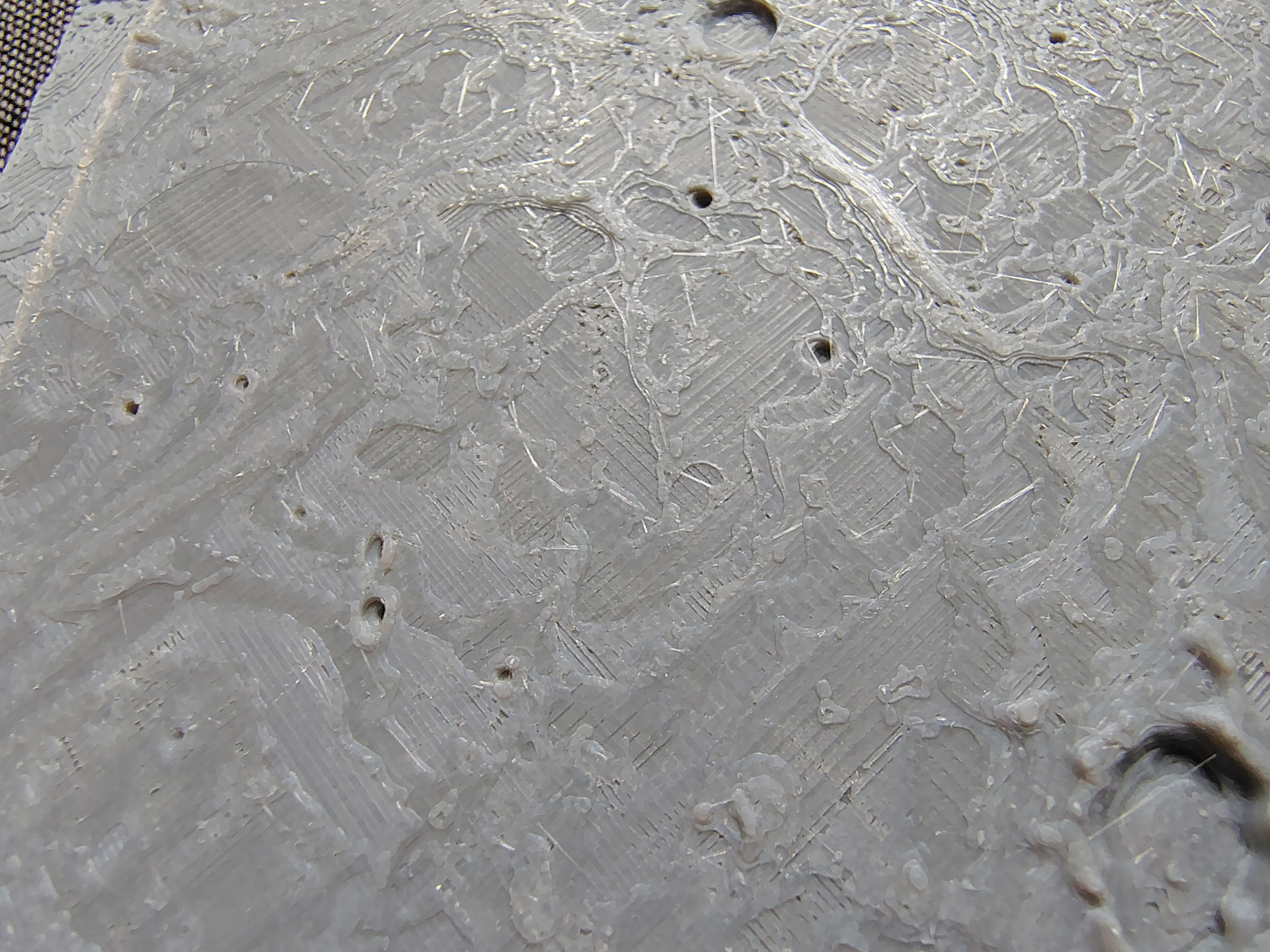
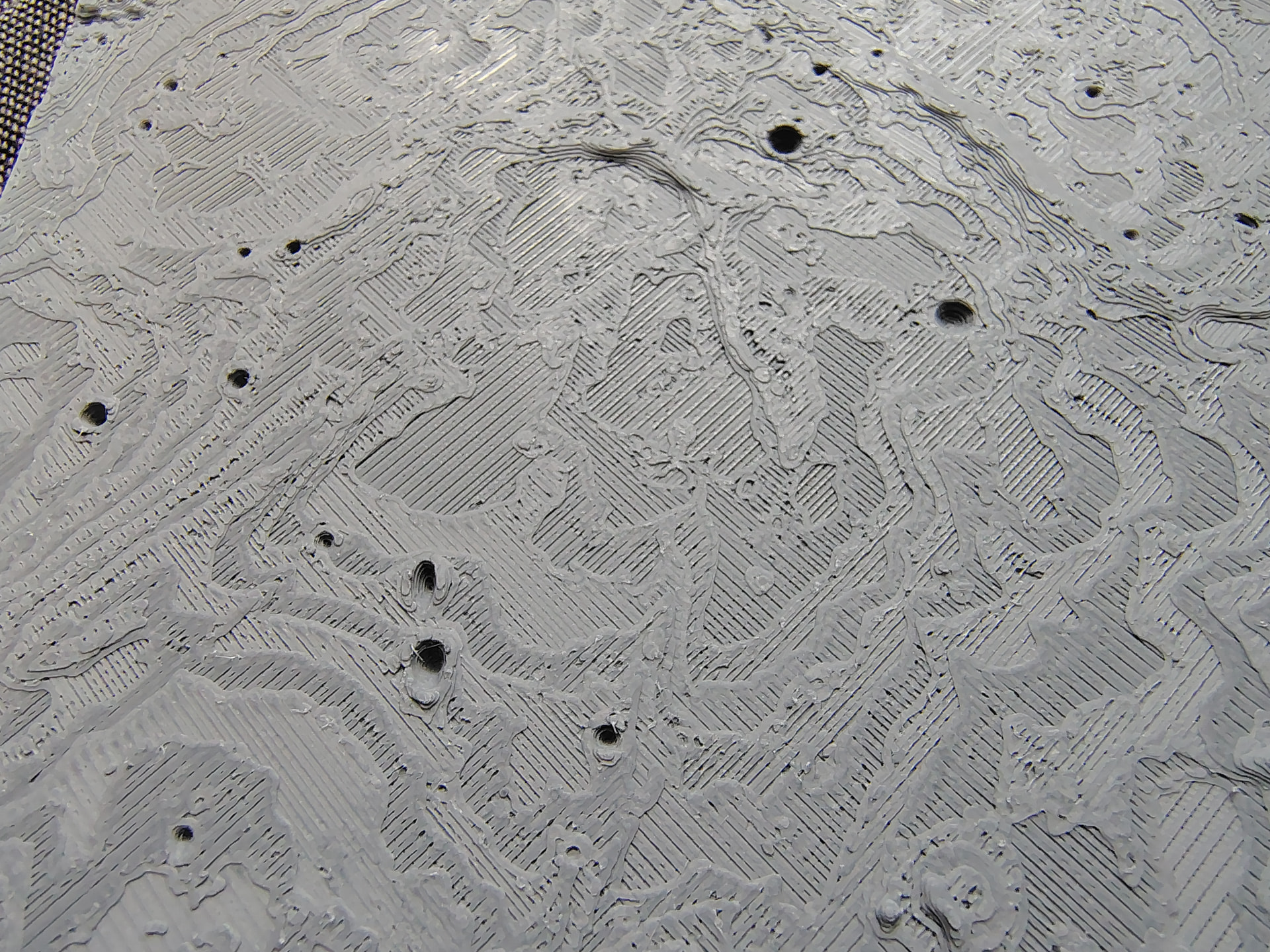
Moon surface, A1 Mini on top, X2D on the bottom. Incosistent extrusion, clearly visible layer lines on X2D.

Moon surface 2, A1 Mini on top, X2D on the bottom. Incosistent extrusion, clearly visible layer lines, same as above.
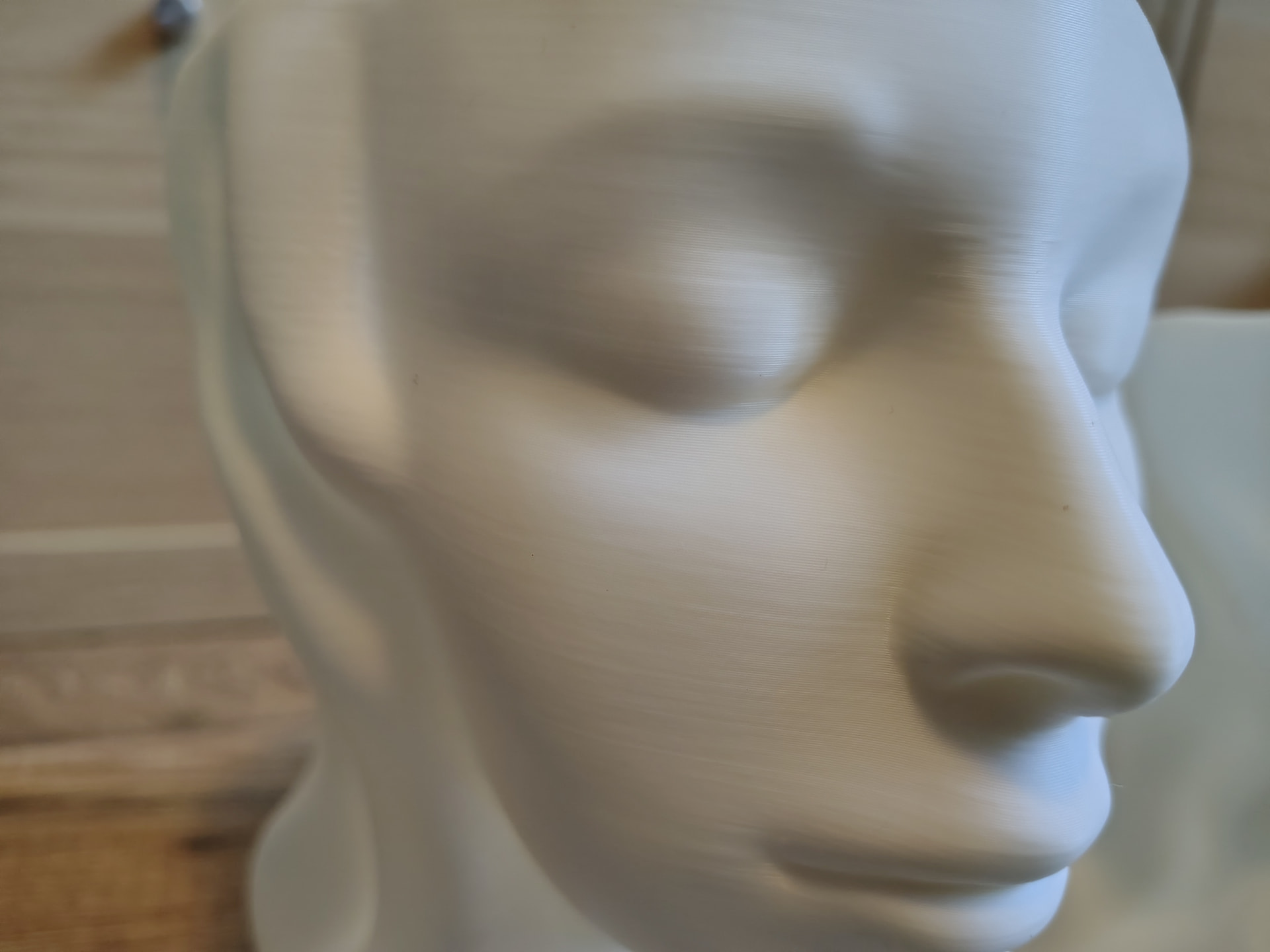
Women head planter, A1 Mini on top, X2D on the bottom. Uneven outer walls extrusion, inconsistent layer width on X2D.

I’ve spent almost full day, running different tests, with different settings and filaments. Results was always pretty much the same - X2D prints were good with simple models (straight walls), but if the model consisted several layers or rounded surfaces, the quality immediately dropped, in compare to A1 Mini.

To be clear, that’s my fifth Bambu printer (P1S-A1-P2S with added A1 Mini-X2D). I’m certainly no expert, but over the years I’ve gotten to know these printers pretty well, the common issues they had, and I’ve tried most of Bambu Studio’s print quality options. To name a few in above case - number of top shell layers, printing inner/outer, speed and acceleration for all moves, infill type and density, top surface layer width, only one wall on top surface option. I’ve printed couple aux fan diffusers to ensure that’s not cooling issue. Manual bed trim done. To be honest, i’m running out of ideas. Maybe it’s the new standard or i’m overreacting, but I simply expected the X series printer to offer at least the same print quality as the cheapest printer in the family.

If you have any ideas what can cause this or what to check next (i can be missing something), please share.

7 Likes

My thoughts are I can’t really make a judgement because the two comparisons are at different angles, or different areas, and different lighting conditions.

Not saying what you are observing isn’t true. It’s just hard to compare in this way.

1 Like

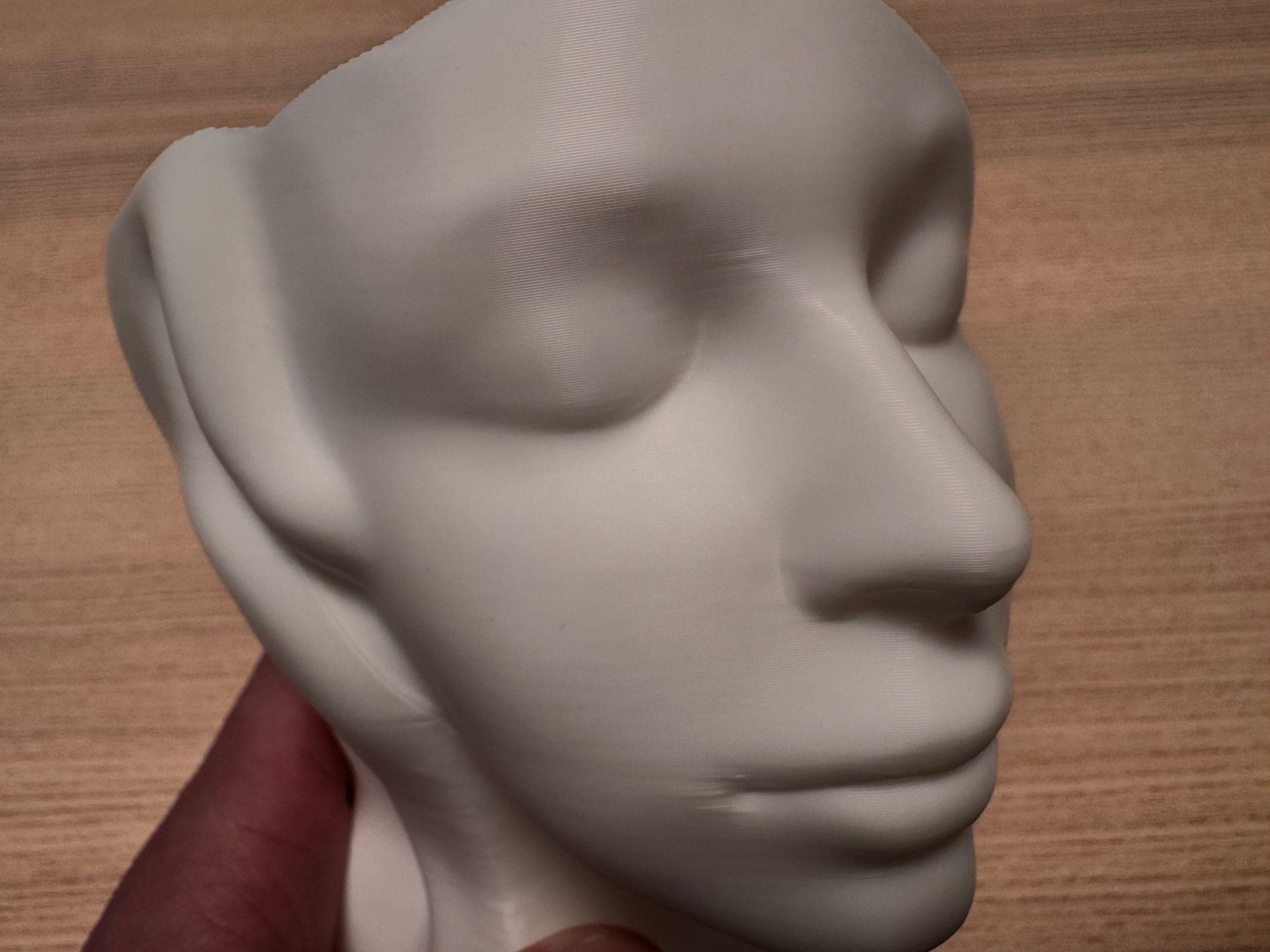
The light is the same, areas are pretty much the same. There’s difference in filament on moon surface project but planter was made using same Bambu filament. But what matter most, i think it is quite easy to see the quality issues with X2D printed elements. Unconsistent layers are clearly visible, while in the case of the A1 Mini the end result is much better. Here’s another planter shoot, you can zoom in picture.

As i said earlier, I expected to get at least the same print quality as with its smaller brother. No more, no less.

I have a hunch that it can be some issue with arc fitting beign turned off, because of curve planning enhancement feature. It was added in an update, so will run additional tests in coming days.

1 Like

I second your opinion @Vulc

I replaced my P1S with the X2D, and the print quality compared to the P1S is disappointing – I was expecting better quality, not worse than a machine that is a few years old.

The differences are not massive, but easily noticeable. It annoys me that a brand-new, top-tier machine from Bambu delivers worse quality than the P1S, which was released three years ago.

5 Likes

If you have same issues, can you try to print planter project, that I’ve linked in first post and paste some pictures here? 0.2 standard BBL profile, the’re two sizes of this pot, smaller one should be more than enough. It’s about 3h of printing. Will be grateful.

Checked arc fitting option and that’s sadly not it.

Will try to do that later today.

I use 3D printing for product development in my small business, and tinkering with a printer is not something I’m after, as it wastes my time. The P1S worked flawlessly for years, and the only reason why I wanted to upgrade was to have the possibility to quickly swap between 0.2 mm and 0.4 mm nozzles, as I use 0.2 mm nozzles quite often.

I’m starting to regret the decision now, and I would not recommend the X2D at this stage.

2 Likes

Fully understandable. Like you, I’m also starting to regret selling my P2S. Alter some minor issues with first layer, it was printing flawlessly, for almost 1k hours. Hard to say where the problem lies. Software side? Maybe additional weight of the second nozzle? For now i will do some additional testing. For years i was sticking with Bambu because it offered consistent quality and reliability. It’s the first time things changed.

4 Likes

Not as severe as in your case, but still, definitely not good enough:

You mentioned under-extrusion with the X2D, and here is a great example from one of my prints on the machine:

4 Likes

Thank you. Yeah, it looks slightly better but still far from “good”. I give my machine another try but with high quality settings at 0.16. Same Bambu Basic White filament. Sadly, it changed nothing, it turned out even worse.

That under-extrusion on your second project looks pretty bad. I can only assume but I noticed that the taller the model, the worse the upper parts look. I had some issues with that on P2S but nothing of this magnitude.

This is what annoys me most, decline in quality for no apparent reason. I started my adventure with 3D printing with Enders, learning how the printer is built and getting to grips with the basic settings, where most of the time was spent looking for solutions to problems rather than printing itself. And that was fine, it gave me a lot of fun and knowlege. Now I need a machine that is repeatable and reliable. Previous Bambu printers met these requirements, the X2D does not. Yet.

4 Likes

I have an x2d with the same underextrusion issues. So far haven’t been able to get rid of it even with calibrations and tightening screws etc. The aux extruder prints better than the main one.

4 Likes

X2D is my first printer so I have nothing to compare to. I’ve had many successful prints but also a few strange issues.

The latest being the AUX nozzle stopped printing PLA supports mid print then resumed and started spewing later.

Any idea what’s happening here?

that one’s easy to fix, keep adjusting, the tools right here. You’re allowed to go over 1.000

4 Likes

That’s not why we purchase a machine with all the technology, like eddy sensors and fancy extruders, and use Bambu Lab filaments to tinker with settings. Of course, we can do that, but that’s not the point, nor is it a solution to the problem.

8 Likes

I assume this could be because of two things. Firstly x2d used double gears extruder, which prone to give inconsistent layer lines because of tight manufacturing requirements. The second issue with servo, because it constantly measures and adjusts rotation, it could give small artifacts, it was on h2d as well, but they fixed it with update.

Yeah, could be it, or fact that toolhead is a bit heavier due to second nozzle, and for now software is unable to compensate. Still, even going down with speed and accelerations, it changed nothing.

Ultimately, this shouldn’t be our concern. Bambu has achieved success partly because their printers don’t require any fiddling, especially when using recommended filaments. I’m more than ready to do some fine tuning and in fact, i did. Flow rate, flow dynamics, manual bed trim, recalibration, it has been done. Sadly, none of this changed the outcome.

2 Likes

Welcome to the world of 3d printing, where you think you’re entitled to treasure but in fact end up being an car mechanic. 3d printing isn’t some magic that, because of some sensors end up being good. you always need to check and test everything. and im not sayingthat you need to but every roll of fillament can be a diffrent batch and so not evenly “dry“ from the factory. better buckle up and start accepting that you’ll need to tweak the settings all day, every day

8 Likes

If you read the topic, I’ve already done that. And as I said earlier, I’ve started my adventure with Enders, so believe me - I have “some” experience with 3d printers, dive deeping into settings, problem solving things (part of my job actually). But again, that’s not the case here. I’ve been buying Bambu machines through years because they offered a certain quality and repeatability. X2D is first printer from this company, that is struggling to meet this expectations. That’s all. For now i will do some more test prints and wait for the firmware update.

4 Likes

The original poster has had apparently several years of experience with four other printers in the Bambu lineup. You’re saying that this is simply the nature of 3D printing, but the fellow member is clearly saying the nature of printing with the X2D is very different than the nature was with the previous four. Did you read what they wrote? Are you saying they were lying? Are you saying they’re too stupid to even remember what their experience with other printers was?

9 Likes

My X1C has been deadlocked on firmware and only until recently with the change to BBL’s PLA has there been any noticeable quality difference. The issue is always the top surface under-extrudes, forcing me to use ironing. I’ve changed nothing on my software other than updates to the slicer. Both BS and Orca do it. First layer and all other layers are perfect. Other brand/type filaments do not give me the same results.

My next question for folks with the X2C, is have any of you run the lidar calibration plate?

I have. Multiple times.

And each time it shows the same correction pattern. I am not sure if it means that the error is always the same (and it did not correct it ?) or if the way the correction pattern is displayed is scaled (and the error is smaller but the display scale it larger to make it easier to read).

2 Likes