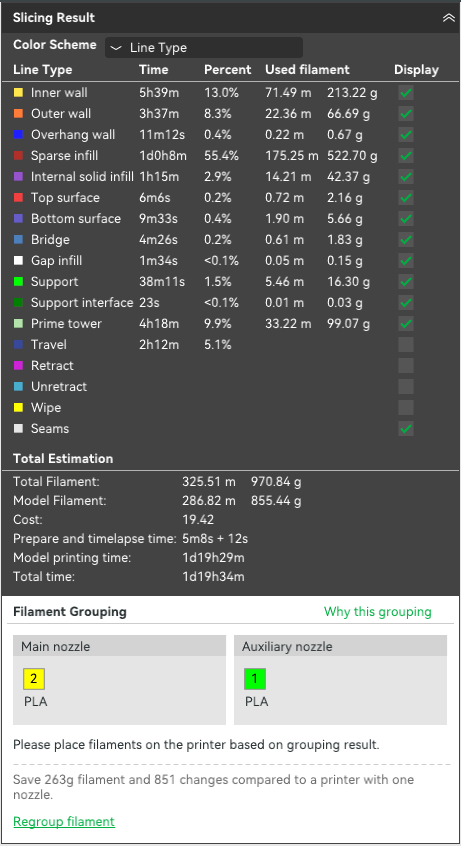
Installed the latest slicer version and added X2D to check the print time difference/improvements.
But so far only seeing disappointments.
First of all, the smaller print bed size (when using both nozzles) really sucks.
But even when comparing with P1 (remember that old timer) print times.
I have a simple 2 color model, which I’m printing 12 copies on a single plate.
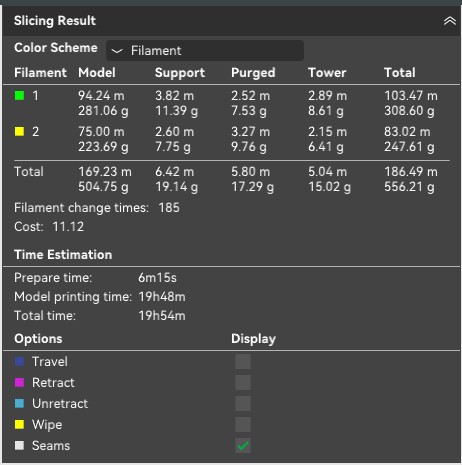
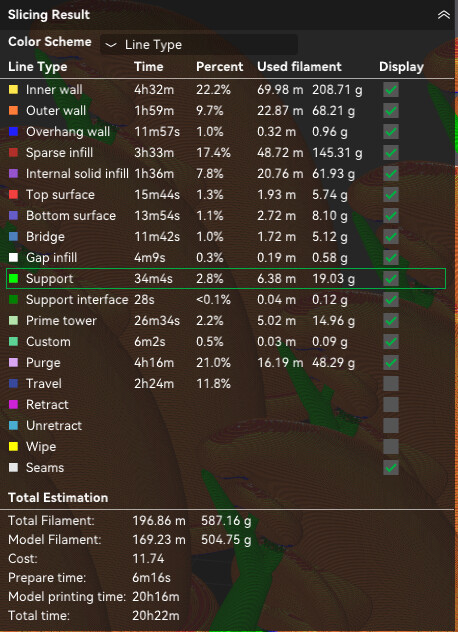
pretty simple - I’m getting 556 grams of filament used, with 17 grams wasted on purge, 185 filament changes and ~20 hours total print time.
So I would expect printing with X2D to slightly reduce the filament (by 17 grams) but greatly reduce the print time, as with only 2 colors all the filament changes are near instantaneous… Right? Right? Right?
Apparently not…
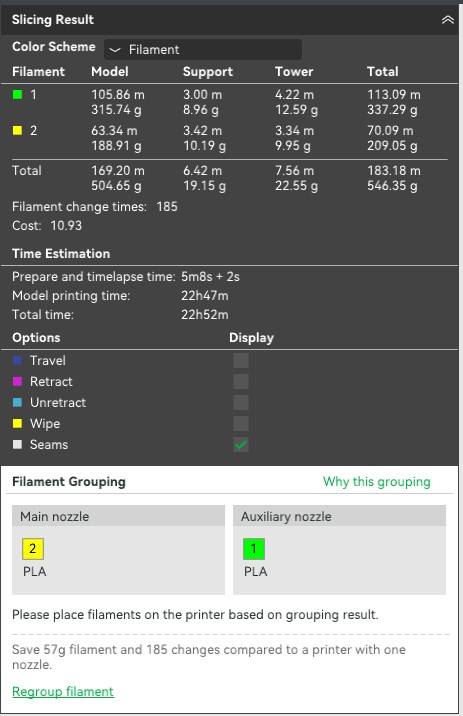
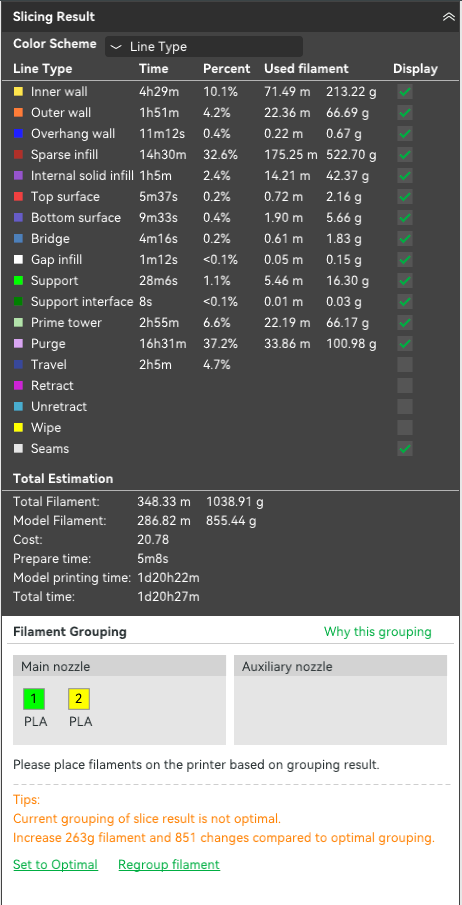
In X2D I’m seeing 546 grams of filament used, so only 10 grams improvement (instead of 17). But what’s worse, the print time is now ~23 hours. So it actually takes 3 hours longer to print the models using 2 nozzles with almost immediate swaps, than with 1 nozzle using regular AMS swaps.
Are your flush volumes proper? I know sometimes studio likes to change them. It’ll be pretty obvious if they are because the little flush volume icon will be orange or red
Interesting… If you print only 1 there’s a huge difference. I’m so confused hahah. But I guess it makes sense. With only 1 model the wall/inner wall/etc… are a much smaller portion of the time taken vs purging.
2 color prints are going to take longer due to the slow speeds and accelerations of the aux side. Do a side by side of a single color print that uses a support interface material.
Nm. First I need to put on my glasses, then type.
Seems like it really depends on the balace of how much you save by not purging vs how much slower aux walls and infill will be. For single model, it’s obv quite a bit faster since you are potentially saving hundreds of colors swaps.
It honestly surprised me. I expected the secondary nozzle to be slower & less accurate. But I have underestimated by how much.
The regular color swaps can take ~1 minute for each swap. So it’s potential hours of print time saved not needing to swap (in this print it’s 4 hours saved). I tested first with 8-color models, where the slicer divided the colors between 2 nozzles - there I saw an increase in print time. But that made sense, because both nozzles eventually need to do filament swaps, and the aux nozzle is much slower - so makes sense the time saved by having 2 nozzles, can be offset by the slower nozzle speed. But what surprised me was it’s true even in 2 color prints, with 0 filament changes.
I already ordered the X2D. And I saw plenty of youtube videos by reviewers. And all of them (100%) showed significant print time reduction on the X2D in multicolor prints. Both in 2-color prints and in >2 color prints. So it’s both surprising and unpleasant to discover this not to be true in many cases. I usually print whole beds of multicolor figurines, but now realize this is exactly the use case where X2D would not give me any added value. It’s not even faster than P1 when using a single nozzle
I tested it with a single huge model (instead of a bunch of small ones) - still barely any improvement in print time when using the dual nozzle. (used the exact same printer, just modified the color configuration)
I did play around in BS before buying to compare print times. I am also surprised there is not really any speed advantage but went into it knowing this.
I also expected additional benefit from the HF nozzles because the volumetric speed is almost 2x in PETG HF, but its also very similar to with and without
Haven’t figured out why this is yet.
Aux nozzle is much slower - cant do high acceleration because of extruder dynamics, youll note the default profile drops its accel to 1000. It’s gonna be slow on detailed models. Aux, not second
If it’s the same model you had before you still want the bulk of the color (green) on the main nozzle.
But what you discovered with a single big model makes sense. The aux nozzle is slower, so if you have enough walls, infill and top/bottom surfaces, that slowness will undo the benefits of not doing color purges.
I don’t have PS1 / PS2 to compare.., but technically speaking.., wouldn’t the X2D be “ever so slightly” slower than the PS1 / PS2 to begin with considering it’s toolhead has the weight of an extra nozzle / fans / hardware there?
On long prints of the same exact model on both H2Ds and H2Cs, the H2C always slightly edges out the H2Ds.. I’m assuming again because the induction side on the H2C is lighter. Could be wrong though.
The problem (or at least my problem with it) is all the reviews, even the ones claim to be objective and unaffiliated with Bambu, show significant improvement both in wasted material and print time between X2D and Bambu single nozzle printers.
Literally couldn’t find a single review that mentioned there is no time improvement.