When asking for help, please provide as much information as possible about your inquiry.
Including pictures and detailed information about the printer model, print speeds, filament type and settings used will help get the appropriate solutions.
It is also recommended to include a .3mf file of the model you are trying to print. This ensures the suggestions received will be more accurate.
I have a brand new AMS Pro 2 connected to my A1. More than half the time the filament gets hung up in the hub/buffer on the printer. It seems like the filament coming up out of the hub is hitting the side of the PTFE tube going to the hot end. There is some play in the PTFE tube connector and I can wiggle it to get the tube to line up with the filament so the filament can pass into the tube. But left on it’s own more times than not the filament hits the side of the tube and is stopped. The AMS pulls the filament back and tries multiple times, the fails with an error.
I’ve trimmed the tube with a PTFE tube cutter that ensures a square cut. This is new PTFE tubing and when the filament does get into the tube, it moves smoothly without resistance. I’ve made sure the tube is firmly seated in the connector.
Anyone with the A1 Series hub, how much play is there on the connector on top of the hub?
I’m working with Bambu Lab support on this and I’m confident they will resolve it, but I’m looking for assistance from the community that might speed things up.
I have 8 AMS units, far too much spare PTFE tubing and the A1 hub connected to my A1 mini.
First things first, the PTFE tube that comes with the A1 hub doesn’t need to be cut, nor should it be.
If you ever cut PTFE for Bambu Lab printers, 90° to the tube is the only angle and no shapes cut at either end.
My experience, attach the hub to the printer with the 3D printed part, insert the supplied PYFE tube into the AMS and the other end into the hub.
Print a test, perfect, print another test with multiple colours, perfect, forget my A1 mini has an AMS rather than the AMS Lite I donated, as it works seamlessly.
You may wish to provide a photo and/or video to illustrate your issue, ideally highlighting where the problem is.
I am not sure if the issue is at the new hub (my answer is based on that assumption) or the buffer on top of the print head.
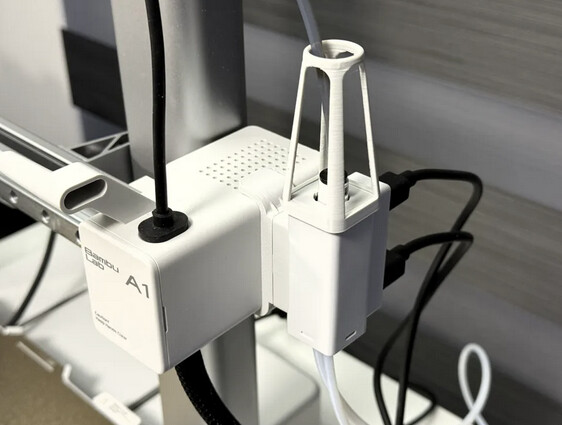
Thanks for the reply. I’ve only trimmed the least amount off the supplied tubing and I used a cutter designed for PTFE tubing to ensure a square cut. I disconnected the tubing at the AMS end and manually fed tubing through that tube into the buffer. The filament is definitely catching at the point where it leaves the hub and enters the tube going to the hot end. If I disconnect the tube going to the hot end, the filament passes through the buffer perfectly. It’s only when the tube to the hot end is connected that the filament gets caught, If the filament makes it into the tube to the hot end, it moves through that tube just fine and into the extruder, so I’m sure that it is passing through the buffer on top of the hot end. I noticed that the connector on the top of the buffer is not square and it does wiggle. Wiggling can make solve the issue, but even if you get it working by wiggling, the next time you print, it’s likely to get stuck. Attached is a picture showing the top of the buffer.
I’m having the same exact issue. My AMS 2 Pro and AMS hub just came in today. The pic you posted is exactly what the top end of my hub looks like and I have to wiggle it to get the filament to feed. I disconnected the PTFE tube from the hub and the extruder, flipped it around and reseated both ends. Still the same issue persists. I’m seriously considering returning the hub and getting a replacement. It may be a bad mechanism within the hub not aligning the filament.
I got a replacement buffer from Bambu Lab Support and it’s doing exactly the same thing as the original. Since you’re having the same issue, I wonder if there is a bad batch of buffers.
Is the tube pulling sideways on the connection on top of the buffer? Maybe the tube is too short.
(edit) Apparently not an uncommon issue. My setup is different but when I re-configured it in the stock Bambu arrangement with the tube that came with the buffer, the tubing coupler was pulled to the left exactly like yours. My arrangement has a longer tube so I have never had the problem.
One thing about 3-D printing, if there is an issue with the machines you can bet there is a print to fix it. I found this on MakerWorld…
I think you may have the solution. I tried a slightly longer (685mm vs the stock 600mm) and the filament seemed to pass through the buffer better. I still hear a thud and the buffer extends when the filament hits the side of the PTFE tube, but it does eventually slide in. The adapter you showed looks like it would help and I plan on printing one.
Suffering from the same issue here. I have gone through a few different solutions - the one which had the biggest reduction in filament feeding errors was the PFTE Guide posted above - I specifically went for the version that has a closed top to prevent it from moving laterally more.
I then mounted the hub horizontally which seemed to help a little.
That being said… I’m still having the error come up constantly, as an obversvation, it only seems to be when, what I assume is the buffer (part that slides in and out of the top - the pfte connector to the toolhead) is up.
I hold it down, press resume (no jiggling of filament or pfte pipes) - and it runs fine.
So to me it’s like the buffer can get stuck/jammed in a manner that doesn’t let filament flow through.
I’m going to contact Bambu detailing the above and will let you know if they come back with anything helpful.
Just wanted to add my voice to this thread. I just got an AMS2 Pro and hooked it up to my A1 Mini, and ran into this exact situation. I bought my hub in the last couple of weeks, so i’m also wondering if there’s a bad batch? I’m going to try and print out that guide to see if it helps as well. @K3ypad Keep us posted on what Bambu says!
So far with the PTFE Guild, I’ve not had a stuck filament issue and I’ve printed through many dozens of filament changes (judging by the number of pieces in my poop bucket). I like K3ypad’s solution.
I think the real problem is that there is enough space between where the filament exits the channel in the buffer to the end of the PTFE tube that allows the filament to wander off center enough that it hits the side of the end of the PTFE tube. This could be compounded by slight kinks in the end of the filament.
I think the engineers at BL are aware of the problem. If you notice when the filament fails to go into the PTFE tube, the software has the AMS pull the filament back and try again a couple of times, so during the development they must have seen this issue.
Is this problem specific to only the A series buffer? Has anyone seen anything similar with the other printers? One difference is that the exiting the buffer is internal with the other printers and it may be held in place better. On the A series the PTFE tube moves a lot as the print head moves on the X axis.
I know BL doesn’t recommend using buffers for the other models on the A series, but I’ve seen online where some have tried it and it appears to work. I wonder what the differences are? Has anyone opened the buffers to see what’s inside? Or better, has someone posted a video of that?
It may be. I have the old buffer that was used on the X and P series, in the same orientation as you have the new one. Haven’t had any issues at all. This buffer has a lot of time on it and I have no problems.
I will assume you have the PTFE cut at a 90 degree angle both in and out of the buffer.
Minor update:
Nothing back from Bambu just yet - however, I bought a new A1 hub as I was convinced mine was broken.
Interestingly, it wasn’t - I stripped the original down for an autopsy and saw that everything was fine - and learned about the internals.
It’s really really simple, a spring keeping pressure on the single PFTE connector to the toolhead - with a magnet that presumably is read by the black dot that leads to the 4 and 6 pin circuitry in the dark grey piece.
I’ve put it back together and have been stress testing my horizontal mount config - and so far about 6 prints in (about 20 filament changes each) - no issues at all.
I’m using a 59cm Bambu provided PFTE tube from the AMS 2 Pro to the Hub, then a 50cm Bambu provided PFTE tube to the toolhead.
I have noticed though in testing, if your tubes are too long/short the friction of the Hub’s connector to the toolhead, rubbing against the inside of the Hub itself is quite high - so if the toolhead is at some kind of X axis extremity - it would rub, potentially causing misalignment, as well as not popping out - therefore not triggering the sensor to say filament passed through.
I’ve greased mine a little - even though I’ve had no issues… Probably wouldn’t recommend doing that though - I’m really just doing it for science… and I have another one ready to replace it
Will post here if Bambu come back - I’ve offered to dump everything I have.
(I can’t seem to post photos in the forum yet… otherwise would dump here too)
Thanks for letting us know! I’ve replaced my PTFE tube going to the toolhead with a longer one, and printed the adapter linked above and am going to give another 20+ filament change print a shot today. I’ll let ya know if that helps!
I opened a ticket with Bambu as I had persistent issues with filament loading even after trying the tips provided in this thread.
Bambu sent me a new hub which didn’t solve the problem. I noticed that quality of filament loading not only depends on having no strain on the tube outlet but also on the tube inlets. I created project A1 AMS Hub Holder with Inlet and Outlet PTFE Guide - Free 3D Print Model - MakerWorld for having a PTFE guide to the tube inlets as well as an unconstrained guide for the PTFE tube outlet. So far, this solved all problems.
I like your print. It looks like it solves the issue of the buffer not moving as well as the outlet tube issues. One question: in the document, you mention that the outlet is the same height as the “Z-Axis Portal.” I’m not familiar with that term. It’s not shown in the BL A1 Wiki. What is it?
The “portal” is the entire construct which holds the parts for z-axis (vertical) movement of the print head. I had problems when the outlet PTFE tube was caught by one of the uppermost edges. Which is why I made the upper guide almost the same height as the entire portal (Called “Z-Axis Top Cover” here, navigate to A1 Side View).
Thanks for the information. I’ve printed out your model and hope to retrofit my A1 soon.
I didn’t have any PETG BASIC, so I used PETG HF. The first time I printed it, the bottom (as it is mounted) edge warped up off the print bed. I don’t know if you had this issue or if it’s due to differences between PETG BASIC and PETG HF. I used the default filament profile for PETG HF along with your print profile. For the second attempt, I rotated the part 45 degrees so the main length was diagonal to the print bed and the ends were further from the side of the print bed. I also added a brim. This time there was no warping.