Hopefully this is ok to post here. I downloaded MacOS 27 developer beta and am getting a network plugin install loop. Looks like its happening to a few people. I’ve tried deleting the network plugin and downloading again and clean installs of Studio and the Studio test build v02.07.01.57. Same issue, keeps looping. Help please.
So i found a work around atm.
It is slower but works until the next update.
First I tested with the recently posted test build from the forums (can’t link the post)
After that, go to Applications> BambuStudio.app, right-click, and tick Open using Rosetta.
Download rosetta, then double click again… and click Bambu Studio in task bar to keep active.
It will load slowly but i can report printing works again on 27 Dev Beta 1
I’d like to make an observation about the nozzle cleaning system. When the nozzle purges, it immediately passes through the cleaner next to it. This process needs to be modified. On more than one occasion, when I have some plastic residue, the nozzle enters from one side, goes through the cleaning process (left-right, left-right…), the filament comes loose and gets trapped in the cleaner, and then the hot nozzle exits again through the same place it entered, sometimes re-sticking this piece of filament and falling onto the table or the first layer of the print. I think it’s a simple change: have it enter through one side of the cleaner, clean itself two or three times, and exit through the other. That way, if anything remains, it’s almost impossible for it to be carried along and get trapped in the cleaner. Greetings to all!
Excuse me, but what kind of support do you expect? You don’t install something like that on a device that’s in active use. There’s a reason it’s called “Developer Beta.” ..
This worked for me as well! Thanks for the workaround!!
did you find a solution yet? Mine still crash this way as of today with lates version.
Bambu studio 2.7.1.62 appears to be missing a network plugin
Bambu Studio 2.7.1.62 on MacOS 26.5.1 is not remembering my choice to disable Nozzle Offset Calibration. It turns back on with every project I load. This is different behavior than previous versions.
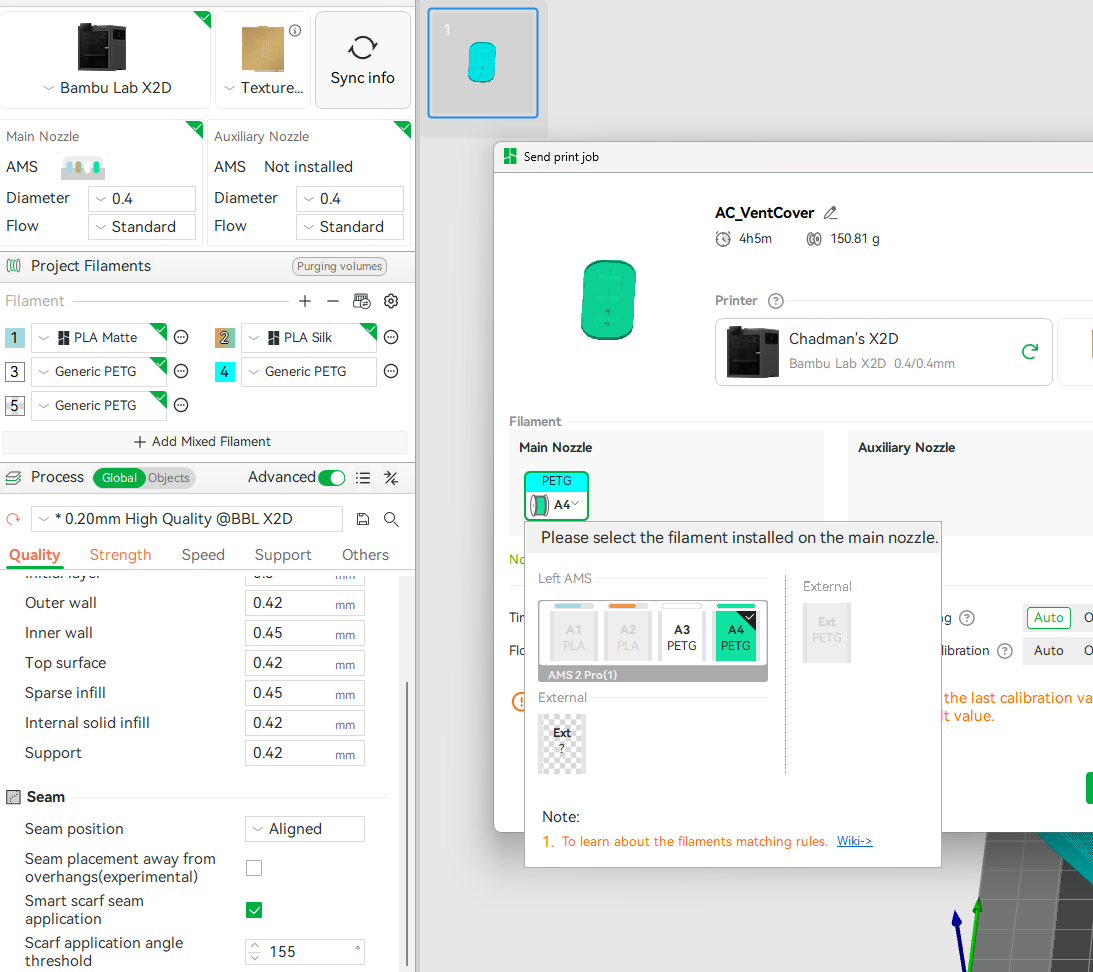
Bambu studio 2.7.1.62
Windows 11
P1S FW: 1.08.01
If I leave studio open for an extended amount of time, say an overnight print, the device page will not connect to the printer that was selected when the print began. It just hangs at “connecting…” above the printer name. It also won’t send prints to that printer either, it hangs at syncing filament on the send screen. I have to close BS and reopen to get it to work again.
The printer is actually connected and responds to commands from panda touch and home assistant, just not from studio.
Version 2.7.1.62 installed 2 days ago.
Importing a few objects on to one plate and Studio will just stop and close or Left alone with no input and Studio will freeze then close.
Problem: AMS 2 Pro will counter-rotate spool when drying even when that spool is being used to simultaneosly print, which causes an “AMS assist motor is overloaded” error.
Firmwares: latest on P2S and AMS 2 Pro
Steps to reproduce:
- Use dedicating switching power adapter on the AMS 2 Pro which enables simultaneous drying/printing.
- Start a drying cycle in AMS 2 Pro and enable spool rotation.
- Subsequently, start a print using one of the filaments loaded in the AMS 2 Pro.
- Every ~10 minutes when all spools are counter-rotated for drying this creates and immediate error for the spool that is actively printed. The spools are periodically counter-rotated when drying and this causes the error “The AMS assist motor is overloaded” error for the spool being used to print.
The AMS 2 Pro and P2S should not rotate (for drying purposes) a spool actively being used printed. This is the bug, that the AMS 2 Pro actually tries to counter-rotate spools being printed.
This is not a Bambu Studio Bug…
What you describe is direct user error of you not following the instructions.
Prior to pressing Start on Drying and Humidity > Filament Drying > Drying Preparation.
The instructions are clear.
”Please remove and store the filament (as shown) e.g. remove from feed port (also called the funnel or inlet)
The AMS will automatically rotate the filament which is properly stored, providing better drying results.
Filament stored in the chamber.
Tick, Tick, Tick, Tick.
AMS-X
Untick - Rotate spool when drying.
If you tick Rotate spoon when drying, with filament still loaded into the feed port, the filament is not properly stored.
That sentence doesn’t mean the AMS will skip incorrectly loaded filament, it will fail, and thus will not be able to automatically rotate the filament.
Just use the AMS2 properly, if you want to dry and print at the same time, simply do not Tick the rotate spool when drying option.
Solved.
readmanr. Your reply is tantamount to the classic deflection from Steve Jobs of “you’re holding it wrong” to explain away why the iphone 4 lost reception depending on how the user was holding the iphone.
The AMS/P2S system is designed to allow printing and drying at the same time. My filament was properly loaded in the AMS 2 Pro when drying started with rotation. The second I loaded filament to start a print the firmware/software should deactivate rotation for that spool, after all, it now knows filament is loaded in that slot. Instead, the system permits the user to proceed and waits until 10 minutes into the print and then throws a misleading error of “AMS assist motor is overloaded.” This could be made absolutely seamless with one line of code that says if filament is loaded during rotational drying then deactivate rotating that spool (or, in the alternative, if filament is loaded throw an error code that says the user must deactivate rotational drying first). Simple and easy. But please, continue to tell me I’m holding it wrong when one line of code could avoid any user ever having this issue going forward. Bambu positions itself as user-friendly and this would be an example of how to enhance that. I’m glad Bambu doesn’t adopt your posture to user experience, yikes.
Both of you and @readmanr are correct. Yes, did not pay attention to the instructions, however I agree with you that the system should be improved to figure that out and pop up a screen and have something like “Dude… I am not going to rotate since you left the filament in!”
I agree. I’ll defer to the philosophers whether this is a bug or a requested product improvement, but from a user perspective it’s intuitive to expect it wouldn’t operate the way it currently does.
Bambu Studio ver 2.7.1.62
MacOS 27 Developer Beta 2
Bambu studio stuck in loop installing network plugin, verified on 3 different MacOS devices. Studio will install the plugin over and over again but will continually prompt for it and will not allow login to view or control hardware.
Bambu Lab A1
Current Firmware: 01.08.01.00
Ever since I updated my machine to this firmware version, the screen keeps getting hung up/frozen. I’ve restarted many times, and it’ll work temporarily but freezes every time.
Problem: Bambu Studio crashes on Windows 11 when using subtraction in prepare
Studio Version: bambu-studio.exe, version: 2.7.1.62
Platform: Microsoft Windows 11 Pro
Version 10.0.26200 Build 26200
Steps to reproduce:
-
Open Bambu Studio
-
Editing assembly of 3 cubes, flat assembly 0.250 “ thick
-
Subtract a cube from assembly that is 0.125 “ thick
-
Program crashes (stops running / disappears) when clicking execute
Log file: uploaded log file
Other information: System Model Alienware Area-51 AAT2250
System Type x64-based PC
Processor Intel(R) Core™ Ultra 9 285K, 3700 Mhz, 24 Core(s), 24 Logical Processor(s), RTX-5090
Installed Physical Memory (RAM) 64.0 GB
Log Name: Application
Source: Application Error
Date: 6/23/2026 8:37:49 AM
Event ID: 1000
Task Category: Application Crashing Events
Level: Error
Keywords:
User: CORTEX\LeeGi
Computer: Cortex
Description:
Faulting application name: bambu-studio.exe, version: 2.7.1.62, time stamp: 0x6a311f10
Faulting module name: BambuStudio.dll, version: 0.0.0.0, time stamp: 0x6a311eec
Exception code: 0xc0000005
Fault offset: 0x000000000334aa1d
Faulting process id: 0x21F9C
Faulting application start time: 0x1DD0325E2164021
Faulting application path: C:\Program Files\Bambu Studio\bambu-studio.exe
Faulting module path: C:\Program Files\Bambu Studio\BambuStudio.dll
Report Id: 61132b29-3097-44d6-80f0-308ea38e3556
Faulting package full name:
Faulting package-relative application ID:
Event Xml:
1000
0
2
100
0
0x8000000000000000
451354
Application
Cortex
bambu-studio.exe
2.7.1.62
6a311f10
BambuStudio.dll
0.0.0.0
6a311eec
c0000005
000000000334aa1d
0x21f9c
0x1dd0325e2164021
C:\Program Files\Bambu Studio\bambu-studio.exe
C:\Program Files\Bambu Studio\BambuStudio.dll
61132b29-3097-44d6-80f0-308ea38e3556
Log Name: Application
Source: Application Error
Date: 6/23/2026 8:37:49 AM
Event ID: 1000
Task Category: Application Crashing Events
Level: Error
Keywords:
User: CORTEX\LeeGi
Computer: Cortex
Description:
Faulting application name: bambu-studio.exe, version: 2.7.1.62, time stamp: 0x6a311f10
Faulting module name: BambuStudio.dll, version: 0.0.0.0, time stamp: 0x6a311eec
Exception code: 0xc0000005
Fault offset: 0x000000000334aa1d
Faulting process id: 0x21F9C
Faulting application start time: 0x1DD0325E2164021
Faulting application path: C:\Program Files\Bambu Studio\bambu-studio.exe
Faulting module path: C:\Program Files\Bambu Studio\BambuStudio.dll
Report Id: 61132b29-3097-44d6-80f0-308ea38e3556
Faulting package full name:
Faulting package-relative application ID:
Event Xml:
1000
0
2
100
0
0x8000000000000000
451354
Application
Cortex
bambu-studio.exe
2.7.1.62
6a311f10
BambuStudio.dll
0.0.0.0
6a311eec
c0000005
000000000334aa1d
0x21f9c
0x1dd0325e2164021
C:\Program Files\Bambu Studio\bambu-studio.exe
C:\Program Files\Bambu Studio\BambuStudio.dll
61132b29-3097-44d6-80f0-308ea38e3556
bambu-studi … 139164.dmp
Dump File
Last Write Time
Process Name
Process Architecture
Exception Code
Exception Information
Heap Information
Error Information
^ System Information
X
bambu-studio.exe.139164.dmp : C:\Users\LeeGi\AppData\Roaming\BambuStudio\log\bambu-studio.exe.139164.dmp
6/23/2026 8:37:54 AM
C:\Program Files\Bambu Studio\bambu-studio.exe
x64
0xc0000005
The thread tried to read from or write to a virtual address for which it does not have the appropriate access.
Not Present
am currently running the macOS 27 Developer Beta and am experiencing a critical issue with Bambu Studio. The application prompts me to install the network plugin, and even though it says the installation is successful, the app does not register it. I am stuck in a loop where it continually asks me to install it.
Here is what I have tried so far:
-
Deleting the ~/Library/Application Support/BambuStudio/plugins folder.
-
Checking my firewall and disabling VPNs.
-
Attempting to manually reset local network permissions via Terminal (which failed).
It appears Bambu Studio is not requesting Local Network permissions from the OS, as it does not appear in my System Settings. Has anyone else encountered this, or is there a known workaround for the new macOS beta?