H2C Clicking noise from Print/tool head

Brand New H2C making clicking noises while printing using the left hotend. I have not pay too much attention to the right hotend so I cannot say is only the left hotend. It looks like the clicking noise occurs during retractions but I have no idea what causes it and how to fix it. I already opened a Bambulab ticket however wanted to check with the community if someone else have faced this issue and how it was fixed. The prints came out good is just quite annoying the clicking noise and I fear there might be an issue later on.

I have triple checked that it is not the PTFE tube be printing without the top glass. Also in case some one ask the filament was dried for 8 hours before printing.

Check link below for video

likely the ptfe tube hitting either the glass or the side walls

I am triple checking that it is not the PTFE tube be printing without the top glass. Also in case some one ask the filament was dried for 8 hours before printing.

So far no reply from Bambulab support on this issue. I will provide update once they respond.

Unload filament, manually heat up nozzle, then press extrude-retract-extrude… Repeat and see if you can recreate this without z movement

Will do. Thanks will update here soon.

Hi, did you ever find the cause or a solution for this?

I seem to have exactly the same issue on my H2C. The clicking appears to be related to retractions / extruder direction changes, and the intensity varies quite a lot depending on the filament.

I noticed it the most with PLA-CF before, but today I installed a 0.2 mm nozzle and I’m printing regular Bambu PLA Basic, and the clicking became very loud.

The prints themselves seem fine, but the noise definitely doesn’t sound normal.

Did you eventually figure out what was causing it?

With the 0.2 mm nozzle it is significantly louder than it was with the 0.4 mm nozzle.

We have the same problem on H2D it seems to be a Z axis movement problem:
https://forum.bambulab.com/t/h2d-rapid-z-movement-knocking-on-01-04-00-00/258856?u=croisade

Quick update from my side, as I did quite a few tests trying to narrow this down.

I originally suspected the dual extruder/retraction mechanism, so I replaced the entire Dual Extruder Assembly with a spare one that Bambu had previously sent me for a completely unrelated issue. I then printed exactly the same model with the same settings. The clicking was identical, so replacing the whole extruder made no difference.

I also tested repeated manual extrusion and retraction with the toolhead stationary. In that case it was completely silent.

Then I printed the same model again with Retraction Length = 0 mm. The clicking disappeared completely.

To separate retraction itself from Z-hop, I restored the normal retraction settings and disabled only Z hop when retract by setting it to 0 mm. Again, the printer was completely silent.

So in my case the clicking is clearly related to the Z-hop movement, not the filament retraction itself.

I then changed the Z-hop type to “Normal” instead of the default behaviour. This helped a lot. The clicking is still present, but it is much quieter and no longer sounds nearly as aggressive as before.

With the quieter “Normal” Z-hop, I can also localize the remaining click better, and it seems to be coming from underneath the printer.

One more thing I noticed recently is a slight rubbing/scraping sound from the Z-axis/belt area when the bed moves up or down. I already performed the Z-belt tensioning procedure, but it did not change anything, so I’m not sure yet whether this is related.

For now, using Z-hop type = Normal is the best workaround I have found.

If anyone else with the same clicking noise can test the same settings, it would be interesting to compare the results

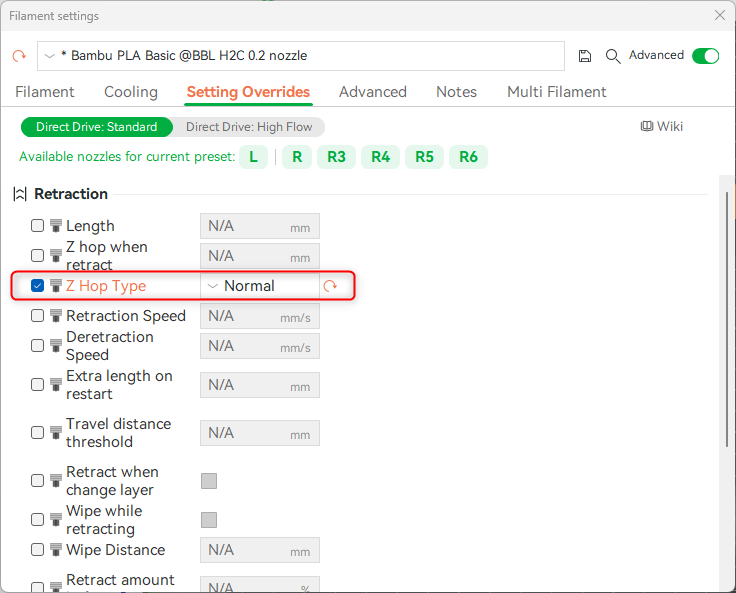
same results. Someone else suggested the Normal Z Hop to me when I first encountrered knocking on my H2C on 1.02 release ealry June. I was going crazy trying to find whats causing it. Didnt. One user popped into my forum thread and said he had that problem sine April on his H2D and told me about Normal ZHop trick.

Works the same on all affected pritners…

but great work nevertherless.