H2D rapid Z movement Knocking on 01.04.00.00

Hello I am experiencing loud knocking during rapid z movements on my H2D running fimrware 01.04.00.00. See this video for the sounds: https://youtu.be/E-H29B51sws

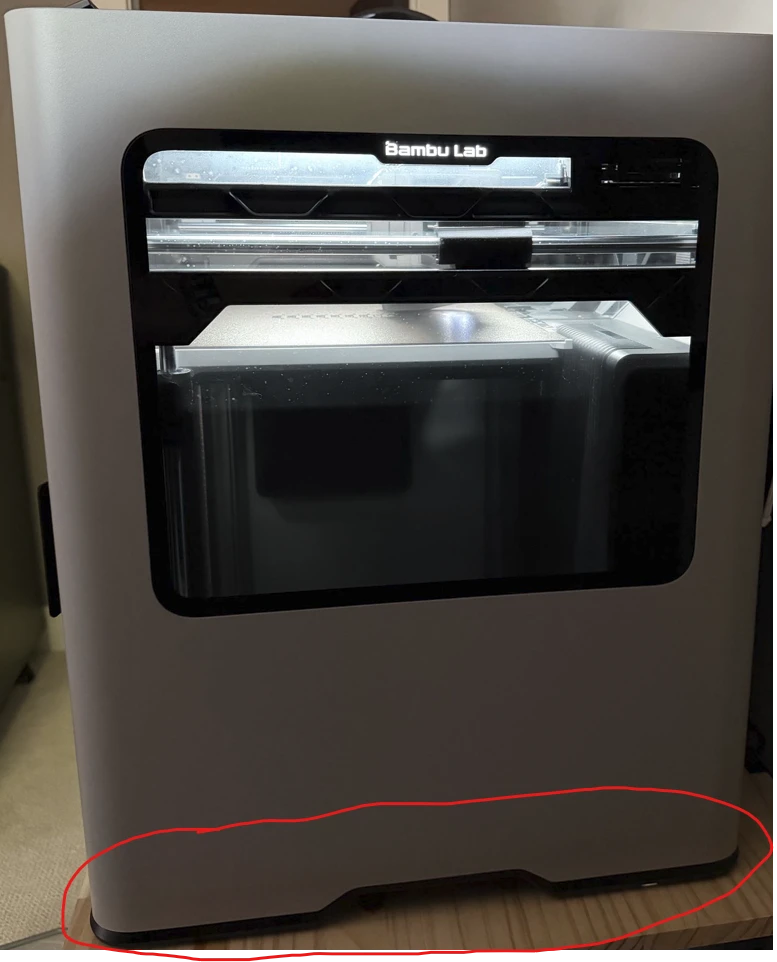
When trying to locate the origin of the sound it is noticeably louder when placing my ear near the bottom of the H2D, especially around the bottom side of it, circled below.

Is anyone else noticing knocking from their H2D like this?

Welcome to the forum.

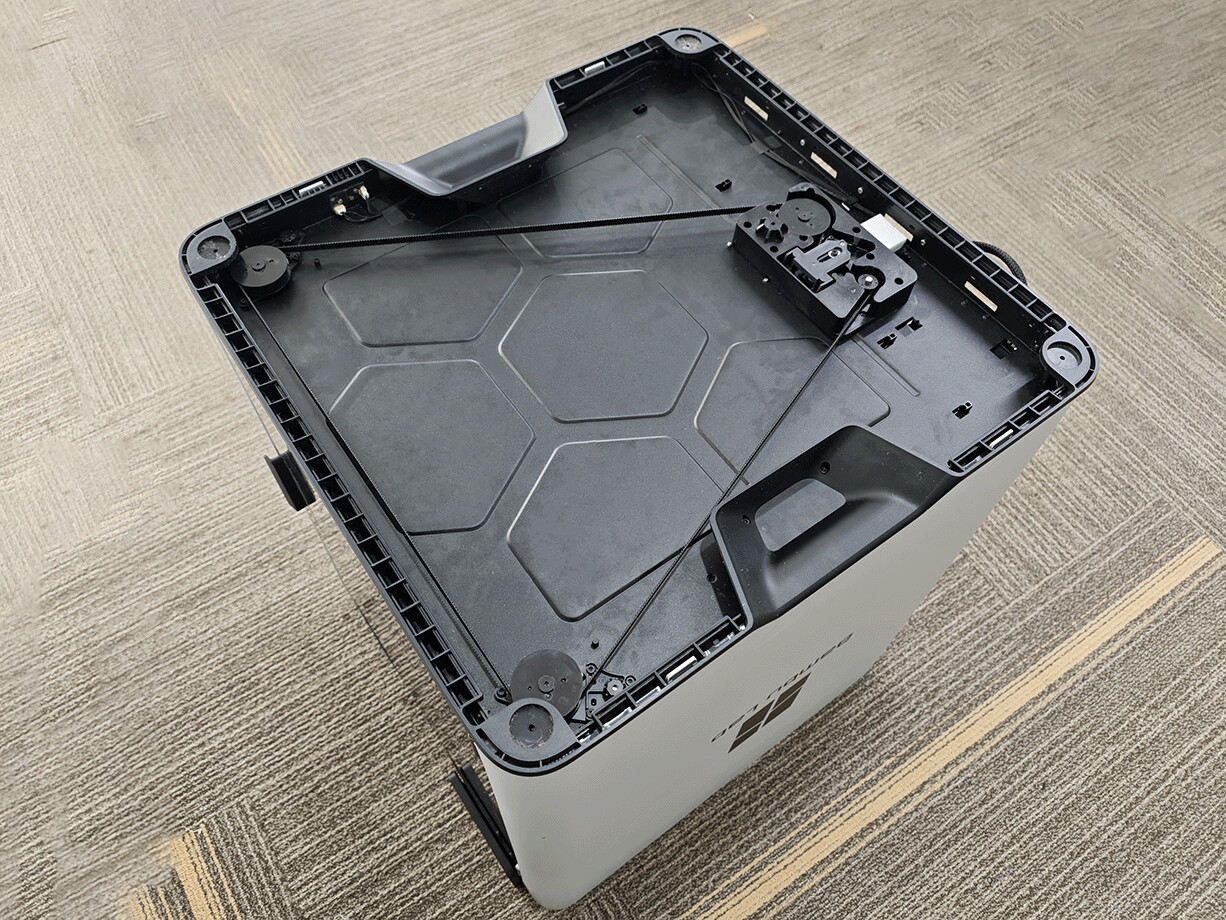
Have you looked under the printer to see if anything is caught in the Z axis belt/pulleys?

It sounds a pulley isn’t tight on it’s shaft, allowing the shaft to rotate a bit before it finally “hits” the set screw.

The other possibility that comes to mind is one of the leadscrew bearings isn’t being retained and is actually being pulled back and forth when the screw tries to turn.

I agree with Jon, start by checking the Z axis drive system under the printer.

Probably best to check belt tension, too.

welcome to the club :

pretty sure this it that.

Bambu has promissed me that the next firmware will fix this. Great progress so far eh ?

P.S. to rule out any mechanical faults, roll back the firmware to something from early 2026 (I have H2C so different schedule). In my case. rolling back to one before the last (which came out in June and introduced new noise compensation) fixes the problem, then loading latest firmware back on, brings the kocking back … its definatelly firmware induced, could be exposing tolerance issues with a certain number of machinces out there.

I am now experiencing the same knocking sounds with the new firmware during Z-axis hops, will this cause extra wear on the lead screw nuts?

Hi,

First and foremost, “welcome to the club.” Sorry, couldn’t help myself. I am so disgruntled with Bambu about this that I get bitter whenever I think or talk about it.

Please read through my forum thread that I linked earlier. It starts off a bit clueless, as the investigation and back-and-forth with Bambu Support was still ongoing, but eventually there is a conclusion: firmware-induced (new motor noise cancellation). They knew about this at least since April, during the beta, and still left it in the final release. We are now months and months since then and still have no fix…

Definitely roll back the firmware to confirm that yours is also firmware-induced and rule out any mechanical faults, just in case.

Then, to answer your question, Bambu has been repeatedly telling everyone affected to just “keep using our printers normally”, as this will allegedly not affect the print quality or the printer itself. Then, in the same breath, they also add that “if anything does break, they will replace it.”

So I am not sure if this is just reassurance that they will fix it if something actually does break, or whether they genuinely know that nothing will break. Or perhaps they simply have no clue what will happen because they don’t know what is causing it or how to fix it.

They have never really confirmed what is actually causing the knocking. They keep reiterating “specific printer and environmental conditions” as if this actually means anything.

It means nothing.

We have printers from different parts of the world affected by the same issue. Bambu is keeping eerily quiet about any details regarding this, which, personally, does not fill me with a lot of confidence. It feels a bit like a cover-up to avoid ending up with mass printer replacement requests…

Anyway, I have done a lot of investigating and research into this matter. Using AI, so obviously take that with a huge pinch of salt, and I am certainly no expert. But my thinking is quite simple: if a machine (in this case, a printer) operates normally and does not make any weird noises, and then something changes and causes it to start making weird noises, it is difficult to believe that this is somehow “neutral,” “irrelevant,” or “good.”

Noise that should not be there is generally an indication of some kind of stress somewhere.

So, will it cause wear or damage? Bambu says NO. Logic suggests YES. Time will tell.

In the meantime, I recommend doing what others have done: raise a ticket. Mention my case and my ticket number US260601389001 and ask them to connect the cases together. The more affected cases they have linked, the harder it becomes for them to treat this as some isolated issue.

Keep the pressure on and hopefully Bambu will finally fix this.
I’ll finish my current print and then revert to the previous firmware version. I’ll let you know if the noise is gone then.

Update: It will take a while to get the results of the downgrade; coincidentally, the right hotend heater stopped working after the downgrade, so I have to wait for spare parts.

My H2C does make the same noise. Well, sometimes not for every print. Seems to be more often when chamber temperature is high (60deg).

Mine as well, I was printing some PET-CF last night and noticed it.

Likely the accel/decel curves are just a bit too steep.

thank you !!! i was starting to get worried about this new strange noise also :thinking:
you save me hours trying to find if i have an unscrewed bolt :sweat_smile::sweat_smile::sweat_smile:

This is so infuriating! Why the ■■■■ would you literally destroy people’s printers? What was the awesome update that you HAD to install on our printers? I literally took 2 hours of bumping and moving parts of the printer to find the source of the knocking for no reason. I’m rolling back and never updating again!

Bit of an overreaction maybe?

Has anyone’s printer actually been destroyed by this? Do you even know that this sound is actually bad, or do people just perceive it as bad? Extraordinary claims require extraordinary proof.

I mean, it enabled the Filament Track Switch, for one thing…you can read the whole update history for yourself.

And to be clear, YOU install updates on your printer, not Bambu. You can also roll back firmware updates if you don’t like them.

Yes, a bit of an overreaction, when a printer that you bought 2000+ USD suddenly starts grinding its gears for no reason.

Is a knocking noise that comes from two parts of metal bad? Maybe not for you. I just like to hear motors running on my printer, no scratches or knocks.

Yes, it’s true, I install the updates, but I can’t know every time I do, if my nozzle is going to fly off the printer because we desperately needed Filament Track Switch. I guess even then we won’t be able to fully confirm if that is a bad thing, or just a good thing for the printer.

Apparently, many people have reported this issue since the beta release in April, and nothing has been done to fix it. I guess many users don’t like the new knocking feature.

Which gears is it grinding?

A while ago on the previous H2D firmware update, some users were complaining about the high acceleration motion towards the right front where the tool checks the build plate alignment.
It seems some people are not aware of how high the acceleration in XY can be.

You might have a defective part in the motion system that causes this behavior under a bit more stress. And this firmware exposes that now.
Definitely something that needs investigating, but that doesn’t necessarily make the firmware bad.

If this was a consistent issue across all H2D’s, this community would be flooded with users having the same issue.

By sticking your head in the sand and reversing to an older firmware version, you might delay the component failure to a point outside of your guarantee period.

I personally would want to get to the bottom of this.

Got you! How do you know what’s the limit for your printer? Obviously, my printer is worse than yours and starts knocking with a slight speed increase. What is the limit for your printer? What if version 01.05 some Bambulab developer decides that the Z speed still is not enough and doubles it and then your printer starts knocking too. What then?
What was the previous and the current 01.04 Z speed increase? Just want to know how much more speed we are going to gain from this increase in bed movement speed?
I’m not the only one having the issue, the starter of this topic has the same issue too, and some of the commenters also, so not so unusual.
I had to finish a print today and here I am troubleshooting knocking noises around the printer with a torch and moving stuff around. Not the perfect Sunday morning don’t you think? All this just because someone at Bambulab thought “Hmm, this bed is not moving fast enough.”

I’ve been troubleshooting what seems to be the same issue on my H2C and did several tests with retraction and Z-hop.

In short, the clicking disappears completely when Z-hop is disabled, and changing Z-hop type to Normal makes it significantly quieter.

I posted the test results here:

My printer is currently not having any issues.
But if you read everything I wrote in my post, you would notice also me mentioning that I would like to get to the bottom of this if I was having the same issue.

I didn’t say you were the only one. I said that if this is something consistent, then the community would be flooded.

The speed is seemingly not the issue, but the higher acceleration.
I don’t know the max limits of the Z-axis as Bambu Labs hasn’t published any.

As an example, the Max acceleration of XY is 20,000 mm/s², while during printing, the standard Profiles in BS do not exceed 10,000 mm/s².
Most people havent even seen it move with the max acceleration.

But to be clear:

  • Is the reason for the knocking already determined?
  • Is it the Z-axis, or something else?
  • Or are we still guessing what the issue is?

For what I understand, the V01.04.00.00 introduces the behavior, and further there is not much substantial information that determines the cause and/or it is breaking your machine.

I’m sorry, I probably should never have replied or even posted here. But all I have to say is this.

10,000 mm/s² is 10 m/s² — roughly 1 g of acceleration. For a relatively heavy moving assembly, that is already a lot, and 20,000 mm/s² is roughly 2 g. I understand that the machine is advertised with these capabilities, but maximum specifications and what is sensible or necessary during routine operation are not necessarily the same thing.

My concern isn’t simply that the printer moves fast. It’s the knocking. In engineering, repeated mechanical impact is generally not something you want to hear from a mechanism that previously operated without it. That’s why people are complaining.

Even if you repeatedly knocked two rolls of filament together for 12 hours, eventually you would expect wear, deformation or damage. The individual impact doesn’t have to break something immediately for repeated impacts to be undesirable.

My printer knocks with this firmware and yours doesn’t. That doesn’t necessarily prove that my printer is defective, just as your printer being quiet doesn’t prove that the new motion is mechanically harmless. Your machine may simply have different tolerances and therefore not produce an audible knock.

And as you said yourself, Bambu hasn’t published the maximum Z-axis acceleration limits. So at the moment neither of us actually knows how close this new movement is to the intended mechanical limits of the bed/Z system.

What I do know is very simple: before the firmware update my printer did not knock during this operation; after the update it does; after rolling back, it doesn’t. Other users have reported the same behavior, and some have traced the sound to the bed movement. Until Bambu explains what changed and confirms that this behavior is intended, I prefer not to subject my machine to a repeated mechanical knock for no practical benefit to me.

I bought the machine to use for work, not to find out experimentally where its mechanical limits are.

Anyway, sorry for the long rant. Good luck with your update.

Are you reading responses or not?