My first 70 hours with the P2S — an honest owner report

Background: I came from an A1 Mini, which I ran from December 2024 until last week. In about 19 months on that little open printer I had a tiny fraction of the problems I’ve run into on the P2S in under 70 print hours.

I keep reading glowing reviews, and I honestly don’t recognize my printer in any of them. So here’s a first-hand report — not to bash, but because honest, critical accounts of this machine barely exist online yet (at least, I could not find them). The one write-up that came closest to my experience was the blog “The Bambu Lab P2S: a painful journey” (The Bambu Lab P2S: a painful journey | Nicolò Andronio) — at least it told me I’m not the only one.

Short verdict up front: with Bambu’s own PLA in a cool room, the P2S probably does “just work” — which is likely why the reviews are rosy. The trouble starts the moment you deviate: third-party PLA/PLA+ or PETG, a warm room (about 25 °C and up), a demanding model. Then it’s a very different machine.

What I hit in under 70 hours (full breakdown with sources in the catalog linked at the bottom):

  • The airduct (the AUX/filter unit on the right side) is forced into HEATING mode for any filament with a softening temp above 50 °C — which is essentially every profile that ships with the P2S except Bambu’s own PLA, generic profiles included. It’s in the P2S’s own start G-code — a hardcoded 50 °C gate — there is no UI override, and it cooks the passive chamber → warping. Bambu PLA (softening 45 °C) escapes it; my Elegoo PLA+ (Vicat 63 °C) doesn’t.
  • Even in cooling mode the chamber overheats in a 25 °C room: 36 °C after 20 min, 40 °C after 25, peak 46 °C — with the door closed. Cooling mode pulls in room air, so it can’t cool below ambient. To print PLA I have to open the door and take the top off — on a printer sold as “enclosed + filtered.”
  • Which undermines the filter promise: filtering only happens in heating/recirculation mode. In cooling mode (the mode PLA/PETG actually need), and with the door open, the air is essentially unfiltered.
  • Waves/ringing on all surfaces, getting worse over run time — pointing at belt tension after ~70 h (still verifying).
  • Shaking hard at certain resonance frequencies.
  • Nozzle + extruder clogs early on (cold pull, extruder teardown, hotend swap) even at 25 °C ambient.
  • AUX/airduct mode can’t be changed during a print — only fan strength, in 10 % steps.
  • Nozzle scraping/rattling over already-printed areas — mild in my case so far (no knocked-over supports yet), but others report the nozzle physically knocking supports off with a ~9-in-10 failure rate (thread linked in the catalog).

To be fair: bed adhesion on a clean textured PEI plate is genuinely excellent, surface and layer quality are good, and none of this is unfixable — I’ve worked out fixes/workarounds for most of it. But “load the model, hit print, great result” — exactly what the A1 Mini delivered and what the P2S is marketed on — is simply not my reality here.

I’m posting this for two reasons. First, to ask: who else sees this, especially with third-party filament and in a warm room? Second, because the community lacks a consolidated picture — so I put one together:

Full fault catalog (symptom → cause → workaround → source): Bambu Lab P2S – Fault Catalog (first-hand owner report, <70h) · GitHub

Corrections and additions welcome. If your experience is different, I’d genuinely like to hear under what conditions (filament, room temp, model).
I understand the frustration, but I’m seeing so many strange arguments that I just have to ask. First off: I’m all for writing critical reviews, but yours raises a few questions for me.

If you’re experiencing issues with specific third-party filaments, wouldn’t purchasing higher-quality filament solve the problem?

To me, it seems as though you’re trying to fill up a sports car with old oil and then wondering why the engine is dying. Please correct me if I’m wrong.


“Demanding models” and “textured plate” are, in my opinion, two terms that don’t go together. Complex prints also require the appropriate print plate. Textured plates are a jack-of-all-trades solution for beginners, which isn’t bad, but they don’t belong in the context of demanding printing jobs.


How is that supposed to work? Of course, the room always affects the 3D printing process, whether it’s heat, cold or humidity, but a 3D printer isn’t an air conditioner. While the printer can heat up cold air, it can’t cool down the room. That’s a room problem, not a printer problem.

That seems more like a problem caused by a lack of research…or false expectations.


To me, that sounds more like either the screws from the print head are loose or the infill settings are wrong. Which infill setting are you using? While you’re at it, check your screws and the belt tension, too.


Again: I’m all for publishing critical reports. Let’s go. But some of this seems more like beginner’s mistakes and room problems than a printer issue. You could immediately fix at least 50% of the problems that have other causes than the printer itself.

Thanks for engaging — this is exactly the kind of pushback I was hoping for. Let me take your points in order.

Filament. I don’t use cheap filament. My prints here are Sunlu PLA+ and Elegoo PLA+ — both well-regarded, well within spec, and both print cleanly on other machines. Equating “third-party” with “old oil in a sports car” is the core fallacy I’d push back on: an open-material printer that only behaves with the manufacturer’s own filament isn’t really an open-material printer. If the P2S needs Bambu PLA specifically to work well, that’s worth saying out loud — because it’s not how the machine is sold.

Plate. By “demanding” I don’t mean highly complex. I mean anything past a cube — a part with overhangs and supports. I don’t accept the premise that the plate shipped as the P2S’s main surface shouldn’t handle that. The same textured PEI type on my A1 Mini did exactly that, no drama. If a textured plate is only a “beginner jack-of-all-trades,” that’s an argument against how the printer is packaged, not against me using it.

“Cooling can’t cool below ambient.” You’ve actually restated my own point — but the conclusion is the opposite of yours. I’m not expecting an air conditioner. The issue is that the P2S’s start G-code forces the airduct into heating mode for any filament with a softening temp above 50 °C — which is essentially every third-party PLA/PLA+ and PETG profile. So the printer is actively driving the chamber above room temp for PLA, by design, with no UI override. That’s not a room problem; that’s the machine heating a chamber that PLA needs cool. The “can’t go below ambient” limit only matters because the default isn’t even ambient — it’s heating.

Nozzle scraping. Fair — belt tension and screws are on my list, and I’ve flagged belt tension myself as a likely factor after ~70 h. So no argument there. Though note others report the same scraping with everything torqued correctly, so it’s not purely a maintenance thing.

The bigger frame: I’m not saying nothing is fixable. Almost all of it is — I’ve worked out fixes for most. The point is that a machine marketed as “load the model, hit print, great result” is, in my hands, a machine that needs G-code edits, plate debates, and a belt re-tension inside its first 70 hours. That gap between the promise and the reality is the whole report. If your experience is different, I’d genuinely like to know your filament, room temp, and the models you’re running.

I think you’re fundamentally misunderstanding some key details that underpin your argument.

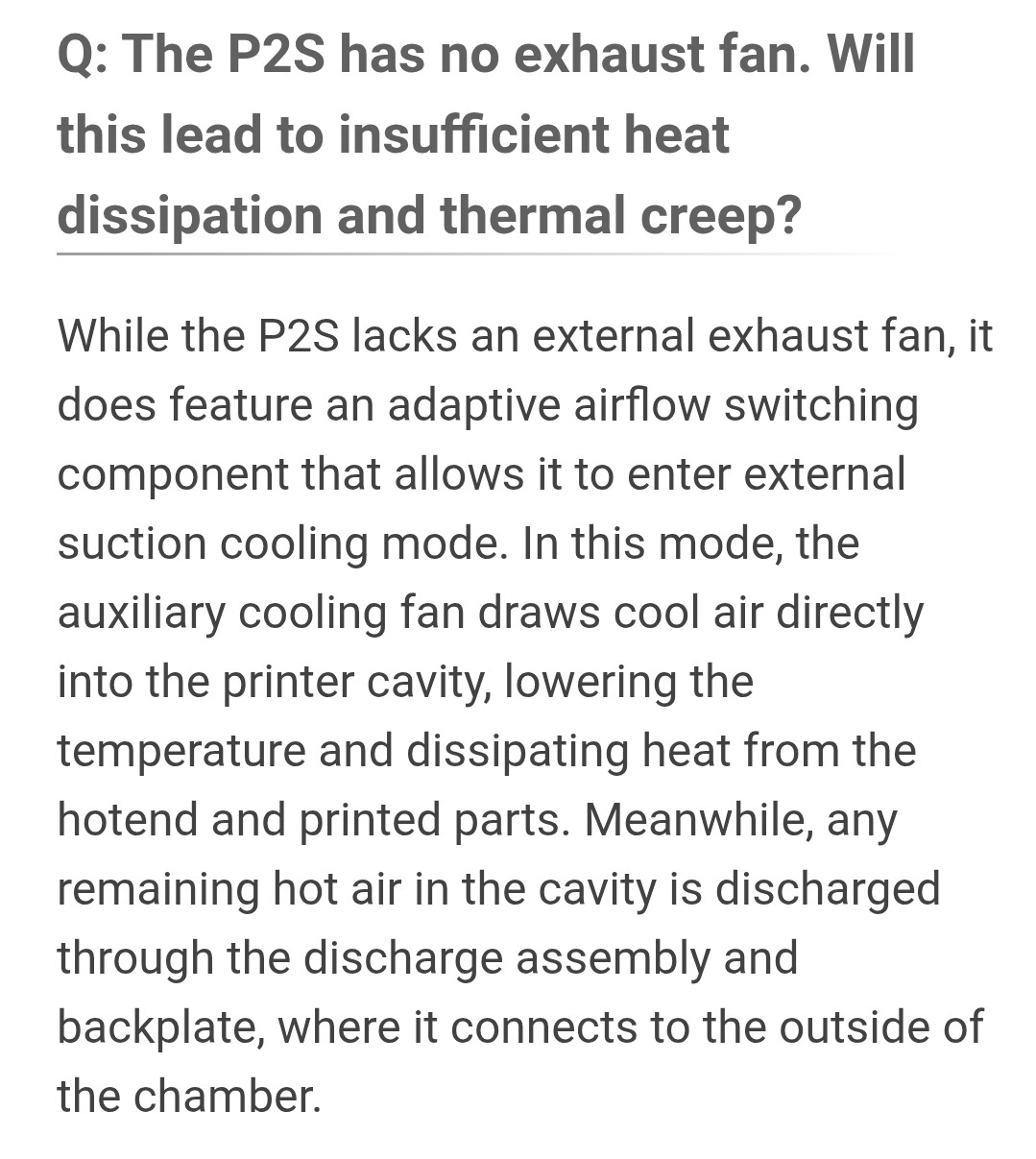
The P2S doesn’t have “heating” and “cooling” mode - it has internal and external air circulation modes to reduce harmful emissions into the room when possible. For very low temperature filaments like PLA, there may be a need to leave the door open, but I’m not even sure that will be the case with some of the newer rapid PLA formulations. It also happens that at these low temperatures the really nasty emissions aren’t being generated, and PLA is one of the safer materials, so is this really undermining the filtration promise? Is there a promise, or is this a feature that only applies in some situations?

Also - do you have actual test results that show PLA isn’t being cooled sufficiently as a result of the chamber temperature?

I don’t agree that PETG needs low temperatures to print - there are plenty of tests showing stronger overall prints at higher chamber temperatures. I run a heater in my X1C for all PETG prints and have never had a heat creep failure - so what’s the downside?

Edit: This is all discussed in thr P2S Wiki. Suggest you spend some time reading it.

Super looking forward to hearing your AI’s opinions on this.

Okay, that’s at least one argument I understand: expectations, advertising, and reality don’t match up.

You were expecting a printer that only requires you to press the ‘print’ button. Yes, that’s how some of the adverts portray it. But the reality is that you have to familiarise yourself with the device, because it’s very complex. At the very least, you should read the wiki and the user manual, which I can tell you haven’t done.

Now you have three options: You can complain about it, which is perfectly legitimate. Alternatively, you can read the wiki and the manual. Or you can ask the community for help - they’ll be happy to assist you!


There you’ll find guides and tutorials for almost any problem:


Here’s a detailed explanation of everything related to fans, cooling, etc.


But in your case, it doesn’t make sense to turn off the fan: If your room is for example 35°C, then the chamber is also that temperature before you turn on the printer. The printer adapts to the room temperature. You’ve made a huge logical mistake there. That’s such a huge logical fallacy that I don’t know how to explain it.

Whether you turn on the fan or not, it can never get any cooler than room temperature!

Yeah, of course not - it’s just physics. I’d really recommend taking a break and checking out Bambu Academy - it explains a lot about the topic. :grin: :+1:

I dont really want to get into writing a book, but I will say one thing…

As someone who owns 3 P2Ss with about 15k hours between them, I can not relate to most of the issues that you are describing.

Only thing I can relate to is the chamber “overheating” sometimes. I have seen them get up to around 40c when printing PLA, but this is only on loooonnnngggg prints and does not seem to have a considerable impact on the print.

This seems like more of a settings issue with your filament profiles.

Also. You expect sub ambient cooling? Your not going to so that with just fans.

I don’t have a lot of experience but I also got a P2S just recently (or more like, my wife got it for me for anniversary) and I have 99 hours on it at the moment.

I understand that your experience is vastly different from mine and it might come from different printing conditions or quality variation of anything else, but I don’t see the problems you listed on my end.

I print Bambu PLA Pure and PETG Basic, room temp is about 27-30C with 50-70% humidity during the day (I have AMS2 Pro though). I always print with the door closed.

I get very good surface quality if the speed/layer time doesn’t change rapidly (there are visible steps when it does). I don’t have the nozzle knock supports / part off, as long as the part has a decent contact patch with the plate.

I’ve printed one miniature with PLA and one somewhat more complex shape (besides simple parts) with PETG and happy with how both turned out. PETG has been extremely simple to use so far, just load the model and click “print”.

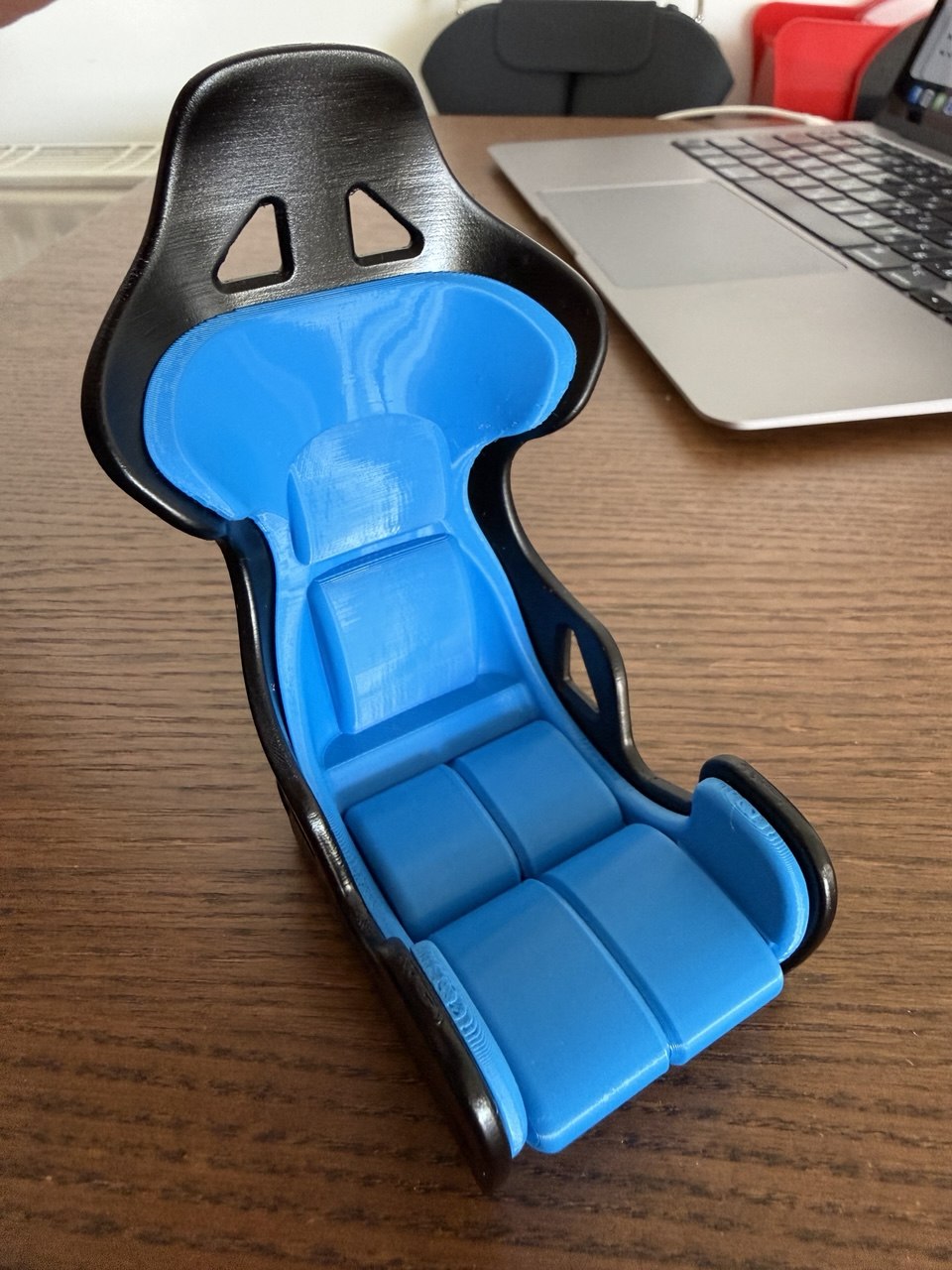
The figurine below is about 5 cm high, printed with PLA, 0.4 nozzle 0.08 layer height.

The “chair” is PETG, black part is moderately sanded, primed and painted (as the plastic used to be of different color), the blue part had no surface post-processing whatsoever.

The belt tension thing you mentioned makes me a bit worried but I hope it’s gonna be fine, provided my experience looks a lot better from the start.

I see that you do not even owe a P2S, but an H printer, right?
Super looking forward for you to think about it for a moment by yourself.
Cheers!

I am complaining, right. But not just that. I tried to find and share solutions. Thats the reason for this post and the gisthub linked to it.
Of course, it does not make sense to turn off the fan if the inner chamber is already way too hot. Bu that is not what I said. The answer is, that sending a fan to head mode when cooling would be needed is the issue. That is what the actual bambulab firmware is doing with certrain profiles. You can see yourselve by following my links to the relared github issues i linked to.
Dont believe me? Just change a PLA profile to a melting point above 50 degrees and start a print …To state “my cant cool below abient” is completey out of context. I was trying to explain that even with the sort of fan that lives within a P2S you will never be able to go below room temperature. That is what “no active cooling” means. But thanks for explaining 4th grade physics. Happy you understood them :wink:

Welcome to the forum.

Here is a link to the guidelines we follow.

https://forum.bambulab.com/guidelines

Cheer!

Thank you for your response. :slight_smile:
How do you get along with 40 degreees chamber heat? Opening the door? You have an idea, under what circumstances that happens. My temp is already at 40 degrees with a print of about an hour. And yes, this was a filament profile issue, as I stated above: In filament settings under basic settings you will find “softening temperature”. If that value is above 50 degrees, bambus P2S firmware (or the bambu slicer) will force tha AUX fan into eat mode. If its below, it will operate in cooling mode. As most of the third party filaments come with values above 50 (as this is there real softening temp), bambu treads them as hi temp filaments, thus heating up the chamber and generating PLA printing problems, including heat shrinking artifacts and so.

I am not expecting sub ambiet cooling. My room temperature is about 25 to 27 degrees as it is a hot summer. But than using the heat fan AUX mode leads to problems. It took me a while to find out, that this is a problem. So i was wondering how to be able to get the fan in cooling mode when printing PLA with third party filaments.

If you’ve just signed up and are already getting cheeky with people who are volunteering their time, I can tell you right now that you won’t have much fun here with that kind of attitude.

Bear in mind: This is a community where people help each other out. Starting off like that could really derail your journey.

Like I said, let off some steam addressed to Bambu - no problem. Venting at other users? Bad idea… Maybe you should read the forum rules, like Jon already said.

You are totally right but as far as i ve understand part of your answere, you were assuming that I dont understand 4th grade physics. If i misunderstood you, my fault.
Just posting half a sentence as a reference, completely out of context and not very polite. Do you agree?

You also might be blocking your fans. Just something to look out for. I dont worry about it. You will not start seeing issues with chamber temp until you get around 45 to 50C. And like I said, that only happens on long long prints.

Since you are running your printer in hotter conditions, I would recommend tuning your fan speeds to compensate for that.

Or another idea is getting a cool plate so you can reduce the amount of heat being put into the system.

To me, 80F is hot. I run my printers in my home office which is consistently 67 to 72 F.

You might want to take the top off or print a ventilated riser, your ambient heat is much more than most of us are probably running.

I suggest making your own profiles for your filaments.

If you need help, there are plenty that you can import from MW. Or Polymaker downloadable filament profiles if you buy from them.

You had some very bad wording if that is not what you meant.

Take it easy - no one here wants to harm you personally; quite the opposite, in fact. But it’s perfectly legitimate to ask questions. Despite your detailed description of the problem and your copy of the text on GitHub, some essential information are still missing.

You have good arguments, but it’s not the length of the text that matters, nor whether you copied the text to your GitHub, but rather how you can back up and describe your points.

This isn’t a personal attack either, but there are significant flaws in your reasoning. You can work on that and revise parts of the text - or not. Like I said, there’s just one thing you need to keep in mind: Bambu won’t help you here - if anything, it’s the community that will.


So you’ve decided to write a review mixed with a little rant - that’s fine, no objections. The next logical step would be, if you want, to post the issues and let the community help you - or not. It’s just an open door; you have to walk through it yourself. :+1:

Thanks for your reply. The 27 to 30 relates to room temperature. You have any idea what the chamber temp is you are printing on with a closed door?

You are right with the feedback on my text.
Honestly, it was not my main intention to get help, but to address problems that I encountered during my first week with a P2S. Furthermore in relation to the experiences I made on my A1 mini. Mainly by the use of PLA.
And yes, of course there is frustration about the need to find out a lot of those things by myself.

Maybe the following will clear things up:
I wanted to print a model with an organic form, supports and overhangs that was placed right in the middle of the plate with PLA. It came out with bad artifacts and warped parts on the right side and big, organic formed spots on the left that were looking like the material was either expanding or contracting differently from neigbour parts. Indication was that it did not cool down evenly and I was asking myself, where that could come from. First suspect: uneven airflow from the right-sided aux-fan. So I turned it off for the next print. Temperature in the chamber stayed lower but was still quiet high. The warping was gone, but “melt” artifacts were still present. Chamber too hot? A logical theory when chamber temp rises up to 45 degrees. Till that point, it did not come to my mind to open the door. Hey, I bought a closed printer :wink:
I realized that the fan mode was set to “heating”. Ok, but if the chamber temp is too high, cooling would be way better, right? Just bring the fan in cooling mode … which did not work as it turned out that this is hardwired to the filament settings. Invetigations showed that everything above a melting temp of 50 degrees is treated as hot material. So I turned down the value (63 on a sunlu profile that you can download for P2S printers on their website) to 49. On the next print, the aux-fan operated in cooling mode, as intended. But chamber temp was still around 40 to 42 degrees. So what else is causing heat in a closed chamber? Nozzle, heatbed, …
Turned down the heatbed to 50 as i have really good bed adhesion and that led to slower rising temperature but still did not solve the problem with spot-formed melting artifacts.
At the end, I had to open the door and even remove the top lid to keep temperatures stable.
Artifacts gone.

Yes, I assume that printing PLA should run in an environment of about 35 degrees at max. To my knowledge PLA start getting soft at 45 degrees … That is, why I am asking people for their operating temperatures and, if they print open or closed.
At what temperatures do you print your PLA without problems? With closed door and closed top lid?

I did not mention, that i had nozzle clogging and an extruder error in the meantime, where i could find filament in the extruder gear.

I also had some other issues, not related to thermal topics. Ringing on the model for example. Not just on overhangs but noticably more often in such areas. So what now? Print speed would be an idea. Maybe it is also a tension problem of the xy-belts? But this printer has run for just 70h, right?!

That is a brief description of my so far P2S journey.

So if the temperature in your room is only 35°C, the printer should be able to handle that without any problems, which suggests there’s another issue.

There are probably several issues at play here, and you’d need to perform a targeted, step-by-step troubleshooting process. This includes checking the screws mentioned, as well as the belt tension, which may have loosened during shipping to you. That’s one of the first things you should check. After that, you can address the temperature issue, but as I said, it’s up to you whether you want to troubleshoot that.


My gut feeling? The problem lies somewhere else entirely… That probably has nothing to do with the temperature itself, but rather with some fundamental issue with your device. What is it? Well, that would have to be figured out step by step. You think it’s a chamber temperature problem, but I suspect the root cause is something else entirely.

You might of course be right, that themal issues are not the fundamental problem. That is why was seeking knowledge from other users about their thermal specs like environment and chamber temperatures. The belts would have been next on my list anyway. Maybe I should have started with them but than I would not have found out about the 3rd party profile issue and that melting temp is related to the aux fan mode.
I will go through the wiki for the belt fix process and post my results here.
Thanks for your feedback.

I have one, maybe silly question, to the belt tightening process showed in the bambu wiki here: P2S Belt Tensioning | Bambu Lab Wiki
What is the supposed end position of the print head when retightening the screws? Or is that completely irrelevant?
Thanks!