My experience has been totally different than yours, but also our circumstances are different. I have about 2,500 hrs on each of my 3 P2S’s. I print exclusively PETG-HF and have installed high flow nozzles in each machine. I typically have them running 18 hrs a day. Once I got my initial settings dialed in I’ve been extremely pleased with these machines (I just bought another one). Nothing but normal routine maintenance needed. But like I said, our circumstances are different. My ambient room temperature is around 25 degrees C. I keep my filament dry (under 12% RH), and I clean the build plates between each print. Clean the nozzles around every 10 prints. Had 1 pully one time squeaking but a little silicon grease took care of it. I came from P1S and had 4 machines. Put about 4,000 hrs on them and sold them. In my opinion the P2S is a much better machine and I would recommend it to anyone doing high volume printing.
Sage advice. I have had some problems but since I understand the variables of 3D printing? Coming from a Artillary Sidewinder 2? Yea I will take this experience over what I have been dealing with for the last 4 years. Thes things are tanks and I love them!
That makes hope that either there is just something wrong with my machine or I am just not doing it right. Honestly, I d prefer the latter. Your room temperatures are equal to mine, so is my bonedry filament. I also tried PETG-HF which went way better than PLA+, but I just tried one model that was pretty much a technical, very squared model with less to no overhangs.
Anyway, thanks for your feedback. Much appreciated.
I’m far from being an expert, and I certainly wouldn’t claim to understand all the complex parameters involved in 3D printing. But I’d also consider myself a bit beyond the complete beginner stage. I spent about 20 months with an A1 Mini and learned quite a lot along the way.
Maybe that isn’t the right reference point when it comes to expectations for a machine that costs more than three times as much. And perhaps it isn’t entirely fair to compare a bed slinger with an enclosed CoreXY machine either.
Most user reports seem to lean in the same direction as yours: a great machine without any major flaws, a real workhorse that simply runs reliably. Which is exactly what keeps me wondering: why is my machine so different?
There are certainly hiccups, flaws, and bugs — and they are well documented, even if some people would rather pretend they didn’t exist  See the footer of my Gist for links to GitHub firmware issues and more.
But honestly, I wouldn’t care too much about any of that if my actual print results weren’t slowly giving me grey hair.
It might be worth considering another option. Something is wrong with your printer or you got a lemon. It happens. Happened to me. P1S but had to ship it back to factory. Second printer has not missed a beat sinse. Or I created a problem.
As far as the “it just works” (with BL filament) the BL printers and filaments and the RFID code on the AMS are intertwined and that runnability is the reason. It reads the RFID and every single possible setting is loaded into the printer and that is important to understand when using other brand filaments. Lots of people use other brands of filament but there is a fundamental difference you have to be aware of and test to find the sweet spot.
Non-BL filament is sort of “Jack of all trades” filament meant to run on all different brands and types of printers.
Aftermarket filaments you will see bed temperature and it will have a range, not a value. These will be random numbers as I do not have all the settings memorized
Aftermarket pla spool will have a label with a nozzle temperature RANGE of +/- 10°C and a similar range for the bed that it is dependent on you to validate. Spool says 200+/- 10° means you have to figure out if it is 190° or 195°, or 205° then you have to save those settings. For example it might be Elagoo .4mm nozzle PLA Profile" and click save.
BL filament in Bambu printer they have aleady done that for you and it is built into the default profiles. You set the nozzle diameter, RFID gets read and says " Okay, let me take every single setting is plugged in.
The nozzle size is set locally and then you choose .2 standard strength as in the first picture. All the setting in the bottom picture set by Studio. You see “System presets” and “User presets” in this fist picture? System presets represents what the engineers have already decided are the best settings and those are PRESET by the system (Studio). THAT is why “It just works”
You decide to use Protpasta filament, which is absolutely your choice, it is on you to validate every setting. Find all the ideal settings in your Protopasta PLA you have to save it in User presets. Maybe “Protopasta .2mm nozzle optimised” finds a home in User presets. Sinse no RFID each time you stick Protopasta PLA in the AMS so it relies on that User preset to be there.
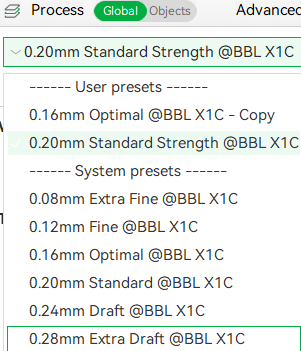
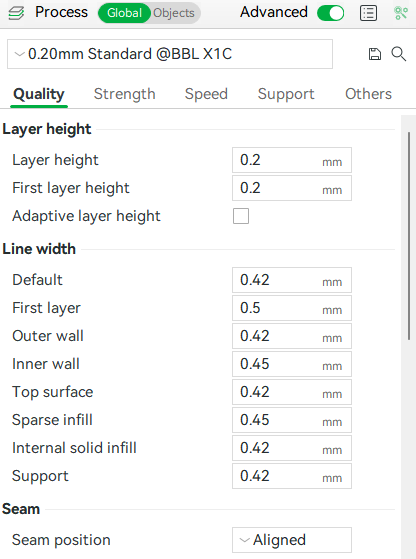
. Ignore third photoI can’t delete it on this aggravating Kindle.
Don’t over think things. It helps to understand how the AMS, RFID, Printer are all a part of a system and to understand what is going on under the hood. Why the printer does what it does.
The printer will absolutely run on non-Bambu filament but you have to fill in the missing parameters bundled up in that RFID code on a Bambu spool or refill.
Another advantage - and the reason I stick with Bambu Filament, for example - is that when an update is released for the slicer and its print profiles, you don’t have to adjust anything. Custom profiles are great once you’ve calibrated everything, but unfortunately, they’re often no longer compatible with newer versions of Bambu Studio.
RFID tags really do help a lot in minimizing human error.
That’s 100% true. Unfortunately, some customers realize this too late or don’t dare to return their device. Then they either write a rant or try to fix it themselves. While people here are always encouraging others to fix things themselves, if it’s a brand-new device, they should contact Bambu right away and, if necessary, request a replacement. At the very least, letting Bambu know is the most important, so that it’s recorded.
If I have the option of choosing between a rant or having the printer replaced, I’d definitely go with a replacement. Especially since Bambu has significantly extended the time window to 30 days - and the warranty isn’t affected by that anyway.
Thank you all for your responses and insights. Very much apprecciated.
In the meantime I checked belt tension and could not find anything suspicious. Nevertheless I ran though the process as described in the bambu wiki. Unforteunately, I did not have the time yet to print a model and check if ringing is still present.
Regarding a lemon device: As “thermal problems” are still present and most of you stated that the need for opening the frontdoor, removing top-lid and decreasing bed temp would not be normal, at least on their devices, I opened up a support ticket, asking for replacement.
We will see how things go on.
Have a nice day and happy printing!
I’m glad my P2S came out of the box and went right to work. What few troubles I have had were easily cured with a few intelligent corrections. I used Bambu Labs filaments all through my “learning curve”, and still do for most things. But I’ve been printing with some of Best Buys Insignia brand filaments (Black PLA, and White PLA) and some interesting colors for doing kid things like dual color dragons and a 3 day marathon ball a grandson wanted. Which he broke right away, even after I told him it would not bounce because it is PLA. So let him figure it out the hard way. He mostly prints easy faster stuff.
Point being, I got used to my P2S before I started bi___ing about it, and I didn’t just fill my AMS with filament I had. Because I didn’t have any. I’m a genuine beginner at 3D printing. But I differ in that I knew there would likely be a learning curve on my part to get the better prints from a new machine.
In order to stop prints from breaking away from my build plate, I finally discovered Brims. Weird name, unless you decide they are like a hat brim that reenforces the hold of a part to the plate. Now, I hardly ever print without them. A brim is very cheap insurance that I won’t get a pile of something done only to break away and become a useless pile of plastic. I knew what I needed, it just took me a while to find Brims in 3D printing jargon. But I’m like that, I’m a patient, methodical, troubleshooter. I don’t blame the machine, I look at what I’m doing with it. I look at why is it doing something and not giving the results I find with other things I print.
And believe me, I’ve found quite a few models that may work on whatever the author was using, but they were crap on my machine. So I look into anything I might have missed. Sometimes I find things, or sometimes I just find another model that when printed works fine. The end result is the object, and not a pile of blame on my printer.
I don’t blindly follow the herd in what they are doing either. I have never washed a plate. I spray 70% rubbing alcohol in a microfiber towel and wipe my plate between prints. Low moisture seems to be a point in this game. Alcohol absorbs moisture, as well as being a great solvent for cleaning. Based on decades of cleaning sensitive parts. Anyway, I do get pretty good adhesion and the brim does the rest.
I got a blob once, did a cold pull once because of my fault not my printer. Point is you need to realize most of your problems are you. Not the machine. Your own impatience.
Now if there was an ignore feature here, I’d most likely put you on mine. I don’t do well with ignorance, except to ignore it. And that is not good for those I ignore. They have to find shared knowledge elsewhere instead of getting any direct sharing.
Maybe 3D printing isn’t for you. Maybe you’d be happier with a bag of marbles instead. But you sound like you tend to make your own problems, then pop off at others trying to help you. See you.
I have to quibble about this because I just finished dealing with the same topic in another thread.
All the settings for a print come from the slicer and are loaded into the printer from the print file, not from the filament’s RFID.
Yes, at the beginning of a print the filament(s), nozzle(s), and bed type is read, but it’s just checking against what’s expected, no actual parameters being used by the print are being introduced.
Reason for this is these parameters all need to be factored into the slice itself - which means heavy processing load. The printer itself has a shockingly minimal processing unit, it’s able to operate as a realtime hardware controller for the heaters, fans, cameras, AMSes, and steppers/servos, and that’s pretty much it!
Hi there,
first of all, I’m genuinely glad that your machine is running well and that you’ve found your own way of dealing with the occasional obstacle. And I do appreciate you taking the time to participate in this discussion and respond to my post.
That said, I have to admit that I’m struggling a little to understand the point you’re trying to make.
Most of your advice seems to focus on bed adhesion, which is actually one of the very few things I haven’t had any problems with.  At the same time, your reply comes across — at least to me — as suggesting that most of the issues are simply down to user error and that I’m more or less a 3D-printing beginner who still needs to learn the basics.
That makes me wonder whether you actually read my original post and the Gist I linked, because the issues I described there go quite a bit beyond bed adhesion.
And just for the record: the “lemon” theory was brought up in this thread. It wasn’t an idea I came up with myself.
To put things into perspective, I didn’t originally post this because I was simply looking for help with my problems. I documented several issues in detail and, more importantly, shared the workarounds I found in the hope that they might help other people who run into the same problems.
Fortunately, judging by the responses here, these issues seem to affect only a relatively small minority of users. That’s genuinely good news — although, unfortunately, it doesn’t make them any less real for those of us who do experience them.
I’ve been into 3D printing for about two years now. As I’ve said before, I’m certainly not an expert, and I wouldn’t pretend to be one. But I also don’t think a complete beginner would normally spend this much time analysing thermal behaviour, filament settings, fan behaviour, print profiles and possible workarounds — unless that beginner happens to have chosen 3D-printing troubleshooting as a new full-time hobby.
And yes, 3D printing is fun. Or at least it was, before I ended up with a machine that currently struggles to produce results comparable to a printer that cost roughly one fourth as much.
Did the P2S meet my expectations? So far, no.
Is it the P2S in general? That is, what I am trying to find out. It doesnt seem so. There is hope.
Is some of that possibly down to something I’m doing? Of course. I’m perfectly open to that possibility.
Am I willing to spend endless hours tweaking settings, experimenting with profiles and digging through G-code just to find out why the machine isn’t producing the quality I expected from it? Not really.
I love 3D printing as a hobby, but for me the enjoyable part is creating things, printing models and experimenting with ideas — not debugging the printer itself.
A little troubleshooting is part of the hobby. I completely accept that.
When the troubleshooting starts becoming the hobby, however, I personally think something has gone slightly off course.
All the best and happy printing!
PS: Do I sometimes take things too personally? Yes, I tend to.
Though this tends to get offtopic but has been discussed here:
Just my personal take on Bambu Lab filament versus the other brands I’ve been using since december 24:
In terms of print quality, I honestly haven’t noticed any meaningful difference between Bambu Lab PLA and the Elegoo PLA+, Sunlu PLA+ and eSUN PLA+ I’ve used.
Personally, I tend to prefer PLA+ because I find it a little more versatile than regular PLA while still being just as uncomplicated and easy to print — at least in my experience so far.
One thing Bambu filament definitely has going for it is RFID. With an AMS, that’s genuinely convenient. When working directly in the slicer, however, it doesn’t make much difference to me. Most useful RFID feature: see how much filament is left on the spool. (I cant remember that I had that on my AMS lite and / or the A1 Mini though).
I should add that I’m only talking about PLA here, since that’s the only material where I have experience with third-party brands to compare them properly. For PETG, I’ve so far only used Bambu Lab filament.
So, I have seen only few advantages in general and any in terms of print quality.
But I did not touch any more advanced technical filaments, yet.
That is, why I ordered a P2S …
… and I hope I’ll get there eventually.
i have a 1000 + hrs on my P2S no problems
Awesome and congrats. I am indeed a bit jealous!
Have a nice day.
I received a response from Bambu Lab Support regarding my request for a replacement P2S.
In short: they are willing to replace the machine, but at the same time they doubt that a replacement would actually solve the problems I am experiencing.
Their main points are:
- They say that PLA warping is usually caused by several factors rather than chamber temperature alone, mentioning things like bed temperature, cooling, model size, build plate cleanliness, filament condition and fan strategy.
- They suggest that I buy the Auxiliary Part Cooling Fan – Left, saying that it could significantly improve cooling and help reduce warping.
- They also suggest cleaning the build plate to improve adhesion.
And this third point is where the reply leaves me rather puzzled.
I have documented the thermal behavior of the printer in quite some detail, including chamber temperatures, Aux Fan behavior, bed temperatures, open-door testing, removing the top glass, different filament profiles and several other things I have already tried.
So being told to clean the build plate makes me wonder whether someone actually went through the description of the problem, or whether parts of the response are simply based on a generic troubleshooting template.
Unfortunately, that also makes it harder for me to judge how much confidence I should place in the recommendation of adding the second Aux Fan.
Regarding the ringing/ghosting I mentioned, they asked me to provide photos for further analysis, but they did not really address it beyond that. The thermal behavior itself was also not discussed in much detail.
So overall, I am glad that they are willing to replace the machine, but from a technical point of view I find the response only partly satisfying.
What I am particularly interested in now:
Does anyone here actually have the Auxiliary Part Cooling Fan – Left installed on a P2S, and if so, what has your experience been?
I can certainly imagine that a second fan might help with the overall chamber temperature and possibly create a more balanced airflow inside the printer.
On the other hand, this fan also blows directly across the build plate. With fans on both sides, could this potentially create uneven cooling on two sides of the model and actually increase the risk of warping with PLA? Or does the more symmetrical airflow work well in practice?
I would really appreciate hearing from anyone who is actually using the second Aux Fan, especially for PLA.
i dont use a second fan the only fillament i have problems with is pla aero witch i think is just setings
I’m using the left fan in combination with PLA without any problems till now
Thank you for your reply. May I ask for some further information?
- Are your chamber temperatures noticeably lower?
- At what temp is your bed temp and chamber temp?
- Does it create a more even airflow around the model > more even / symmetric surfaces?
- Does it help with PLA warping or curling in the model itself (not bed adhesion)?
Thank you very much!
what exact problems are you having
It might help if you share pictures of your issues before getting the printer replaced.
If its user error or environmental based, the same problems are going to happen again.
If you are worried about temps, it might be better to get the external fan kit and add some gcode to run it all the time.