My review of the X2D after 200+ hours

On P1S Im longer PLA prints print with tilted top glass with this thing:

https://makerworld.com/models/423637

Shorter prints(1-4 hours) Im print closed. On X2D now in first 100 hours when most of things are printer upgrades Im print everything complete closed because most of material has been ASA and PETG… :slight_smile:

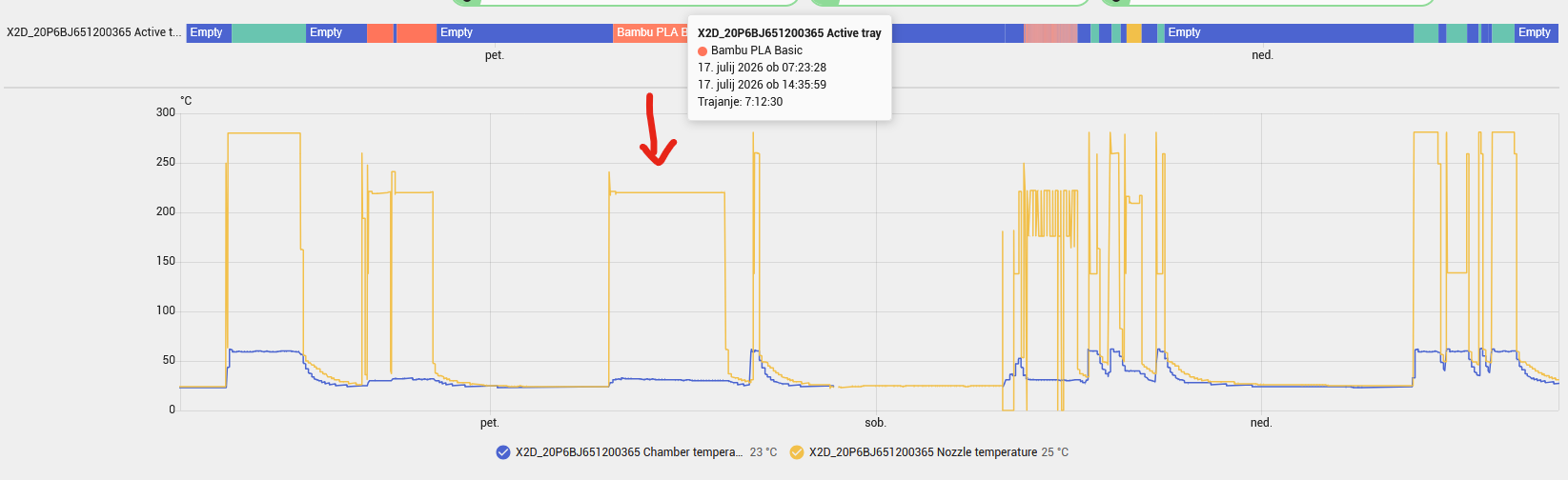
I have 3,5kW Daikin AC above printer in room and temperature around 22°C so maybe this make some difference… This is from HA history when I print full plate of skadis cable clips with PLA chamber temp has been 30-32°C:

Im quick check also other PLA prints and all have chamber temp around 30-34°C … With PETG around 40°C and with ASA 60°C :slight_smile:

I think the recommendation to open the door or raise the top lid was only for X1, P1 and P2 printers. H-series and X2D all have active air management to exactly avoid the need for leaving something open. So I think that is something you carry over from those older printers that doesn’t apply to the X2D anymore.
I have already printed large PLA parts at 32 °C around the printer without any issues. With the X1C, I regularly was rewarded with a serious clog in such situations.

I’m having an issue with my X2D. I wanted to print an object with a color gradient so that each toolhead has its own filament. As soon as the right toolhead (the auxiliary toolhead) starts printing thin layers, I get a “filament runout” error (code: 07FE_2000_0002_0001).

The easiest way to reproduce this error is to draw a 100mm cylinder with a 10mm height and apply a gradient. You can also do a 50/50 color mix and select the 0.08mm profile. The 07FE_2000_0002_0001 error pops up almost every single time. Interestingly, when I print smaller objects (e.g., 10x10mm), the error almost never occurs. Bambu Studio itself suggests splitting the two filaments between both toolheads.

Am I doing something wrong? Could this be some kind of malfunction? Or is this a hardware limitation of the X2D and everyone is experiencing this?

I should add that when I print a single color with just one toolhead, everything comes out perfectly. It seems to me that the problem is somehow related to printing a very thin layer with the right toolhead and/or a temperature drop on the right toolhead while it’s on standby.
I’m using bambulab matte filament

Wow, a lot of material to read!

The X2D is my first 3D printer. I currently have 2 AMS2s and a AMS HT connected. I’m mostly using the AMS HT for drying new spools before loading into the AMS2s.

So far I’ve had a few issues, mostly self inflected. Build plate not clean enough and PLA not dry enough. However I love this machine. I have almost 200 hours on it so far.

I appreciate all the information above which will, hopefully, prevent future issues.

Learning Bambu Studio but most of my prints so far have been from Bambu Handy and Makerworld. Tools for the X2D and various things for the wife.

I’ll be here to learn what I can and asking questions that are too difficult to ask Bambu Support with all the junk they need, pictures and files, to ask simple questions.

Greg

Do you have any experience with the support on the AUX nozzle so far?

What filaments on both of the nozzles?

Maybe some problems with the PTFE tubes get too cramped at some specific locations?

This is with AMS on both of them or direct feeding? Trough the buffer or without it?


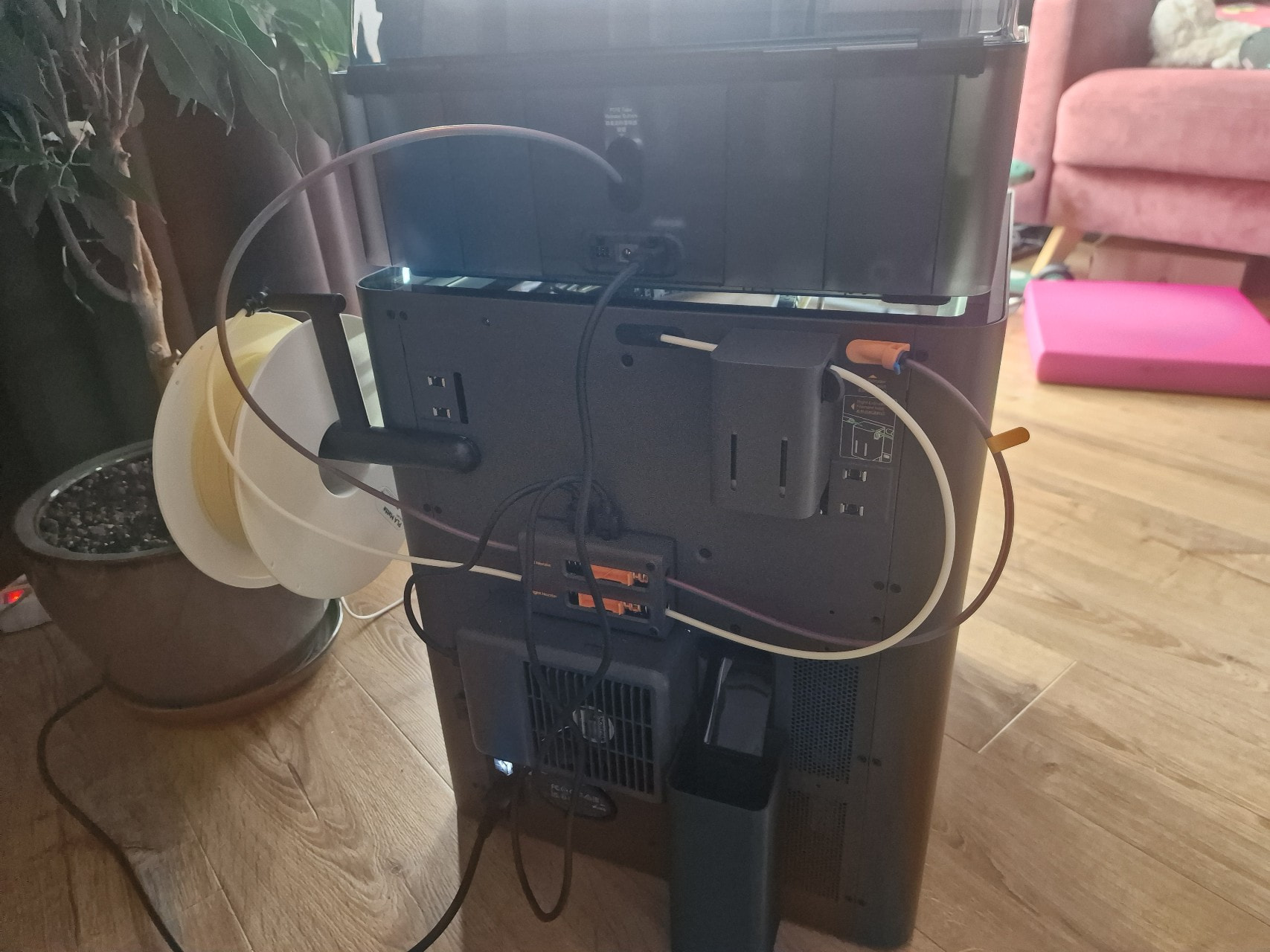
My PTFE setup.
Filament: Bambulab PLA matte on both nozzels.
Left one connected to AMS right one from spool. Both are feeded through buffer.

So I found it. And one problem is that BL docs are all over the place. Then some things are a bit against each other.

Here it says for enclosed and mention only P1/X1. But this topic is not printer model specific.

Next one:

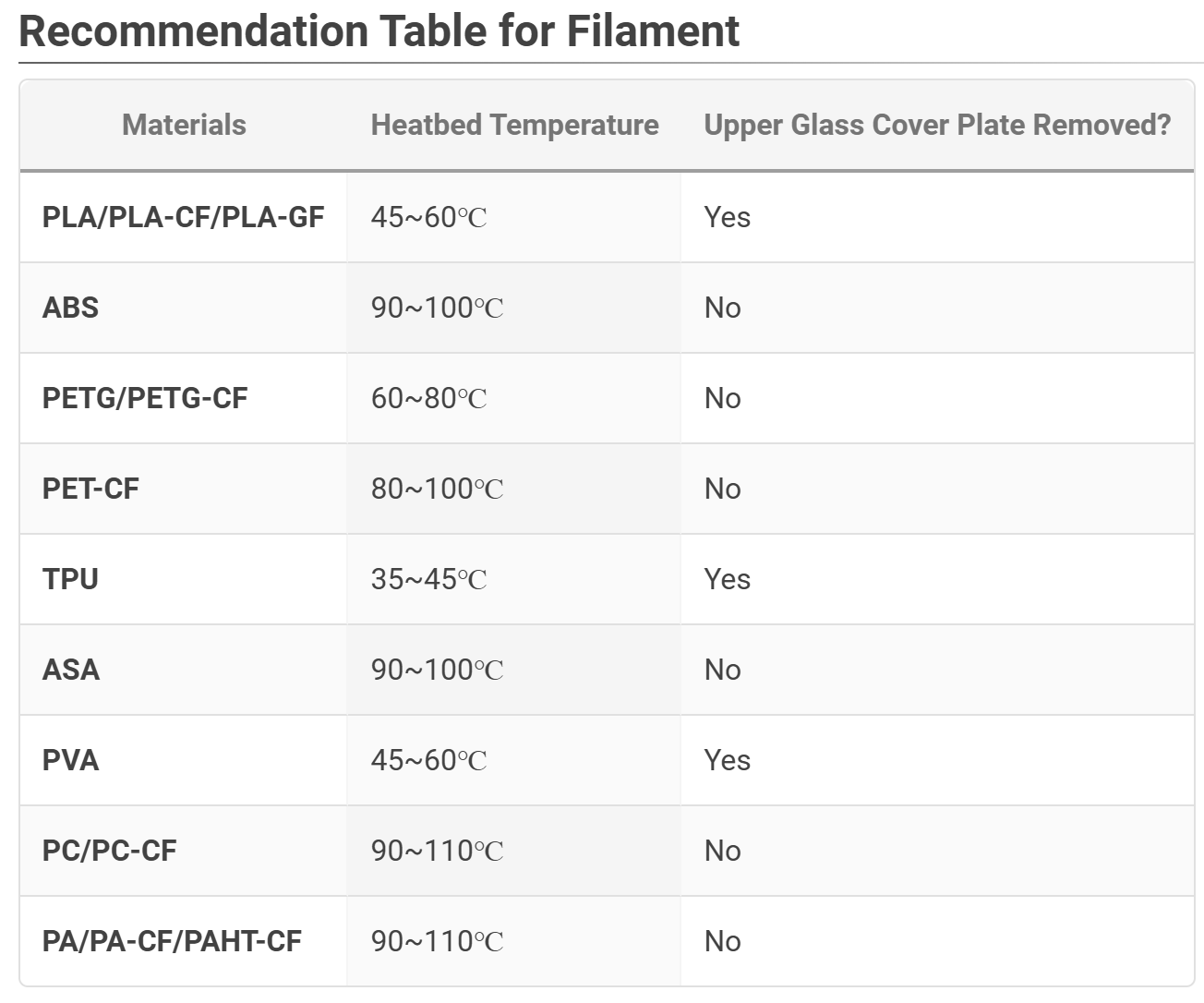
Most probably do remember this table here:

And in the below the tables notes you can see that to low temp also could create warpage.

And we have many topics here and all other forums that show that elements close to the fans or with specific form, or when used with different materials can be get affected by too much blowing from the aux fans. From all this guides opening the lid/door and leaving on natural cooling is the best solution especially for PLA. Or with very easy cooling for PETG.

Currently the active cooling does what it likes. And so far I was never able to get temps around 30C with closed lid/door, more like 35-40C.

In addition all material/plate guides suggest if heated bed above 45C and PLA better to open the lid.

From the active cooling section we do not have material specific info only how great the system is.

Something like this but not exactly. It is more like the missing part from the X2/H2 docs and existing part of the filament/plates/clogging docs. :smiley:

Now:

How exactly you can make balanced and even cooling if you are blasting very narrow stream of the cool air from the both sides of the plate. And meanwhile the tool head cools the head/extruder and nozzles. Which makes hot air to come from it. And if you are printing multiple object like for example 9 cubes like 8x8 cm, for simplicity of the example. You have no way to get the same cooling for the left and right side, front and back of any of the side sitting cubes. It will be blown with cool air from one side, and hot from the heated and tool head from the other. And even worse for the front and back cubes. Most probably these in the middle will get the most even cooling. I think it will affect the most taller objects. And if the object is thin it should be less affected as it is close to the heat bed/plate.

In this situation if you change the materials like PLA for PETG support and you will blow the PETG like you will do with PLA. Or opposite.

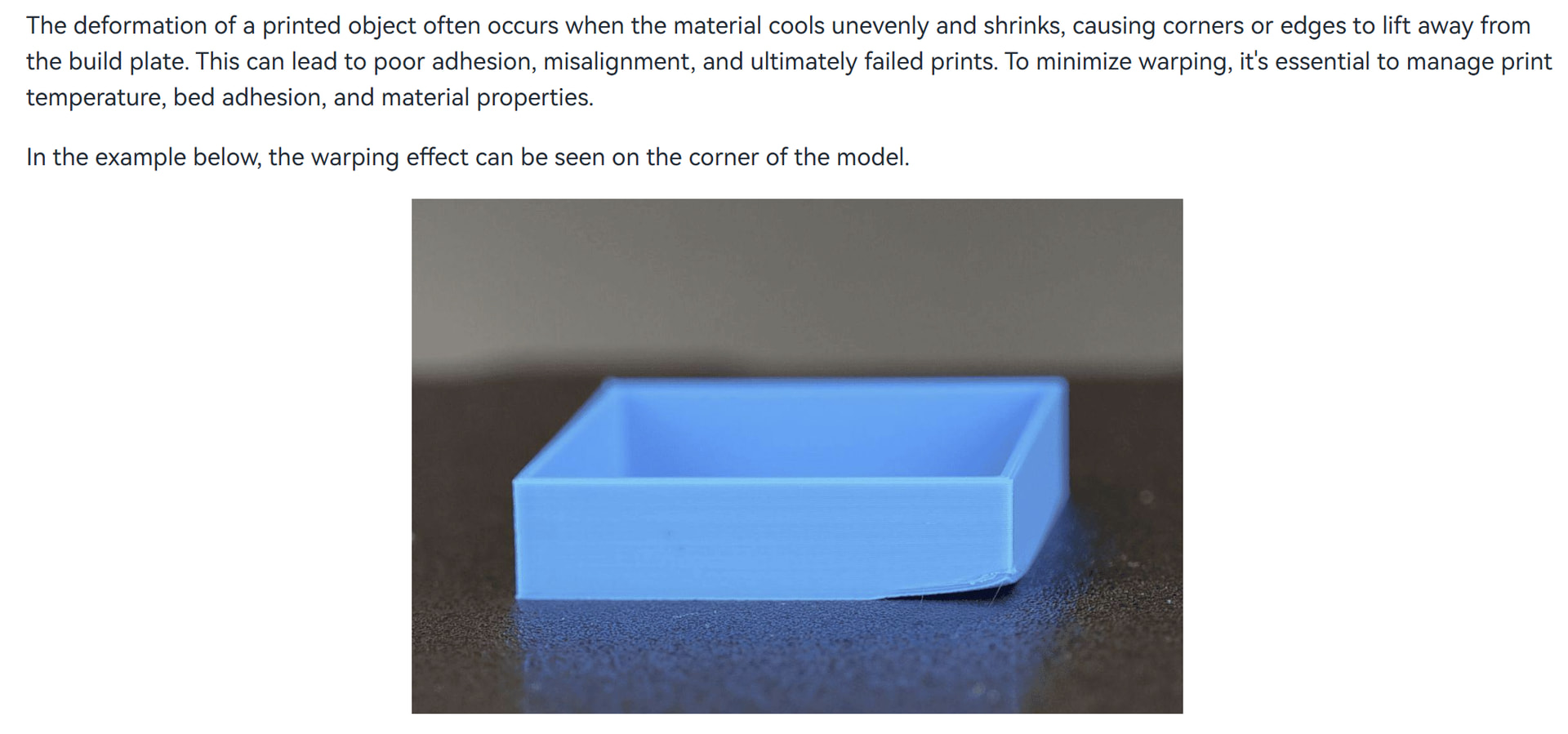
You can see from the clogging docs that heat creep can clog but also too cold can warp.

And the kind of warping as on the picture I already got with some toys. Even by default Bambu Studio arrange the objects in the middle and left area of the plate. So the most left objects get most the blow, and their right side get almost no colling especially if there are like 2-3 rows of objects. There are no left or right temp sensors, also no front and back, so I am not sure how it chose how much from which fan to blow.

In addition it seems strange to have two AUX fans in cooling and only one exhaust. As the two without filters will be able to blow much more than one with 3x filters any day.

It much more looks like design made fast, with parts on hand for the lowest possible price, then very well thought and refined. But many are arguing this is exactly why they needed and the price is right so no place to complains. Different people different ideas :smiley: .

I will try to play around with my IR camera soon. To try to show you some more examples.

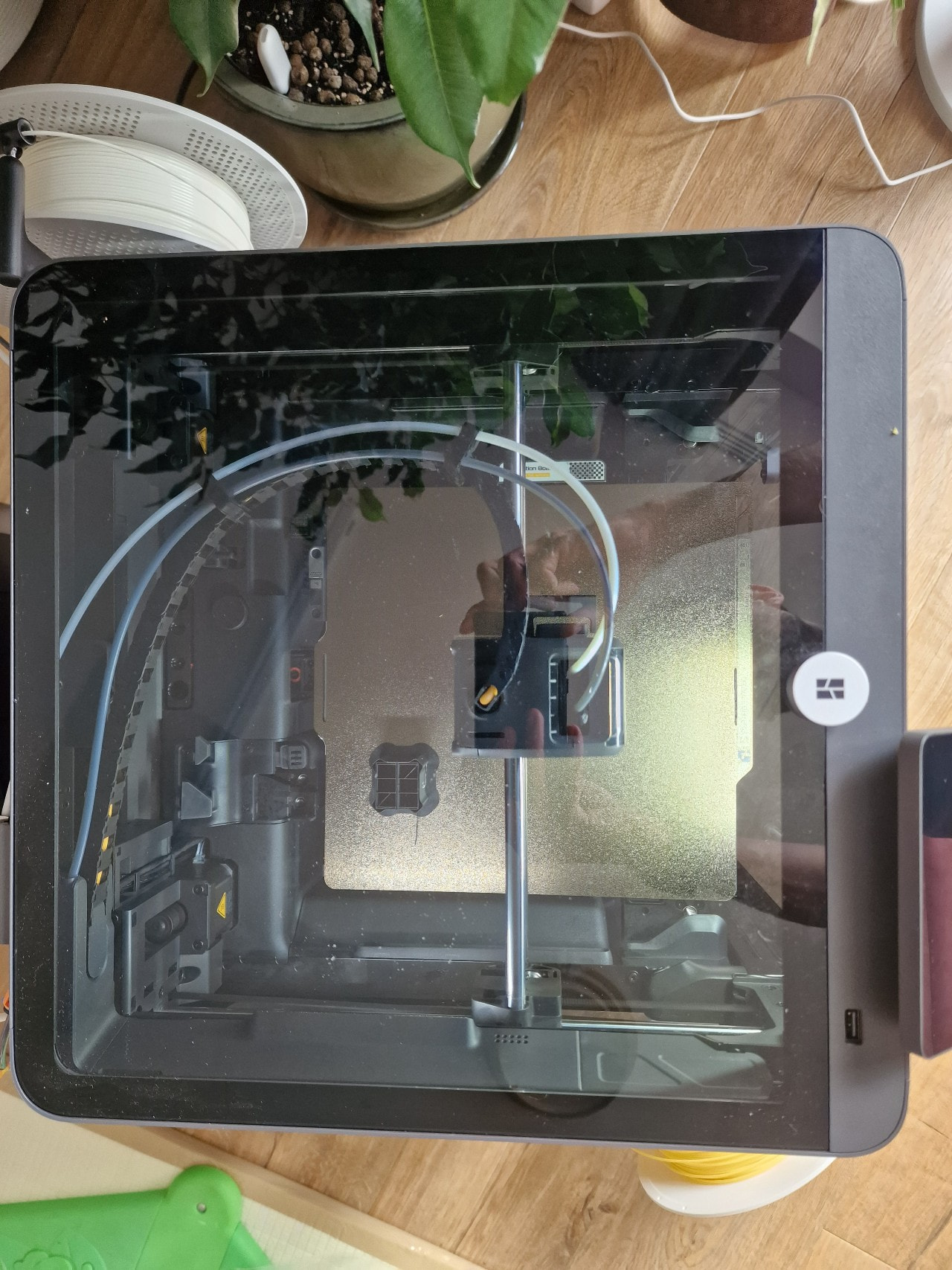
And if you shoot from the top now it looks when the head moves in the problematic areas? I have mine clips for the PTFE attached to the sleeve as at some moves it cased some bad looking PTFE deformations. To be more fluid and linear.

Also sometimes the PTFE tubes between the bolden extruder on the back and the tool head are getting lose and even disconnect.

So maybe you can remove the AMS from the top, give it some task and watch for the PTFEs from the lid and buffer on the back on what is going on.

And what is the nozzle size? Pla Matte should be fine though.


That’s the top view. Everything looks normal to me. Right now, I’m printing using the standard Bambu Lab 0.2mm High Quality profile, with Bambu Support for PLA in the right nozzle and matte PLA in the left one. Everything is working fine so far. The problem occurs only when I try to mix colors while using thin layers. At least, so far it has only happened under these conditions.

Nozzle size is 0.4

Ok It looks like mine in the beginning as with some moves it does somehow stuck the PTFE and it needs time to go back to normal. But this may not be the issue here.

How do you set this thin layer? By selecting the different profile, or by manually dial in thin layer size in the 0.2mm high Q profile?

I am wondering if maybe the speed is to high?

I just select the default Bambu Lab 0.08mm High Quality profile and add a new mixed filament with a gradient effect. I put one filament in the AMS and one outside, and then start printing. Nothing fancy.

A clue might be that the mixed color starts with 95% of the main nozzle filament and 5% of the auxiliary nozzle filament. The first two layers are always fine. The problem occurs somewhere between the 3rd and 6th layer. It always happens on the auxiliary nozzle.

UPDATE: Now it happened during a regular print with the auxiliary nozzle loaded with Support for PLA and a layer height of 0.2mm. This is exactly the basic kind of task the auxiliary nozzle is meant for. I will report it to the help desk after I go through all the troubleshooting instructions from https://wiki.bambulab.com/en/x2d/troubleshooting/hmscode/07FE_2000_0002_0001 one more time.

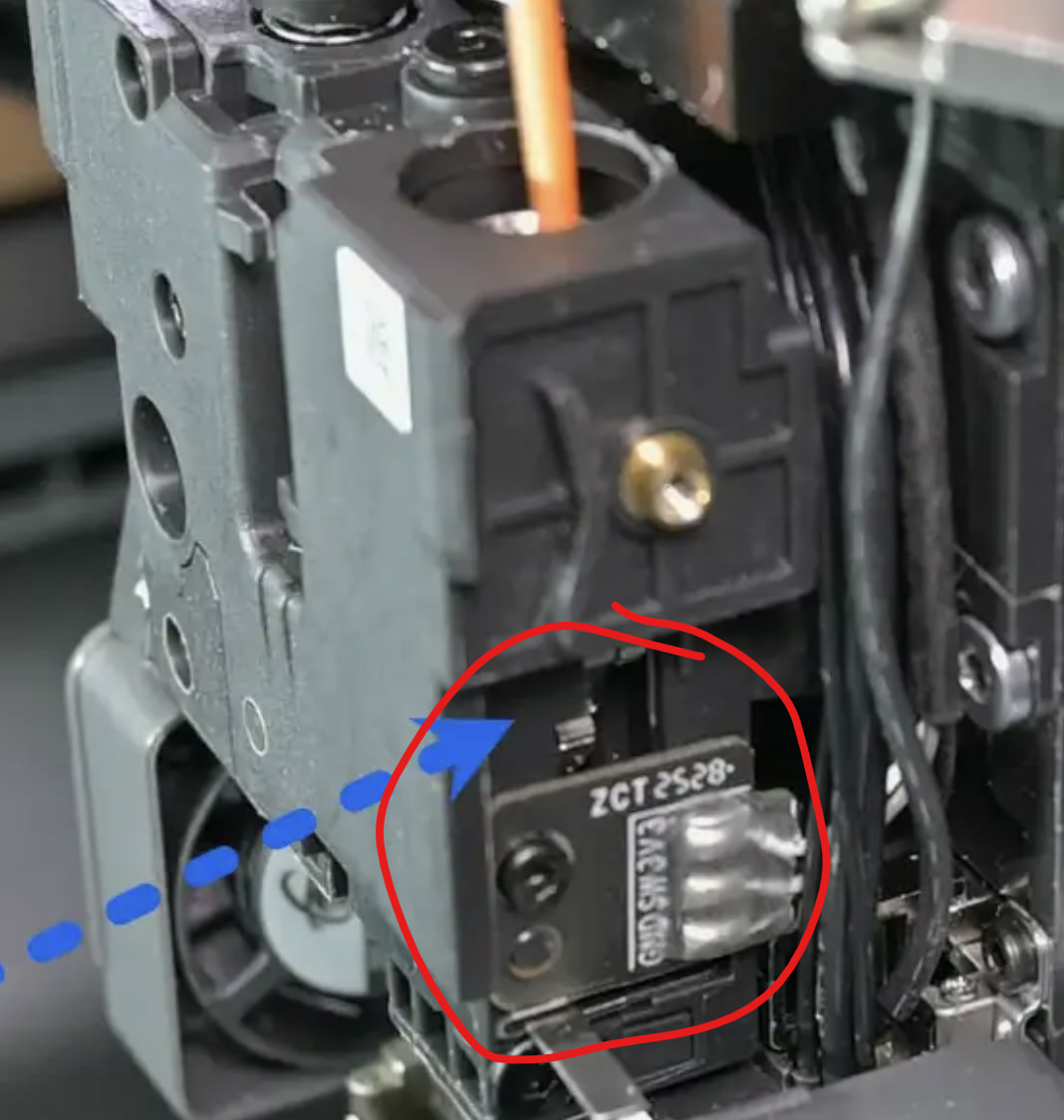
UPDATE2: I figured out that it has something to do with the Bowden extruder. It shows filament presence regardless of whether the filament is loaded or not. Even when the filament is in the extruder, it sometimes randomly indicates for a brief moment that there is no filament. This triggers a nozzle cleaning cycle, which consequently wastes a lot of time and material. After a few of these cycles, it just gets stuck on the ‘no filament’ status.

sounds like a broken filament sensor then. That is what I try to point out all the time: Most of the time, issues appear not because the printer is trash by design, but simply because something is broken. Then telling people to avoid the X2D because it is a bad printer simply are wrong conclusions put into a generalized advice.

Defenitely sounds like HW problem here.

Update 2:

If I am you I will request new one from Bambu and meanwhile will investigate this small PCB, it seems like there is some micro switch on it. So either the arm is not pressing it solid enough or maybe the switch itself gone bad. So you may be able to “simulate it” close/open to be able to do some prints while waiting for parts. If you are good with soldering el. circuits.

I just rolled 880 hours on the X2D I received on June 2nd, 2026 and it has been nearly flawless. A couple false positives, but you still have to track them down, to track switcher issues (but that was due to it’s horizontal mount, and that all I had going into it was a single AMS), and lastly, one plugged hotend after TPU, but it was not actually plugged, as my cold pull had nothing on it buy my pull color filament.

This was my first foray into 3-D printing, and while I appreciate the traditional “Start Small” suggestion of the A1/A2 argument, I don’t have the same opinion. You buy the A1/A2 and have measured success, so then you buy the P or X variant, but that simply fosters more success, and a better understanding, and then you buy the H2C. The only part of Apple that Bambu has nailed, is the upgrade, or for a few dollars more (you could get this feature) business model.

Granted, I’m only barely over 10 weeks into it, but when I was making my purchasing decision, I did what I’ve told myself never to do; i.e. let budget concerns drive bad decisions. While my X2D was anything but a bad decision, it was not the right decision for me, where I should have simply bought the H2C. As it turned out I ordered my H2C less than 4 weeks after I bought the X2D. On the flip side I now have 2 printers that run day and night, and I’m eying the Sovol M1D and or the Infimech X series IDEX printers. I’m also in both Kickstarters, so I can get the pretty steep discounts.

Lastly, I’ve read and commented on several recent Facebook (what should I do or buy) posts that ask “I’m buying for an 11 year old, what should I get.” My first question is will it be a budget driven purchase? Second, what current sit still hobbies does he or she have? Third, what is their technical aptitude? If they have more than a few functional brain cells, they will outpace both the machine and your expectation of their abilities, possibly within the first week. Most kids nowadays are so tech forward, that they consume any device they are given within days, and are teaching family members how to use them. The same will be the case with any 3-D printer you get them, because the rewards (successful prints) are realized with minimal efforts. Plus it opens the door for physically painting models, painting within the Slicer, making custom print models, sparks an interest in CAD, and might actually lead to an interest in writing or participating in code dev.

Staying with the advice model.

Whatever you do, make certain you buy the variant in the combo package. Do Not Short Yourself for the $100-230 combo difference. I also tell them to buy 10 spools right out of the gate for the best pricing.

P.s. I did not go the mandated PLA route, and fought the current by starting with PETG. You can’t safely put PLA in Aquariums (or so I’ve read), and I do a lot with both fresh and salt systems, so PLA was not going to be a good fit.

Great post, and would love to agree. Unfortunately I’m really finding it difficult to get past the Filament Feed Issues. My requirements mean I needed to implement the Switch Box, so that I could assign the nozzles between a single loaded AMS 2 Pro, and an AMS HT. I prototype engineering components so support for HT materials is a must.

The heat creep issues on the nozzles, and what is demonstrably a terrible design for the entire toolhead module is making my X2D unworkable. I just can’t live with it.

For example, I just stripped down the entire print head, to remove 13mm of clogged filament in the extruder, caused by heat creep on a straight forward print just using the main nozzle. It’s proof of a series of remarkable bad design decisions. Just design the tool head to be able to remove the extruder in 10mins if you know it’s got heat creep issues. I mean come on. It takes 90mins everytime.

Loaded some ABS from the AMT HT for the first print after putting it back together and it jammed in the extruder. Could not rewind the filament, had to do an ABS cold pull to get it out. The very next attempt on loading with a different spool of ABS, from the AMS2 instead of the AMS HT this time, it wouldn’t load at all. The extruder is clear, I know this as I ripped out the filament and it cleared the nozzle through using the nozzle settings in the software. It just won’t load. I literally have to baby sit the damn thing and load filament manually. Rendering £300 of AMS useless.

I’ve been up all night trying to coax the thing into completing it’s most basic function, and it simply won’t behave. I’m going to bed, when I get up, I’ll be onto Bambu for a replacement X2E or D, I’ll take an X1C if they have one, that’s been churning out prints for the entire afternoon the X2D had to be stripped and put back together only to not work at all. I can do without the secondary support capability, if it means my printer downtime isn’t so badly affected. I’ll pay for the extra filament thanks.

I can’t afford to waste an entire afternoon or morning stripping the entire Print Head just to get at the extruder, every time it decides it wants to clog. I’ll be astonished if they manage to address the X2D’s short comings with firmware updates. It’s just a bad design.

I’ve had twice the trouble with the X2D in it’s first 500 hours, than I have with the X1C in five years. Never had so much buyers remorse for passing on an H2D. If you’re thinking of getting an X2D prior to what surely must be a Toolhead re-issue from Bambu to early adopters….don’t.

It’s not the ptfe track, it’s the extruder and nozzle placements. People will figure this out over time. I hope it won’t take long. I’m getting seriously annoyed with the X2D.

Until now I’m print PLA, PETG and ASA on same main nozzle without any issues… So all printers looks like do not have that issue… But of course not in same print… For TPU I use dedicated nozzle. Currently only at around 190hours.

Main nozzle Matte PETG(215°C) and Aux nozzle Basic PLA work ok.

Main nozzle ASA (260°C), Chamber 60°C and Aux nozzle HIPS work ok.

Main nozzle ASA (260°C), Chamber 60°C and Aux nozzle PETG HT DO NOT WORK and it clog aux extruder!!!

So you need match support material temperature to main material… What combination give you issues? I print with FTS from 2x AMS 2 PRO and 1x AMS HT without issues. AMS devices has not be part of X2D and I buy them before and they work normally with P1S so maybe there is some issue with AMS devices shipped with X2D or some batch problem…

And yes X2D, H2 Series and all other printers with new nozzle system have more complex extruder than old P1/X1 series and if something clog it will take a lot of more time to fix it…

As with all things in life, everyones experiences are not a 1 for 1 mirror of what happens with everyone else. It sucks that you got a lemon, but in general I don’t find/or read the X2D to be the lemon tree that you promote. You’re well beyond me with materials, and I don’t have an acceptable air handling unit to be able to print materials that outgas. Ironically, yesterday evening I was having a number of perceived issues with my X2D, but it all turned out to be a bad nozzle. When I threw in another one all of the problems went away.