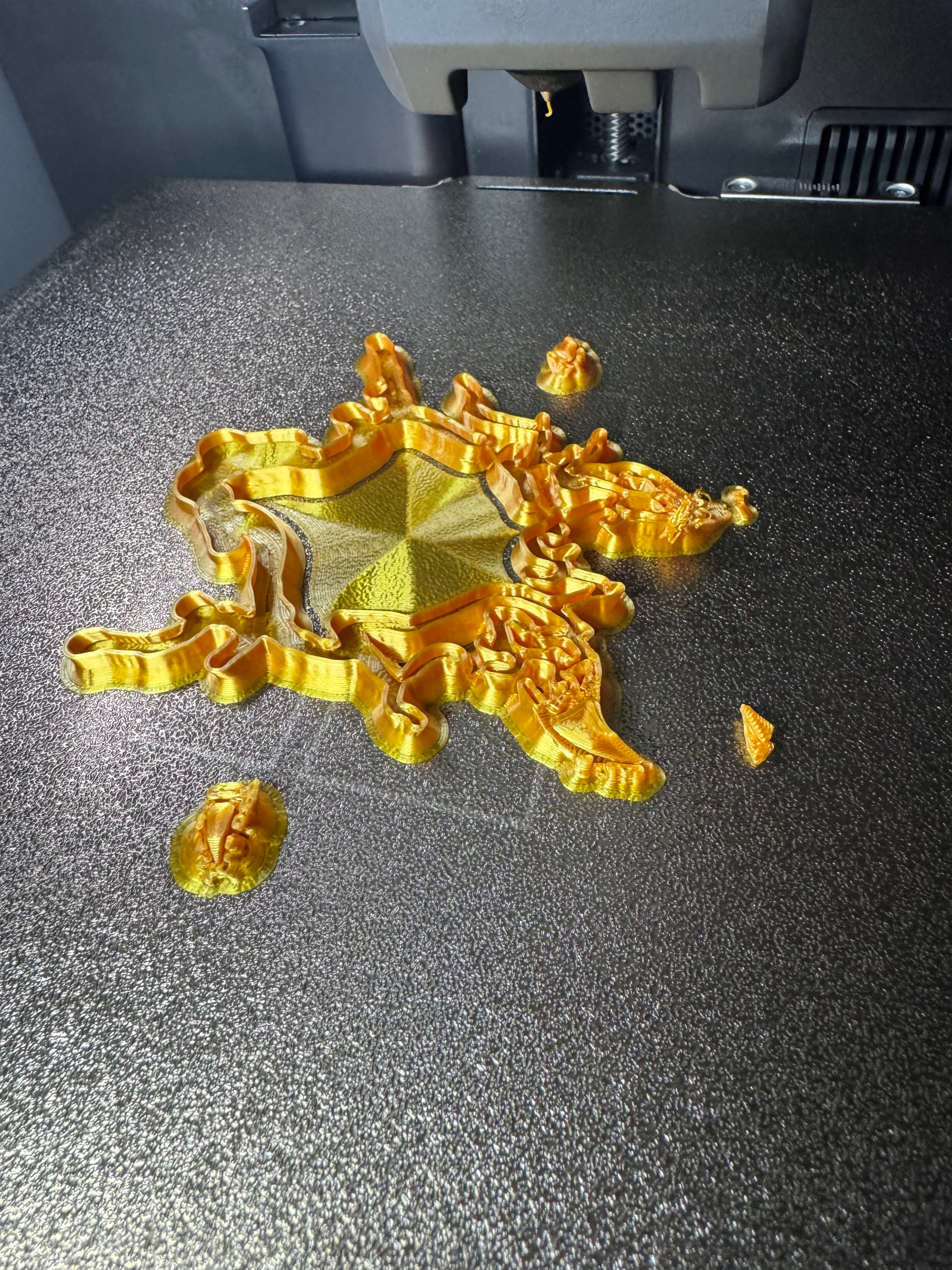
I’m having a persistent issue with my P2S and I’m running out of ideas.
Problem:
The nozzle keeps colliding with already printed material (especially infill and supported areas). As a result, supports get knocked over mid-print and the print fails. This happens very consistently.
Behavior:
Nozzle audibly scrapes over infill (Gyroid, Grid, etc.)
Supports are physically knocked off, not just weak adhesion
Small printed features get ripped away during travel moves
Z-hop seems to work during layer changes, but not when moving across printed areas
Failure rate is roughly 9 out of 10 prints
What I already tried:
Different filaments (PLA, Silk PLA, Metallic PLA)
Multiple recalibrations
Different support settings (stronger, slower, denser)
Different infill types (including Gyroid)
General slicer tuning
No meaningful improvement.
Important detail:
This does NOT look like a typical adhesion issue. The supports are not detaching from the bed – they are getting hit and broken off by the nozzle.
Question:
Has anyone seen this specific behavior on a P2S (or similar Bambu printers)?
I’m trying to figure out if this is:
a Z-offset / calibration issue
a mechanical problem (hotend, gantry, bed leveling)
or something related to motion planning / firmware
At this point the printer is not usable for supported prints.
Any concrete ideas or similar experiences would help.
I have this exact same issue on some prints with my P2S, but not all. on the prints that have this issue it is 9/10 failure as posted said. The base will stay adhered to plate but supports break higher up, or small parts are knocked from supports. I have tried de-selecting independent Support Layer Height, and disabling infill retracting, no effect. Increasing tree support size also was not very effective. On one print I was able to switch to a grid support, and it helpped, moved to a 5/10 failure rate, but was much harder to remove all the supports.
Just checking to see if you or anyone have found a soultion to this issue.
Just started having a similar issue. My prints were coming out pretty flawlessly on default settings, but as soon as I calibrated my filament and changed my settings for ironing and easier removal of supports things have gone down hill.
I started using these new settings with sunlu silk and the supports were breaking constantly and failing nearly every print, then I switched back to default .2 high detail settings on sunlu matte black (which I had almost no problems with before) and the issues carried over. I am still using my custom calibration settings though so I am wondering if that is the issue.
I bought this printer because I heard it was dummy proof and after my experience with the anycubic kobra v1 I didn’t want anymore frustrating headaches. I got a good week of cool vibes before it started acting out!
Can you feel any notable slack or lash in the Z lead screw ACME nuts?
Gently lift and wiggle up and down the bed mount (where the ACME nut meets the lead screw). There should be no lash, little to no movement.
I recently discovered that my rear Z lead screw was installed incorrectly at the factory, the rear of the bed was sitting 2mm to high. This caused significant binding, extra wear, and resistance in the linear rails and ACME nuts.
I was able to fix it easily by removing the 4 screws holding the brass ACME nut to the bed mount and turning the nut a quarter turn counter-clockwise. The binding immediately disappeared and the Z-axis now moves much smoother. Obviously I had to readjust the bed mesh, this also pointed to being where the factory compensated for the improper z alignment
Same problem here since the last printer update. Sometimes the noozle even crash into the model. I have solved it since 4 days. I had run every calibration for the printer and filament. I even activated zhop and slowed down the print to 50mms… And had to print the supports with 2 layer walls, that when he crash, nothing will happen… better slow then no print atm…
Yeah, I don’t know either. My old P2S that I had a few months ago never did that. Never. I had it as a beginner, it was my first printer. I got it when it came out, sometime early last year. If it had behaved like this back then, I probably would have quit the hobby right away and lost my patience.
I really don’t know what’s causing it right now. Anything delicate, it just can’t handle anymore. Rough stuff, bigger parts, no problem. But anything fine fails. I’ve already tried it again with a different build plate, the Engineering plate. But even with the exact same parts, I keep getting the same issues. I don’t know.
I also tried it on the Snapmaker U1, and it runs through the print without any problems.
Having the exact same issue. Been like trying out al sorts of setups and settings am already in 111 hours of failed prints and tests at this moment. Biggest thing that bugs me, I freaking don’t know what to do next
Ich kann das ebenfalls bestätigen. Ich hatte bisher keine Knock-Offs aber es ist deutlich hörbar, gerade im oberen Bereich der Modelle, dass die Nozzle ünber infill und supports ratter.
Kein knock-off, nur killt das sicher die nozzle schneller als notwendig.
I am experiencing the same issue.
I tried about five times, and the print head keeps colliding with the object or the support tree at almost the same height, knocking the print off the build plate.
I suspect this might have started after a recent Bambu Studio update.
As a workaround, if I print the objects one by one, this problem does not occur.
I have currently rolled back to an older version of Bambu Studio to see how it goes, although I haven’t tried printing the problematic object again just yet.
There was some spaghetti due to moist filament i suspect but that should have stopped the print.
Also the scraping over infill, this happend before the last update as well.. Did all calibrations, still happening.
But to smash into a print so hard to overcome the magnetic force by which that plate sticks to the bed had me worried.. Guess ill do some calibrations first before the next.. wtf!
Same problem here on my P2S Combo – and I think I’ve narrowed it down to tree supports.
I watched it happen several times: the toolhead rams a tree support trunk and shoots it to the back of the plate, then the printer keeps printing in mid-air and the print turns into spaghetti. It almost always happens a few millimetres above the top of the model’s base, mostly on trunks that stand on the model itself (miniatures on round bases). Bed adhesion is fine – the models stay firmly on the plate, only the support trunks get knocked over.
To make it reproducible I made a simple test model: Ø50 mm base, centre column, a disc on top and four arms, so it creates tall tree supports both on the base and on the plate.
My results:
Bambu system profile “0.08mm High Quality @BBL P2S”, 0.4 nozzle, Generic PLA, “Tree (auto)” supports → a trunk was knocked off at ~layer 67
Exactly the same settings, only “Normal (auto)” supports → printed perfectly
Things I already tried with tree supports, all without success:
Bambu system profiles, custom profiles, and a MakerWorld model with the creator’s own profile
0.2 and 0.4 mm nozzles, three different PLAs, bed up to 60 °C
Z-hop 0.4 / 0.8 mm (Spiral Lift)
“Independent support layer height” off, “Reduce infill retraction” off
Slower travel (200 mm/s) and support speed (45 mm/s), 2 support walls, thicker branches
Full calibration, nozzle removed and reseated, plate cleaned
So for now normal supports are my workaround, but tree supports should obviously work on this printer.